
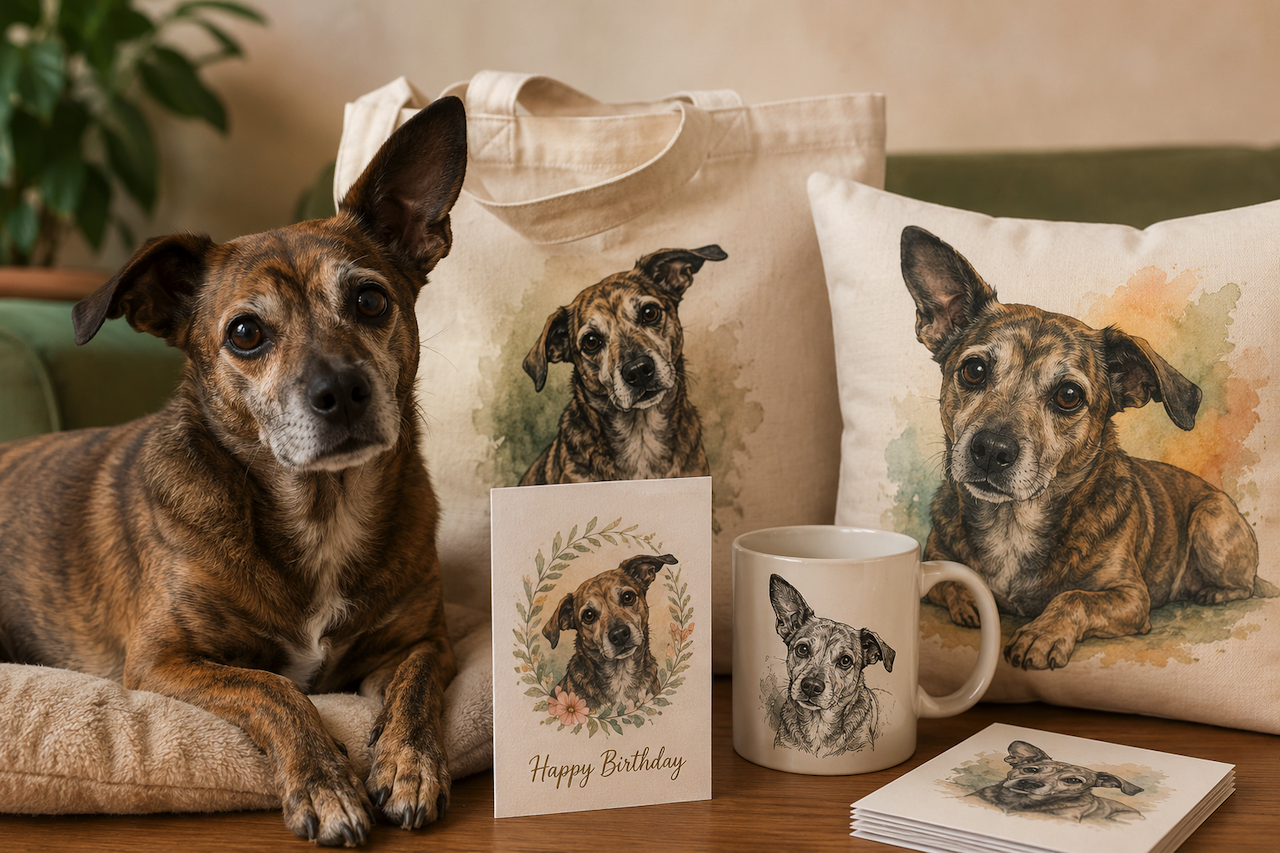
I have a fourteen-pound rescue mutt named Olive who looks like she was assembled from leftover parts of three other dogs. Long body, short legs, one ear that points up and one that flops down, an expression that suggests she has opinions about your life choices. I have been carrying photos of her around on my phone for six years, and last spring I finally got the idea to put her face on things.
It started small. I wanted a birthday card for my mom, who is Olive's biggest fan from a distance. I wanted the card to have Olive on the front, painted in a way that felt warm and storybook-ish, with my mom's name in script underneath—a reasonable, modest goal.
That single project turned into one of the more surprising rabbit holes I have fallen into in the last year, and a whole shelf of household objects that now feature my dog.
Why People Want Their Pets on Everything
There is something to acknowledge up front about why pet merchandise is such a huge market, and it is not really about the merchandise. It is about the relationship.
For people who are deeply attached to their pets, putting that pet on a card, a mug, or a pillow is a way of acknowledging that the animal is family. Not in a sentimental commercial way, in a real way. The pet is in the house, on the couch, in the family photos. Making them a literal part of the household objects feels right because they are already a literal part of the household.
This is also why generic pet merchandise — the mug from the gift shop that says "I love my dog" with a stock illustration — does not really scratch the itch. It is not your dog. The point of pet merchandise is that it has to be your specific animal, with their specific face and personality. Anything less feels hollow.
That requirement is what made the whole market historically difficult. Generic merchandise is easy. Personalized merchandise that captures a specific animal is hard to find.
What the Old Options Looked Like
Before AI tools made this possible at home, the path to custom pet merchandise ran through commissioned artists. There is a healthy ecosystem of pet portrait artists on Etsy who will paint or illustrate your animal from a reference photo. The work is often beautiful. The prices range from about $40 for a simple digital illustration to $400 or more for a hand-painted oil portrait. Turnaround is usually two to six weeks.
For a single special piece such as a memorial portrait, a wedding gift, a milestone, those services are wonderful, and I have used them. But for casual personalized merch, the math does not work. If I want my dog on a birthday card, a tote bag for my mom, a pillow for my sister, and a sticker pack for myself, I am suddenly committing to multiple commissions across multiple artists, hoping each one captures Olive's personality in a way that matches the others.
The other historic option was print-on-demand sites that offered "upload your pet's photo, and we will turn it into art." These existed for years and produced wildly inconsistent results. Sometimes the output looked good. Sometimes it looked like a slightly blurred filter had been applied to the original photo. There was no preview, no iteration, no real control.
What Changed With AI Image Tools
The first thing I tried was fairly straightforward. I uploaded a clear photo of Olive sitting on a porch in the afternoon light and requested a watercolor-style illustration with gentle pencil outlines and a warm cream background. The generated image retained many of Olive’s recognizable features, including her uneven ears, brindle coat, and overall expression.
That was the test that mattered. Earlier AI tools could generate a generic painted dog, but they could not reliably generate a painted version of your specific dog that still looked like your specific dog. Without that, the whole exercise is pointless.
Once I had a watercolor-style version of Olive, I experimented with generating variations in different poses and compositions. That made it easier to create multiple designs from a single reference photo for use across different types of merchandise.
The Styles That Actually Work for Merchandise
Different styles work for different products, and figuring out the right pairing took me a few rounds of trial and error.
For greeting cards, soft watercolor and storybook illustration tend to work best. The card has to feel warm and personal, and a slightly painterly style feels more handmade than a sharp digital illustration would.
For tote bags, bold line illustrations with limited color palettes hold up better than watercolors. Tote bag printing flattens subtle color gradients, so a clean two- or three-color design with clear shapes prints sharper than a delicate watercolor would.
For pillows and home goods, a more painterly style often works well, closer to an actual oil painting of the pet, slightly stylized but not overly cartoonish. Some people also experiment with humorous concepts, such as rendering their dog as a formal historical portrait in elaborate period clothing, which has become a fairly common internet trend in personalized pet art.
For mugs, anything works, but I have found that simple line art with a clean background prints most reliably across different mug printers.
My Actual Workflow for Pet Merchandise
The process I have settled into is straightforward enough that I have walked a few friends through it.
I start with the best, clear photo I have of the pet. Eye contact with the camera, decent lighting, and a neutral background, if possible. If the only good photo is on a busy background, I can usually generate a version with the background cleaned up before getting into stylization.
Then I run that photo through an AI image-generation workflow, sometimes using tools such as Nano Banana, with a specific style description and product use in mind. For a greeting card, soft watercolor portrait, warm cream background, room for handwritten text below. For a tote bag, bold black outline, limited two-color palette, white background, square composition. For a pillow, an oil-painting style with a soft, fabric-friendly palette and minimal background detail.
I usually generate four or five variations and pick the strongest one. Then I take that image into a basic design tool. Canva works fine for this, but Figma or Photoshop work too. I add any text, lay out the print area for the specific product, and prepare the file for the print-on-demand service.
The print-on-demand step itself is the easiest part. Services like Printify, Printful, and Society6 will print one-off custom items for prices that are not as low as bulk manufacturing but are reasonable for personal use. A single custom pillow runs about $30 to $45. A custom tote, fifteen to twenty-five. A set of greeting cards, often under twenty dollars for ten.
What Makes a Good Reference Photo
The most common mistake I see when people try this themselves is starting with a poor reference photo. AI image tools can only work with the details visible in the original image. If the photo is dark, blurry, taken from too far away, or shows the pet from an awkward angle, the generated portrait will usually reflect those limitations.
The photos that work best are taken at the pet's eye level, in good natural light, with the pet looking at or near the camera. Phone cameras are entirely sufficient. The pet does not need to be doing anything particular. The clearer their face is and the more visible their distinctive markings are, the better the resulting portraits will be.
For pets with very specific physical traits, such as unusual coloring, a missing eye, distinctive scars, or a particular breed mix, it often helps to mention those details in the prompt as well. Combining a clear reference photo with a detailed description generally produces more accurate and recognizable results than relying on either one alone.
Gifts That Land Differently Than Expected
What surprised me most about this project was how strongly people reacted to receiving pet merchandise for their own pets. My mom cried when she got the birthday card with Olive on it, which seemed like an outsized reaction for a card, until I thought about it. She lives several hundred miles away. She does not get to see Olive often. The card was the closest she had come to having a piece of Olive in her own house.
The pillow I made for my sister went on her couch and stayed there. The tote bag I made for myself goes everywhere. The set of greeting cards I made for a friend whose dog had just turned ten became the way she sent thank-you notes for the rest of the year.
These are not objectively spectacular gifts. They are not expensive. They are just personal in a specific way that mass-market gifts are not, and that personalness lands harder than I would have predicted.
What AI Image Tools Cannot Quite Do Yet
I want to be honest about the limits, because pretending this is a one-click solution would set people up for disappointment.
Multiple pets in the same image are harder than single pets. If you have two cats and want them rendered together, getting both of them to look like themselves in the same illustration usually takes more iteration than two single portraits would. AI image tools will sometimes blend the two animals into a single, ambiguous creature, and pulling them back apart into two distinct pets takes patience.
Action shots are also harder than static portraits. A photo of your dog mid-jump, mouth open, paws extended, is a more chaotic source image than a calm portrait, and the generated version will tend to simplify or smooth out the chaos.
And the truly final, premium pieces, the centerpiece artwork that will hang above the fireplace for a decade, I still think benefit from being commissioned by a real artist. AI image tools handle the everyday merch beautifully, but for the showpiece, a human painter with a clear reference and a careful eye still produces something the AI cannot match.
Why I Keep Recommending This to Other Pet People
The friends I have walked through this workflow have all reacted the same way. Mild skepticism at the start, then surprise when their actual pet appeared in a style they liked, then a small spiral of making merchandise they did not realize they wanted.
Pet merchandise used to be either generic or expensive. The middle ground, personalized, affordable, and available in almost any style you can describe, was largely missing. That gap is beginning to close, and many pet owners are embracing more personalized ways to incorporate their animals into everyday items and gifts.
If you have been storing photos of your animal on your phone for years without putting them anywhere, this is your reminder that the technical barrier is essentially gone. The only step left is deciding what you want to put them on first.
Conclusion
AI image tools are changing how people create personalized pet merchandise by making custom designs more accessible and affordable than they were in the past. While the results still depend heavily on strong reference photos and sometimes require experimentation, the process is significantly easier than coordinating multiple custom commissions for small personal projects. For many pet owners, the appeal is not really about the merchandise itself. It is about turning familiar photos and everyday moments into something more personal, memorable, and uniquely tied to the animals they care about.
Featured Image generated by ChatGPT.
Share this post
Author

Read the latest articles from Olivia
ERP Integration Best Practices: Connecting CRM, Accounting, and Logistics Platforms

May 15, 2026
Modern businesses rely on a growing network of digital platforms to manage sales, finance, operations, logistics, and customer relationships. However, when these systems operate independently, companies often face data silos, duplicated processes, reporting inconsistencies, and delays in decision-making. Disconne [...]
Learn moreKling 3.0 API: Architecting Unified Multimodal Pipelines for Enterprise-Grade Video Synthesis

May 15, 2026
The evolution of visual content generation is shifting from manual, high-latency creative tools toward a programmable media infrastructure. For development teams and enterprise architects, the Kling 3.0 API provides a robust framework to treat video production as a standardized, code-driven service. By integratin [...]
Learn moreLeave a comment
All comments are moderated. Spammy and bot submitted comments are deleted. Please submit the comments that are helpful to others, and we'll approve your comments. A comment that includes outbound link will only be approved if the content is relevant to the topic, and has some value to our readers.
Comments (0)
No comment