

What are the differences between Google Enhanced Conversions for Leads vs. Offline Conversion Tracking?
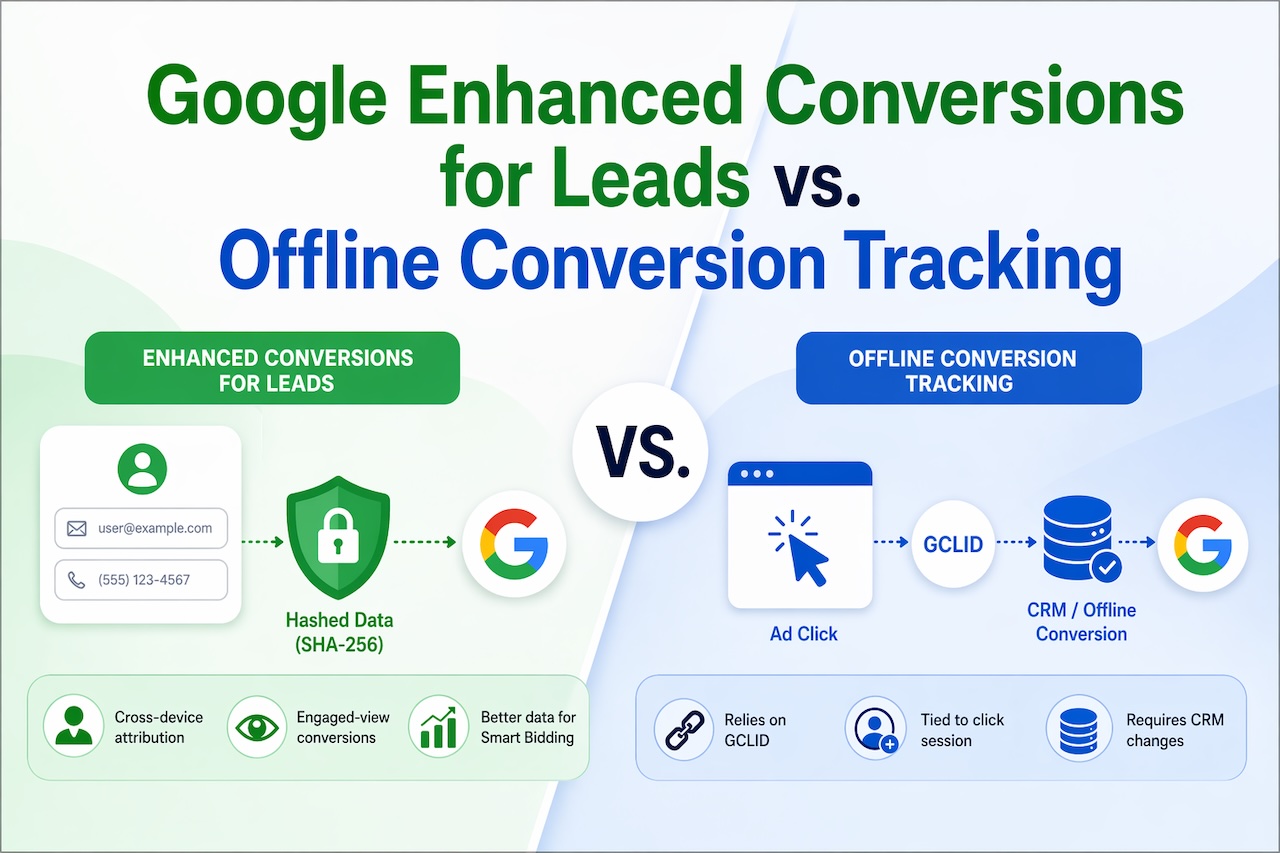
Following our recent migration from Salesforce to Hubspot, our existing offline conversion tracking (OCT) stopped functioning. In our search for a solution, we discovered that Google now recommends Enhanced Conversions for Leads (EC4L) over traditional OCT. However, clear explanations as to why this shift is beneficial are hard to find. In this article, we’ll compare EC4L and OCT to help you determine if you should make the switch.
These two features solve the same fundamental problem but they use different mechanisms to do it. Advertisers can't see what happens after someone fills out a form, and there is no way to track conversions beyond leads. Think of OCT as the original solution, and EC4L as its upgraded replacement. Google itself now recommends that if you already use OCT Import, you upgrade to Enhanced Conversions for Leads, and if you haven't adopted offline conversion import yet, you should start with EC4L instead.
How Each One Works
Traditional Offline Conversion Tracking (OCT)
The original method, and it revolves entirely around the GCLID (Google Click ID) — a unique parameter Google appends to every ad click URL. Here's the flow:
- Someone clicks your Google Ad, and lands on your site
- Your site captures and stores the GCLID (requires dev work on your forms/CRM)
- The lead goes into your CRM: e.g., as an MQL
- When that lead converts into a customer after days, weeks, or months later; you export a CSV from your CRM with the GCLID + conversion name + timestamp
- You upload that CSV to Google Ads (manually, via API, or a CRM connector like Salesforce or HubSpot)
- Google matches the GCLID back to the original ad click and records the conversion
The core dependency: every step hinges on the GCLID being successfully captured, stored, and passed back. If the GCLID gets dropped — because of cross-device journeys, iOS privacy restrictions, browser cookie blocking, form redirects, or CRM misconfiguration — the conversion is lost.
Enhanced Conversions for Leads (EC4L)
EC4L is an upgraded version of offline conversion import that uses user-provided data, such as email addresses, to supplement imported offline conversion data to improve accuracy and bidding performance. The key difference: instead of relying solely on the GCLID, EC4L adds a second matching signal — the user's actual first-party data (email address, phone number, name) — hashed using SHA-256 before it ever leaves your server.
Here's how the flow works:
- Someone clicks your ad, and lands on your site
- Your Google tag fires and captures both the GCLID and the hashed version of whatever contact data the user submits (e.g., hash([email protected]))
- That hashed data is sent to Google at the moment of form submission
- The lead goes into your CRM as usual
- When that lead converts offline, you upload the conversion with the same hashed email/phone (you don't need the GCLID anymore, though including it improves accuracy)
- Google attributes the offline conversion by matching the imported hashed data with the lead information from the tag AND with signed-in Google Account data — so it can attribute across devices and sessions where no GCLID exists.
| Feature | Offline Conversion Tracking (OCT) | Enhanced Conversions for Leads (EC4L) |
|---|---|---|
| Primary Matching Signal | GCLID (Google Click ID) | Hashed email/phone + GCLID |
| What If GCLID Is Missing? | Conversion is lost | Can still match via hashed user data |
| Cross-Device Attribution | No — tied to the click session | Yes — matches to signed-in Google accounts across devices |
| Engaged-View Conversions | No | Yes |
| Setup Complexity | Higher — requires GCLID capture in forms/CRM | Lower — tag handles data capture automatically |
| CRM Changes Required | Yes — must store and pass GCLID | Minimal — just pass hashed email/phone |
| Privacy Compliance | GCLID-based, no hashing | SHA-256 hashed — more privacy-durable |
| Google's Recommendation | Legacy — migrate away | Current recommended method |
| Bidding Signal Quality | Good | Better — more conversions attributed = smarter Smart Bidding |
The Critical Advantage: Closing the GCLID Gap
The GCLID is the biggest pain point with traditional OCT. It breaks in several common scenarios:
- Cross-device journeys: user clicks the ad on mobile, fills the form days later on desktop. Different session = no GCLID match.
- iOS / Safari: Apple's ITP (Intelligent Tracking Prevention) blocks or expires cookies, which can kill GCLID storage.
- Redirect-heavy landing pages: GCLIDs often get stripped during redirects if not handled carefully.
- CRM integration issues: if the GCLID isn't mapped correctly to the lead record, it's gone.
EC4L sidesteps all of this because the hashed email address is a durable identifier tied to the person, not the browser session. Customer data is matched with online identifiers — including GCLID, GBRAID, WBRAID, and email — to link offline conversions with your ads. That means even if the GCLID is missing, a conversion can still be attributed if Google can match the hashed email to a signed-in Google account. GBRAID and WBRAID are essentially "privacy-safe" versions of the traditional GCLID for iOS devices.
How the Matching Actually Works (Under the Hood)
When a user fills in your lead form, your Google tag hashes their email (e.g., sha256("[email protected]"), a 64-character hex string) and sends that to Google. No raw PII leaves your site. Later, when you upload the offline conversion from your CRM, you include that same hashed email. Google then does two things:
- Matches to the original tag event: pairs the uploaded hash with the hash captured at form submission
- Matches to signed-in Google accounts: if the person is signed into Gmail, YouTube, or any Google product with that email, Google can tie the conversion back to ad interactions across all their devices
This is why EC4L unlocks cross-device and engaged-view conversions that OCT simply can't capture.
What's Changing in 2026
Starting in June 2026, enhanced conversions become a single feature with a simplified toggle. Advertisers will no longer have to pick between "enhanced conversions for web" and "enhanced conversions for leads" in the same rigid way — that structural split is being removed from the interface. The structural split between two separate enhanced conversions products — one for measuring on-site purchases and form completions, the other for tracking offline leads through CRM data — has existed since Google first launched Enhanced Conversions for Leads in 2022. The consolidation reflects Google's push to make first-party data measurement the default baseline for all advertisers, not an advanced configuration.
When to Use Each One (Decision Guide)
Use Enhanced Conversions for Leads if:
- You're starting fresh with offline conversion tracking. It is the recommended starting point now
- You have cross-device lead journeys (mobile ad to desktop form submission)
- Your GCLID capture rate is unreliable or you've had attribution gaps
- You want to minimize CRM changes: EC4L requires less custom dev work
- Privacy regulation compliance is a priority (GDPR, CCPA environments)
Stick with or supplement traditional OCT if:
- You already have a mature, working GCLID-based pipeline and high capture rates
- Your CRM integration (Salesforce, HubSpot) has a well-functioning GCLID sync
- You want to use EC4L as an additive layer on top — if you already use offline conversions, you can upgrade to enhanced conversions for leads to import user-provided data in addition to the identifiers you already import (GCLID)
The cleanest setup for most lead gen advertisers in 2026 is to run both — keep passing GCLIDs when you have them, and layer EC4L on top so the hashed email provides a fallback match when the GCLID is unavailable.
Setup in Brief
EC4L requires two components:
1. Tag-side (captures hashed data at form submission)
- Implement via Google Tag Manager or the Google tag directly
- Configure it to read email/phone fields from your lead form and hash them before sending to Google
2. Upload-side (sends offline conversion data back to Google)
- Use Google Ads Data Manager (the new UI-based option, no coding required)
- Or use the Google Ads API for automated CRM imports
- Or use a native CRM connector (Salesforce, HubSpot, Zapier are supported)
Many advertisers report 5–10% more conversions after enabling Enhanced Conversions — those are conversions that were happening all along but getting lost due to GCLID gaps and cross-device attribution failures. For lead gen campaigns running Smart Bidding (Target CPA, Maximize Conversions), those recovered conversions feed directly into the bidding algorithm and improve efficiency over time.
How Conversion Tracking Saves You Money on Google Ads?
Most lead gen advertisers make a costly mistake without realizing it: they optimize their Google Ads campaigns based on form submissions — not actual revenue. A form fill is easy to track, but it tells you almost nothing about which clicks actually made money. Consider this scenario:
- Keyword A generates 50 leads at $20 cost per lead = $1,000 spent
- Keyword B generates 10 leads at $100 cost per lead = $1,000 spent
Without OCT, Keyword A looks like the clear winner. But if Keyword A leads close at 2% and Keyword B leads close at 40%, you've been pouring budget into the wrong keyword. OCT is what reveals that reality to Google's algorithm — and once it does, everything downstream improves.
1. Smart Bidding Gets Trained on Real Revenue, Not Vanity Metrics
Google's Smart Bidding strategies — Target CPA, Target ROAS, Maximize Conversions, Maximize Conversion Value — are only as good as the conversion signals they're trained on. Feed them form fills, and they'll optimize for form fills. Feed them closed deals with revenue values, and they'll optimize for closed deals.
When you upload offline conversions with conversion values (the actual deal size or revenue), Google's algorithm learns:
- Which keywords attract buyers vs. tire-kickers
- Which audiences have higher lifetime value
- Which ad copy attracts prospects who actually close
- Which times of day and devices produce revenue, not just leads
- Which geographic locations generate real customers
Over time, Smart Bidding shifts budget automatically away from high-volume/low-quality traffic and toward high-value signals. You spend the same budget but on clicks that are statistically more likely to produce revenue.
2. It Eliminates Spending on High-Cost-Per-Lead Keywords That Don't Close
This is where the direct dollar savings happen. When Google knows which clicks eventually became customers — tied back through GCLID or hashed email — it can identify:
Negative patterns to suppress:
- Keywords that generate lots of leads but low close rates
- Audience segments that convert online but churn quickly
- Demographics that click frequently but never buy
- Placements or devices that attract low-intent users
Positive patterns to amplify:
- Long-tail keywords with low search volume but high close rates
- Job titles, company sizes, or industries that consistently convert to revenue
- Ad creatives that attract prospects further down the funnel
Without OCT, your campaign is flying blind and optimizing for the wrong goal. With OCT, you're telling Google exactly which clicks were worth money — and Google's bidding algorithm is extraordinarily good at finding more of those.
3. It Improves Quality Score Indirectly Over Time
Quality Score drives your cost-per-click. Higher Quality Score = lower CPC for the same ad position. While Quality Score isn't directly influenced by offline conversion data, the downstream effects are significant:
When Smart Bidding is trained on real conversion data, it focuses budget on ad groups, keywords, and audiences with genuine intent signals. That means:
- Higher click-through rates from better-matched audiences
- More relevant landing page experiences (because you stop sending irrelevant traffic)
- Lower impression share wasted on low-intent queries
All of these contribute to better Quality Scores over time, which compounds into lower CPCs across your campaigns.
4. Target CPA Drops as the Algorithm Learns Quality Signals
One of the most direct cost savings is the impact on Target CPA bidding when you shift from optimizing for leads to optimizing for qualified leads or sales. Here's how it plays out in practice:
Before OCT:
- Target CPA set to $50 per form fill
- Algorithm bids to get as many form fills as possible at $50
- Many of those form fills are low-quality, unqualified leads
- Sales team wastes time on bad leads; revenue per ad dollar is low
After OCT (with qualified lead or sale as the conversion):
- Target CPA set to $300 per qualified lead (or $2,000 per closed deal)
- Algorithm now knows what a real conversion looks like
- It bids more aggressively for high-intent searches and less for low-intent ones
- Cost per qualified lead drops because the algorithm stops chasing bad traffic
- Sales team closes more because the leads are better
The overall ad spend may stay the same, but revenue per dollar spent increases — which is functionally the same as saving money.
5. Conversion Value Rules Let You Bid by Profit Margin, Not Just Revenue
An advanced application of OCT is uploading conversion values that reflect actual profit, not just deal size. If your $5,000 deals cost $2,000 to fulfill and your $3,000 deals cost $500 to fulfill, the second deal type is more profitable — and Google should be bidding harder for it.
With Target ROAS bidding trained on real margin data:
- Google learns which segments generate high-margin deals
- It shifts budget toward those segments automatically
- You stop overspending on revenue that looks good on paper but doesn't generate profit
This is one of the most underutilized capabilities in Google Ads for sophisticated advertisers — and it's only possible with offline conversion data that includes meaningful conversion values.
6. It Reduces Wasted Spend from Audience Overlap and Redundant Targeting
Once Google has real conversion data to work with, it builds audience patterns around your actual customers. This powers:
- Customer Match: upload your closed customer list so Google knows who converts; suppress ads to people who are already customers and avoid paying for clicks from existing accounts
- Similar Audiences / Optimized Targeting: Google builds lookalike segments based on converted customers, not just form fillers; these audiences have meaningfully higher conversion rates
- Exclusion lists: feed back people who converted but have low lifetime value, so Google stops targeting profiles that resemble them
Each of these reduces wasted impressions and clicks on the wrong people.
7. The Compounding Effect Over Time
The most important thing to understand about OCT's impact on cost savings is that it compounds. Every offline conversion you upload makes the algorithm slightly smarter. Every month of clean, revenue-tied conversion data narrows the gap between what you're paying for and what's actually driving revenue.
A rough timeline of what this looks like in practice:
| Timeframe | What's Happening |
|---|---|
| Month 1–2 | OCT set up; first upload cycles begin; baseline data starts flowing. |
| Month 3–4 | Smart Bidding starts detecting quality patterns; CPA for qualified leads begins to shift. |
| Month 5–6 | Algorithm has enough signal to meaningfully differentiate; budget starts shifting to high-value segments automatically. |
| Month 9–12 | Full compounding effect; CPA for revenue-generating leads is measurably lower than pre-OCT baseline. |
| Year 2+ | Continuous improvement as more conversion data accumulates; lookalike audiences improve; negative patterns are well-established. |
Conclusion
For lead generation advertisers, accurate conversion measurement has always been the missing link between ad spend and real business outcomes. Traditional Offline Conversion Tracking solved part of that problem but introduced a critical dependency on the GCLID — a fragile identifier that breaks across devices, browsers, and privacy restrictions. Enhanced Conversions for Leads closes that gap by layering hashed first-party data on top of the GCLID, creating a more durable, privacy-safe matching signal that works even when the click ID is lost. The result is more conversions attributed, better data fed into Smart Bidding, and ultimately more efficient campaigns.
With Google consolidating both features into a single unified toggle starting June 2026, the direction is clear: first-party data matching is no longer an advanced add-on — it's the new baseline for conversion measurement. For any advertiser running lead gen campaigns, the time to migrate from legacy Offline Conversion Tracking to Enhanced Conversions for Leads is now, before the transition becomes mandatory and before competitors gain a bidding advantage from richer, more complete conversion signals. The setup is straightforward, CRM changes are minimal, and the upside — recovering 5–10% of conversions that were previously invisible — feeds directly into the metrics that matter most.
Featured Image generated by ChatGPT.
Related Articles

October 28, 2025
How PPC & Google Ads Deliver Quality Leads Fast
Nowadays, speed and accuracy are the most important factors in the competition of the digital marketing world. Companies do not want to wait months for results; they want them in d...
Read More
April 3, 2025
How IP Tracking Can Improve Affiliate Marketing Conversions
Affiliate marketing is a performance-oriented niche, and besides cookie tracking, IP tracking also plays a significant role in conversions. In essence, IP tracking involves monitor...
Read More
March 10, 2021
How to track offline conversions?
Doing business online doesn't necessarily mean selling products online, but also includes lead generation which leads to sales. Companies that sell mortgages, insurances, and o...
Read More
Comments
Comments are available to signed-in users and are moderated to keep the discussion useful and respectful. Spam, automated submissions, and low-value promotional comments are removed. Outbound links may be approved when they are relevant and genuinely helpful to readers, but they are displayed as plain text rather than clickable hyperlinks.
No comments have been published yet.
Please sign in to submit a comment.