

As organizations scale beyond a single office, a familiar pattern emerges: IT assets start disappearing from view. Not literally, though that happens too, but from an operational and financial standpoint. A laptop purchased for the New York office shows up in Austin. Equipment meant for a warehouse sits unused in a conference room. Finance asks for a breakdown of assets by location, and IT scrambles to cross-reference tickets, shipping records, and endpoint tools that were never designed to answer that question.
The problem isn't a lack of data. Most organizations have multiple systems tracking devices, users, and locations. The problem is that this data exists in fragments, scattered across platforms that don't interoperate and weren't designed to maintain authoritative location records over time.
Why Tracking IT Assets by Office Location Keeps Breaking
The breakdown typically happens in stages. When a company operates from one or two locations, tracking assets manually is manageable. A spreadsheet, a shared document, or even institutional knowledge can suffice. But as headcount grows, offices multiply, and hybrid work becomes the norm, that informal system collapses under its own weight.
Three common data sources emerge, each with its own version of the truth:
- Device management platforms: Platforms such as Microsoft Intune, Jamf, or Kandji can see where devices connect from, but this reflects network location, not physical office assignment. A laptop may authenticate from a home IP address even though it is officially allocated to the Boston office.
- Ticketing systems: Tools like Jira Service Management, Freshservice, or ServiceNow capture location details indirectly through support requests, shipping updates, and user transfers. However, this information lives in comments and workflows rather than structured asset records. A note saying “sent to Chicago office” doesn’t update the asset’s authoritative location, and reconstructing movement through ticket history doesn’t scale.
- Security and discovery tools: Solutions such as Lansweeper, Qualys, and Rapid7 are highly effective at identifying devices on the network, detecting operating systems, and flagging vulnerabilities. They are not designed to track financial ownership, cost center assignment, or whether an asset’s physical location has been validated for audit or compliance purposes.
The result is predictable: when Finance needs to validate asset chargebacks by office, or when IT prepares for an audit, teams spend days reconciling conflicting records. Location data exists, but not in a single reliable source.
The Core Issue: Location Isn't Treated as Authoritative Asset Data
The deeper problem is conceptual. Most organizations treat asset location as metadata, a nice-to-have detail that can be inferred from other sources. Shipping records show where something was sent. User assignments imply where a device should be. Ticket comments provide context.
But none of these sources establishes an authoritative, auditable record of an asset's actual location.
Shipping or procurement data reflects intent, not reality. A laptop shipped to the Denver office might be reassigned to a remote employee upon arrival. The purchase order shows Denver; the asset never stayed there.
Assigned user location doesn't always match the physical office. Hybrid and remote work have made this even more complicated. An employee based in Seattle might work from home four days a week, travel to Portland once a month, and keep their equipment at home. What's the asset's location? The answer depends on what you're trying to track, and most systems don't distinguish between user location, device location, and billing location.
Ticket comments and notes aren't structured data. They help understand history, but they're not queryable, not consistently formatted, and not maintained over time. A note that says "moved to warehouse" doesn't update reporting dashboards or trigger financial reconciliation.
Many endpoint or discovery-focused tools detect devices effectively; they can tell you what's on your network, what patches are missing, and what vulnerabilities exist. But they're not designed to maintain long-term, finance-ready location data. That's a different requirement, with various stakeholders and other consequences for inaccuracy.
Step 1: Define What "Asset Location" Means Across the Organization
Before selecting or configuring any system, organizations need to answer a fundamental question: What does "location" mean?
For most teams, the answer is "it depends." IT cares about physical location for support and logistics. Finance cares about the billing location for chargebacks and cost allocation. Operations might care about the office to which a device is assigned for compliance or insurance purposes. Security might care about network location for threat detection.
These aren't the same thing, and conflating them guarantees confusion.
A practical framework, commonly supported by modern asset management platforms, distinguishes between:
- Physical location: Where the asset actually sits—office, site, warehouse, or remote location.
- Assigned user location: The office or region the user is associated with, which may differ from where they work day-to-day.
- Financial or billing location: The cost center, department, or legal entity responsible for the asset.
- Last verified location: A timestamp showing when the location was last confirmed through an audit, ticket, or manual update.
Platforms allow multiple structured location fields, giving teams the flexibility to track what matters for their specific workflows. But the technology only delivers value when teams agree on definitions upfront. Without that alignment, you end up with five location fields, each contradicting the others.

Image generated by Midjourney.
Step 2: Use a Single System as the Location Source of Truth
Once definitions are in place, the next step is deceptively simple: pick one system to own location accuracy.
This is where most organizations falter. Location data gets tracked in parallel:
- Finance maintains a spreadsheet mapping assets to cost centers
- IT updates locations in tickets as devices move
- Security or Operations rely on discovery tools that report where devices connect from
None of these systems is wrong, exactly. They're answering different questions. But when Finance requests a report on assets by office, IT has to reconcile three sources manually, and by the time the report is finished, the data is already outdated.
The landscape of tools that could serve as the source of truth varies widely in scope and design:
- Endpoint management tools like Microsoft Intune, Jamf Pro, and Workspace ONE focus on device state—configuration, compliance, and security posture. They're excellent at keeping devices secure and up to date, but they're not optimized for tracking physical location, cost centers, or financial attributes over time.
- Enterprise ITSM tools like ServiceNow, BMC Helix, and Cherwell offer broad coverage across IT operations, but they require significant configuration to serve as reliable asset repositories. Many organizations use these platforms primarily for ticketing and change management, with asset tracking as a secondary function that never gets fully implemented.
- Dedicated asset management platforms exist specifically to centralize inventory and location data. This category includes commercial options such as InvGate Asset Management, Asset Panda, and ManageEngine AssetExplorer, as well as open-source alternatives such as Snipe-IT. Some discovery tools, such as Lansweeper, have evolved to include asset management capabilities.
The key point isn't which tool category you choose. It's that one system must be designated as the authoritative source for asset location, and all other systems should either pull from it or feed into it, not maintain their own parallel versions.
Step 3: Standardize Location Data Before Relying on Automation
Here's an uncomfortable truth: automation amplifies insufficient data.
If you connect your asset management system to your endpoint platform and enable automatic synchronization, you'll quickly discover that automation doesn't resolve inconsistent naming conventions, undefined cost centers, or missing location fields. It just propagates the mess faster.
Before turning on integrations, teams need to standardize:
- Consistent office and site naming conventions: “New York,” “NY Office,” “NYC HQ,” and “New York City – HQ” should all map to a single canonical value. This seems obvious until you audit your data and discover a dozen variations.
- Mandatory location and cost center fields: If location is optional, it won’t be filled in. If it is required but allows free text, inconsistency creeps in. Enforce controlled values wherever possible.
- Controlled values instead of free text: Dropdown menus, picklists, and reference tables prevent typos and naming variations and make reporting possible. You can’t build a dashboard showing asset distribution by office if each location appears under multiple spellings. Most modern asset management platforms support custom field configurations to enforce these standards at entry.
- Clearly defined ownership of location data: Someone must be accountable for accuracy. IT may track physical movement, while Finance may own cost center assignments. When ownership is unclear, data quality erodes over time.
This is fundamentally a process issue, not a tooling gap. The best asset management platform in the world can't overcome organizational ambiguity about who owns data quality.
Step 4: Connect Existing Systems Instead of Reconciling Manually
Once standardization is in place, automation becomes powerful.
Modern asset management platforms integrate with the systems that already contain pieces of the location puzzle:
- Endpoint and discovery tools: Tools like Intune, Jamf, and Lansweeper can push device information—such as serial numbers, models, and operating systems—into the asset repository.
- Directory services: Services such as Active Directory and Azure AD provide user and department data that can enrich asset records with assigned user location.
- Ticketing platforms: Platforms like Jira Service Management and Freshservice can trigger location updates when assets are moved, shipped, or reassigned.
- Procurement and finance systems: Systems such as NetSuite, SAP, or Coupa can synchronize purchase orders and cost center data, linking assets to their financial home.
Most dedicated asset management platforms support integrations across these categories, allowing organizations to keep asset location centralized while synchronizing updates from connected tools. This eliminates the need to reconcile spreadsheets or tickets manually.
The goal isn't to replace these systems, but to connect them. A centralized asset management platform becomes the hub where location data converges, is standardized, and is made queryable.
Some platforms support bidirectional sync, where updates in one system flow back to others. Others function as one-way collectors, pulling data in but not pushing it back. The right approach depends on your organization's architecture and the location of critical workflows.
What matters is avoiding the trap of manual reconciliation. If IT is still exporting spreadsheets from three systems every month and using VLOOKUP formulas to match assets to locations, the process hasn't been fixed; it's just been documented.
Step 5: Build Finance-Ready Visibility by Office Location
At this point, the technical foundation is in place. The question shifts from "can we track location?" to "what can we do with it?"
Finance has specific needs that go beyond device location. They need to validate chargebacks, allocate costs accurately, and report on capital expenditures by office or business unit.
A reliable asset management system should support reporting on:
- Asset count per office: How many laptops, monitors, and mobile devices are assigned to each location?
- Asset value per location: What is the total capital value of equipment at each site?
- Purchase source or purchase order: Which vendor or purchase order funded the assets at a given office, and when were they acquired?
- Assigned department or cost center: Which team or cost center is financially responsible for these assets?
- Last audit or verification date: When was the asset’s location data last confirmed as accurate?
Finance typically expects this level of visibility, but it is rarely achievable with spreadsheets alone. Spreadsheets are snapshots. They become obsolete the moment they're created. A proper asset management platform provides live, queryable data that reflects the current state, with customizable dashboards and reports that Finance can access directly without requiring IT to run manual exports.
And because the data is structured, not buried in ticket comments or free-text fields, it can be sliced by any dimension: location, department, asset type, purchase date, depreciation status. Building these reports often requires dedicated administration resources, but once configured, they eliminate the need for monthly reconciliation cycles.
Step 6: Add Audits So Location Accuracy Doesn't Erode Over Time
Even with perfect processes and integrations, asset data naturally decays.
Employees leave without returning equipment. Devices get moved between offices without updating records. Remote workers relocate to different cities. Shared assets—conference room displays, printers, and dock stations—move from room to room, and no one updates the system.
To prevent this drift, mature asset management programs build in regular validation:
- Scheduled audits for mobile devices: Quarterly or annual checks in which IT verifies that laptops and phones are located where the system indicates.
- Periodic reviews of shared assets: Office walkthroughs to confirm equipment in conference rooms, storage areas, and other common spaces.
- Alerts for missing or outdated location data: Automated reminders triggered when assets have not been verified within a defined period or when location fields are incomplete.
Most modern asset management platforms support audit workflows and automated alerts for stale location data. Some organizations integrate physical asset tags with barcode or RFID scanning—Asset Panda and similar tools offer mobile apps specifically for this purpose. ServiceNow can trigger scheduled tasks and approval workflows for location verification. Others rely on periodic user attestation, in which employees confirm they still have their signed equipment.
The method matters less than the discipline. Without ongoing verification, even the best system becomes a historical record of where things used to be.
Common Mistakes Organizations Make Regardless of Platform
Specific failure modes appear across organizations of all sizes and industries, regardless of what tools they use.
- Using ticket comments as a system of record: Tickets are workflows, not databases. Whether using Jira, ServiceNow, or Freshservice, they are effective for tracking actions and communication but poorly suited for storing structured, queryable asset data.
- Treating location as optional: If location data is not required at intake, it will not be consistently entered. Without reliable data, reporting breaks down, and Finance will inevitably create separate spreadsheets.
- Mixing office, user, and cost center data: These are related but distinct concepts. An asset can be physically located in Chicago, assigned to a user based in New York, and billed to a cost center in San Francisco. Conflating them leads to reporting confusion.
- Unclear ownership between IT, Finance, and Operations: Asset management spans multiple functions. IT manages the technology, Finance owns financial records, and Operations may handle logistics. Without clear end-to-end ownership, gaps in accuracy emerge.
- Over-relying on discovery without validation: Tools such as Lansweeper and Qualys excel at network discovery, but network presence does not guarantee accurate physical location tracking. Discovery data should inform asset records, not replace validation processes.
A Simple Maturity Roadmap for Tracking Assets by Location
Organizations mature at different rates, and not every team needs, or can support, a fully automated, finance-integrated asset management system from day one.
A practical maturity framework looks like this:
- Level 1 — Spreadsheet-based tracking: Location data resides in Excel or Google Sheets and is updated manually as assets move. This works for small teams but doesn't scale.
- Level 2 — Discovery or endpoint-driven inventory: Tools such as Lansweeper, Intune, or Jamf automatically detect devices on the network and report their findings. Location is inferred from network data or user assignments, but not maintained as authoritative records.
- Level 3 — Centralized asset management with structured location tracking: A dedicated platform serves as the source of truth for asset location, with standardized fields and integrations to other platforms.
- Level 4 — Automated reporting, audits, and finance-ready visibility: Location data flows seamlessly between systems, Finance can self-serve reports, and regular audits keep data accurate over time.
Most organizations start at Level 1 and hit scaling problems around 200-300 employees or when they open a third office. The jump from Level 2 to Level 3 is the hardest because it requires process change, not just technology adoption.
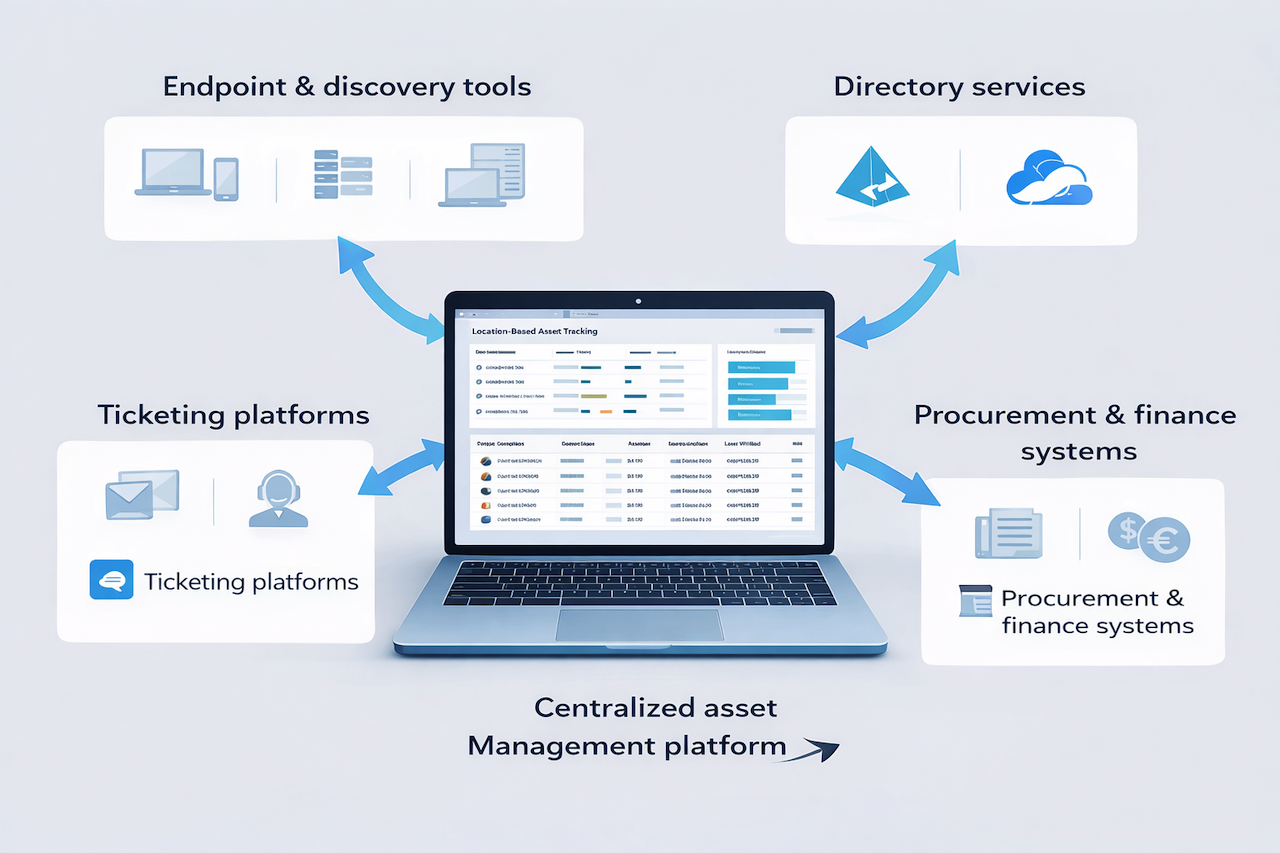
Image generated by ChatGPT.
Final Takeaway
Dedicated asset management platforms can all support robust location tracking when appropriately configured. But accuracy ultimately depends on three things that no software can solve alone: clear definitions of what location data means, organizational agreement on which system owns that data, and ongoing discipline to keep it accurate.
Spreadsheets fail not because they're the wrong format, but because they represent the absence of a system. They're what teams create when no authoritative source exists. The goal isn't to replace spreadsheets with software. It's to build a process where location data is captured once, maintained centrally, and trusted by everyone who needs it, so spreadsheets are no longer necessary.
The platform you choose matters less than the rigor you bring to implementation. Start with clear definitions, standardize your data, connect your systems, and build in regular verification. Get those fundamentals right, and the technology—whatever vendor you select—will deliver the visibility Finance needs and IT can actually maintain.
Featured Image generated by Google Gemini.
Share this post
Author

Read the latest articles from Taras Tymoshchuk
IP Geolocation for Gaming Security and Compliance
March 5, 2026
Online gaming works worldwide. Every day, millions of players connect to play games, trade items, and talk to each other. That size creates problems, though — cheating, fraud, and rule-breaking or lawbreaking happen a lot.
Learn moreBest Agriculture Software Development Vendors for Precision Farming (2026)

February 27, 2026
Precision farming today isn’t some futuristic buzzword. For many agricultural businesses, it’s already part of daily operations. Sensors in soil, satellite imagery, predictive analytics, and automated irrigation — all of this is now part of how serious farms operate.
Learn moreLeave a comment
All comments are moderated. Spammy and bot submitted comments are deleted. Please submit the comments that are helpful to others, and we'll approve your comments. A comment that includes outbound link will only be approved if the content is relevant to the topic, and has some value to our readers.
Comments (0)
No comment