
Most organizations continue to run data warehousing, data lakes, and machine learning on separate systems. This siloed architecture causes teams to move data between tools, leading to duplication, latency, and governance issues.
Databricks launched the Lakehouse architecture that combines the best of data lakes and data warehouses. Data is stored only once in open formats, and the same dataset supports analytics, data engineering, and machine learning workloads.
In this blog, we will address what is limiting the application of traditional architectures and how Databricks is overcoming these limitations, with examples.
What Is Databricks and Why It Matters Today
Databricks is the enterprise SaaS platform for data and AI on Apache Spark. It was the first to introduce the Lakehouse paradigm, a blend of the flexibility of a data lake with the reliability and performance of a data warehouse.
A data lake is a scalable and cost-effective way to store raw data, but often requires additional layers to provide governance, quality, and structure. Data warehouses are optimized for structured analytics and performance, but they can be less flexible than current Lakehouse designs when handling semi-structured or unstructured data.
How It Integrates Data Engineering, Analytics, and AI
Databricks doesn’t make your team's work between building pipelines, running SQL, or training ML models. You can do all three on one platform.
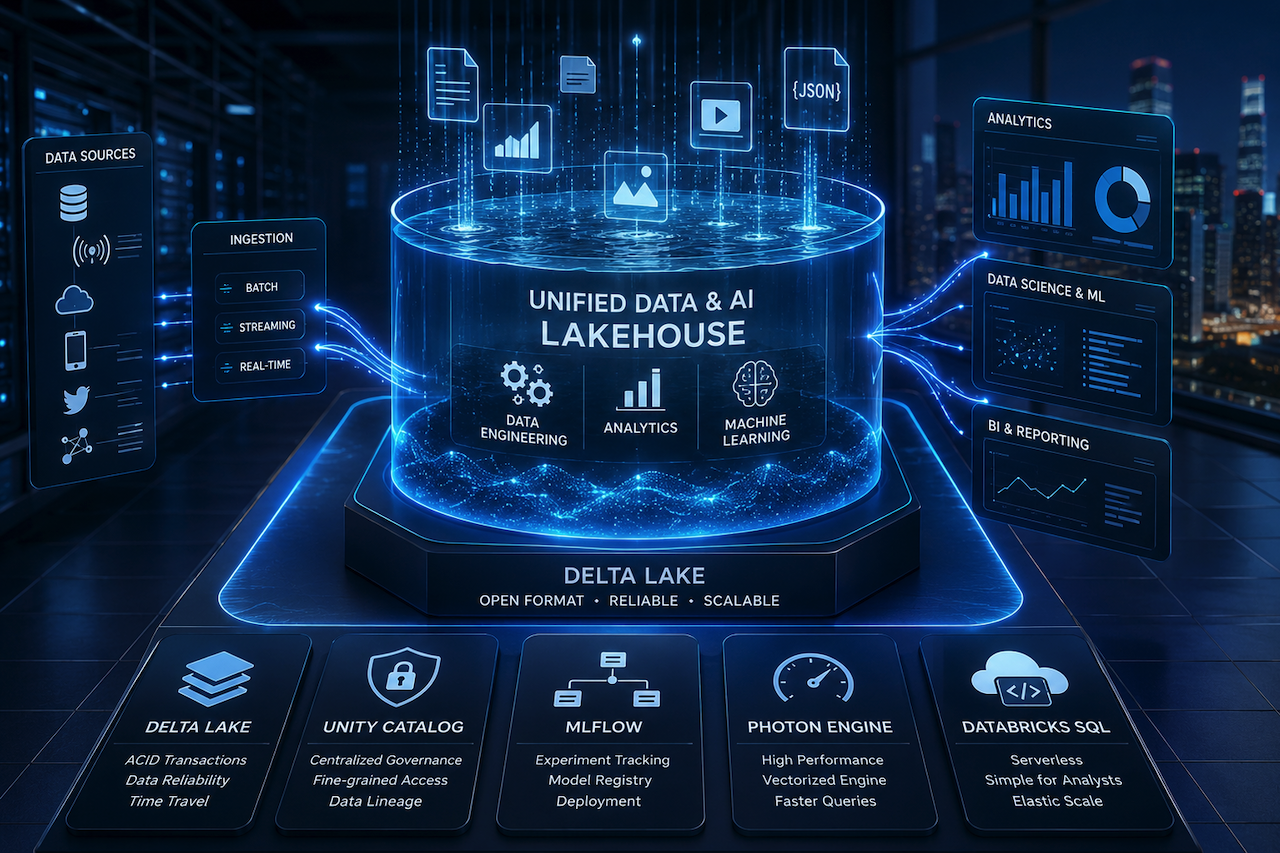
In Databricks, data engineering, analytics, and machine learning processes all operate on the same underlying data in Delta Lake. Delta Live Tables can construct and coordinate pipelines, and analysts can query the same data using SQL. MLflow enables data scientists to train, monitor, and serve models without exporting or copying datasets.
The same underlying data underpins all of it: no copy, no sync, no change of format.
Enterprise Capabilities of Databricks
- Delta Lake: An open-source storage layer that brings ACID transactions to data lakes
- Unity Catalog: Simple governance and access control to all your data and AI resources
- MLflow: Native experiment tracking, model registry and deployment
- Photon Engine: Huge speedups of SQL workloads with a native vectorized query engine
- Databricks SQL: A serverless SQL warehouse for data analysts who don’t want to deal with Spark
Traditional Data and AI Architecture Challenges
Data Silos Across Teams and Tools
Most organizations have been building their data stack over the years, adding tools as needs arose. Ingestion tool here, warehouse there, Notebook environment elsewhere.
The result? Data silos. The product team creates data that is not easily accessible to the marketing team. Pipelines that run every 24 hours force analysts to build dashboards on stale data. Many organizations put significant engineering effort into keeping data pipelines, system sync, and cross-platform integrations running.
Slow Data Processing and Decision Making
Fragmented architectures are the standard for batch pipelines. Data for today’s decisions arrives today. Their inventory models are based on yesterday’s sales, so yesterday's money. “Transaction scoring is "one in batches, not in real-time, and banks are seeing fraud too late.
The Challenge of Managing Multiple Platforms
Each platform has a security model, access control, and billing. Five tools refer to five sets of credentials, five support contracts, and five sets of documentation to learn.
When something breaks at 2 am, it becomes the on-call engineer's task to determine which of the five systems has broken and why. That complexity often becomes an operational challenge as well as a data engineering one, especially when you have to maintain and coordinate multiple tools.
How Databricks Solves These Problems
One Platform for Unified Data & AI
Databricks enables different workloads to run on a common data layer, which helps reduce the need to maintain separate copies of data across different analytical systems. One of the foundations for analytics and AI is that most workloads can run directly against Delta Lake tables. The same tables are used by engineers, analysts, and data scientists: no replication, no sync lag, no transformation overhead.
Unity Catalog adds one more layer of governance—one place to control access to everything, everywhere, across all workspaces and clouds.
Infrastructure that Scales to Run Data Faster
Databricks is designed to support both batch and streaming workloads without any modifications. Teams can process data as it arrives with Structured Streaming. Auto-scaling clusters scale up when workloads peak and scale down when they don’t, so you are not paying to scale idle compute.
In most scenarios, the Photon engine can dramatically accelerate SQL workloads without requiring any code modifications.
Team Collaboration Made Easy
Databricks Notebooks allow you to work together in a single environment with Python, SQL, R, and Scala. You can write SQL with a data scientist and a data engineer. An analyst can write SQL as part of a machine learning pipeline.
That removes the handoff friction. Teams work directly on shared data assets, rather than emailing CSVs or waiting for a data request ticket.
Comparison: Traditional vs. Databricks Lakehouse
| Feature | Traditional (Warehouse + Lake) | Databricks Lakehouse |
|---|---|---|
| Architecture | Fragmented (Two-tier) | Unified (One-tier) |
| Data Types | Mostly structured | Structured, Semi, & Unstructured |
| AI Support | Requires separate ML platforms and integrations (Traditional) | Integrated ML lifecycle tools built into the platform (Databricks) |
| Cost Model | High storage/movement costs | Low-cost cloud storage |
| Governance | Siloed security rules | Centralized (Unity Catalog) |
Business Impact of Using Databricks
Fast Time to Insight and Decision Making
Get rid of the wait by eliminating the need to move data. Companies say they can now deploy AI models faster and more efficiently than before. This allows companies to respond to market changes in real time.
Cost Reduction by Reducing Tool Sprawl
Fewer bills to pay and fewer professionals to employ; it all comes down to one platform. This may decrease the overall cost of ownership by reducing infrastructure redundancy, minimizing data flow between systems, and simplifying platform management.
Example Use Case: Global Retailer
Case: An international fashion retailer had inventory issues. Their warehouse data showed them what they had in stock, but their AI models could not accurately predict demand, because the data was always a week old.
Solution: They moved to Databricks. With one Lakehouse containing their sales data and social media trends, they could run “demand sensing” models every hour. The improved demand forecasting accuracy, reduced overstock, and improved product availability for high demand items.
Why Enterprises Are Migrating to Databricks
The need to deploy Generative AI has accelerated adoption of unified data platforms. Great AI starts with great data, and many organizations use Databricks consulting services to help implement scalable data and AI workflows more efficiently.
Improved Support for AI and Advanced Analytics
Databricks recently announced the launch of Mosaic A, which allows companies to build and train their own LLMs. They allow organizations to create AI applications using proprietary data, improving contextual relevance and domain-specific performance compared to general-purpose models.
Open Architecture and Flexibility
Vendors can lock businesses into their products. Databricks is built on open-source technologies such as Apache Spark, Delta Lake, and MLflow. If a company ever leaves Databricks, it retains ownership of its data, which is stored in open formats. This “no lock-in” guarantee is a huge relief to CTOs.
Rich Ecosystem and Integration Capabilities
Databricks works with Power BI, Tableau, Azure, AWS, or Google Cloud. You don’t have to change your cloud strategy; it just makes it work better together.
Conclusion
Enterprise data stacks have been broken for far too long. Teams work in isolation. Tools are not integrated, and the data that should be driving decisions is stuck in too-slow pipelines.
The move to unified data and AI platforms is part of a broader architectural theme of reducing fragmentation in favor of shared data foundations that enable analytics and AI. As AI workloads grow, the cost of running fragmented systems rises, making unified architectures even more strategically important.
Databricks is a great fit for modern enterprise needs, built on the idea that data engineering, analytics, and AI should not be separate worlds. The Lakehouse architecture shows you don't have to choose between flexibility and structure.
 FAQs
FAQs
The Lakehouse architecture combines data engineering, analytics, and AI on one platform. It breaks down data siloes and makes decision-making faster.
One platform accelerates data processing, real-time analytics, and other tasks and workflows. This enables teams to work together without transferring data between tools.
Databricks simplifies ETL pipelines and supports large-scale data processing. Its built-in ML tools help teams build and deploy models faster and more efficiently.
Yes. Databricks is designed to scale with enterprise-grade governance and security, making it suitable for enterprise-scale data workloads across clouds.
Featured Image generated by ChatGPT.
Share this post
Leave a comment
All comments are moderated. Spammy and bot submitted comments are deleted. Please submit the comments that are helpful to others, and we'll approve your comments. A comment that includes outbound link will only be approved if the content is relevant to the topic, and has some value to our readers.
Comments (0)
No comment