

When businesses think about data breaches, they often picture an outside attacker. Internal exposure is usually less dramatic and more common in daily work. A document gets shared with the wrong group. Download rights stay open longer than planned. A junior team member can see files meant only for deal leads or legal counsel. None of that looks like a major failure at first. It still creates risk. Virtual data rooms were built to control that kind of exposure more tightly than general file-sharing tools.
The problem grows when several teams work in the same folder structure. Finance, legal, HR, executives, advisers, and buyers may all need access to the same project, but not to the same documents. A standard shared drive often treats access too broadly. A VDR is different because it is designed around role-based access, audit trails, and restrictions on what users can actually do once they open a file.
What granular permissions in a VDR actually control
Granular permissions let administrators decide more than who gets in. They control what each user, group, or external party can see and what actions they can take after access is granted. That usually includes separate settings for viewing, downloading, printing, editing, uploading, and sharing. Some platforms also allow time-limited access, IP restrictions, watermarking, and instant revocation.
That level of control changes how sensitive projects are run. Instead of opening a whole folder to everyone involved in a transaction or review, teams can expose only the documents a person needs and only for the stage of work they are handling. This narrows the chance of casual oversharing, unnecessary visibility, or access that continues after a task is finished.
Limiting access by role, document, and activity type
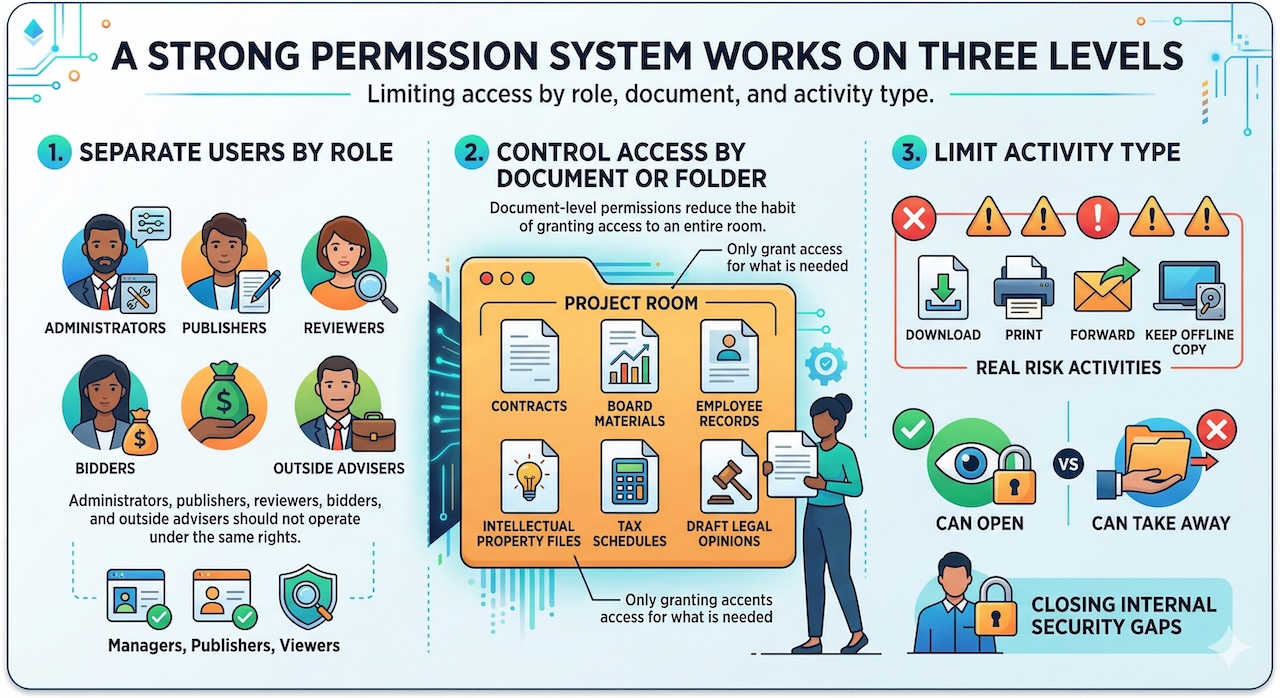
A strong permission system works on three levels.
First, it separates users by role. Administrators, publishers, reviewers, bidders, and outside advisers should not all operate under the same rights. Some platforms make that distinction very explicit, with different controls for managers, publishers, and viewers.
Second, it controls access by document or folder. That matters because one project room may contain contracts, board materials, employee records, intellectual property files, tax schedules, and draft legal opinions. A team member might need one part of that structure and have no reason to see the rest. Document-level permissions reduce the habit of granting access to an entire room simply because it is faster.
Third, it limits activity type. The real risk is often not viewing alone. It is downloading, printing, forwarding, or keeping an offline copy. Good VDR controls let teams separate “can open” from “can take away.” That distinction is where many internal security gaps start to close.
How permission settings prevent oversharing and accidental exposure
Most internal leaks do not begin with malicious intent. They begin with convenience. Someone shares a broader folder because the deadline is tight. A manager forgets to remove an adviser after a workstream ends. A board pack sits in a room where too many internal users still have download rights. Granular permissions reduce those mistakes by forcing access decisions into smaller, clearer units.
They also improve accountability. When user activity is logged in detail, managers can see who opened which file, when they accessed it, and whether they downloaded it. That record does two things. It helps teams spot unusual behaviour early, and it makes people more careful because access is visible rather than informal.
Using VDR permissions to protect confidential deal and legal documents
This matters most in projects where document sensitivity changes from folder to folder. In M&A, for example, buyers may need access to financial statements, customer contracts, and compliance materials, while compensation files, litigation strategy, or executive planning documents remain restricted to a smaller internal circle. A VDR lets teams open the room without opening everything in it.
Legal teams benefit in the same way. They often need controlled disclosure rather than broad collaboration. A good permission model makes it easier to share only the necessary draft, only with the necessary people, and only for the necessary period. That is cleaner than relying on email attachments or a general cloud folder with loose settings.
The same logic applies to internal governance work. Board materials, investigation files, financing documents, and HR records rarely belong in one open-access environment. Granular permissions help keep sensitive matters compartmentalised without slowing the wider project down.
Common mistakes that weaken internal document security
The technology helps, but poor setup can still create problems. The most common mistakes are simple:
- giving entire groups default access instead of building smaller role-based groups
- allowing download and print rights when view-only access would do
- forgetting to remove users after a workstream, bid round, or advisory role ends
- copying old permission templates into a new project without checking whether they still fit
Another weak point is rushing setup. Permission errors are rarely obvious at first glance, especially in live transactions with multiple folders and external parties. That is why the better VDRs emphasise permission grids, user groups, and review screens that let administrators compare settings before the room goes live.
What to look for in a secure VDR permission system
A permission system should be detailed without being hard to manage. Look for role-based access, folder- and file-level settings, separate controls for viewing and downloading, fast user removal, watermarking, time limits, and clear audit logs. Those are the features that give teams practical control over internal exposure.
It also helps to choose a platform in a structured way rather than from a generic software list. For Canadian teams, dataroomproviders.ca is useful because it lets you compare providers by deal size, use case, permission depth, audit reporting, support coverage, and pricing model before moving into demos. It is a practical way to narrow the field when your main concern is controlled document sharing rather than basic cloud storage.
If you reach the demo stage, test the permission model with a real folder structure. Add internal and external users, create separate groups, restrict a few documents to view-only, then check how easy it is to confirm those settings. A good VDR should make that process feel precise, not fragile.
Final thoughts on reducing internal breach risk with better access control
Granular permissions matter because internal data risk usually builds through ordinary decisions. Broad access, leftover rights, weak review habits, and unclear user roles create openings that should not exist in sensitive work. A VDR helps close those openings by turning access into a controlled process rather than a loose convenience.
That does not remove the need for judgment. Teams still need to decide who should see what and when. What the right VDR does is make those choices easier to apply, easier to review, and much easier to defend later. That is where better permission design starts to reduce the risk of internal breaches in a real, everyday way.
Featured Image generated by ChatGPT and an infographic generated by Google Gemini.
Share this post
Leave a comment
All comments are moderated. Spammy and bot submitted comments are deleted. Please submit the comments that are helpful to others, and we'll approve your comments. A comment that includes outbound link will only be approved if the content is relevant to the topic, and has some value to our readers.
Comments (0)
No comment