
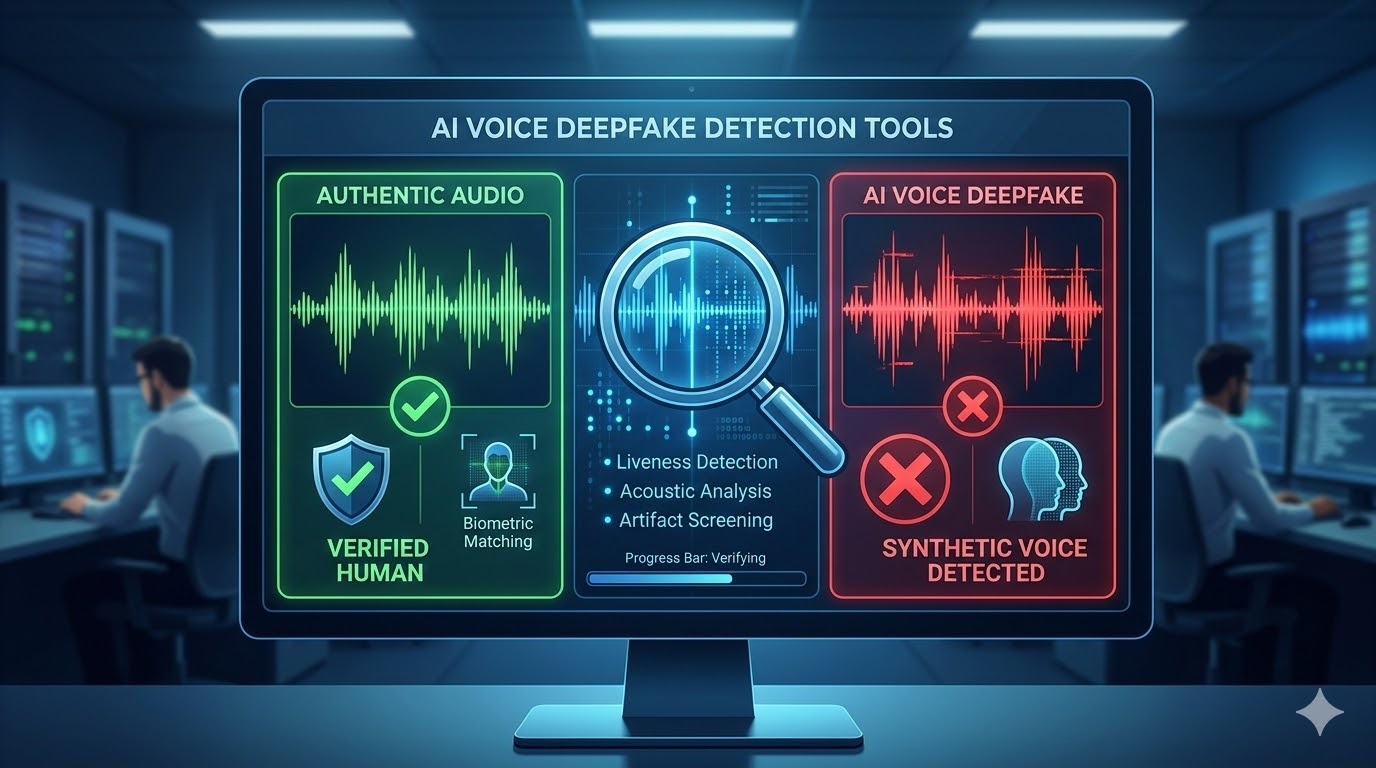
AI-generated voices have gotten so convincing that they can trick people into thinking fake audio is real. These deepfakes show up in scams, fraud, and the spread of misinformation.
Detection tools now exist that can analyze audio files and figure out if a voice is real or created by artificial intelligence.
It's important to know how these tools work and which ones are out there to help protect yourself or your organization. Detection tools use different methods to spot fake voices, like analyzing sound patterns or checking for clues of AI generation.
This guide highlights the top detection tools available and gives you practical tips on using them.
1. Modulate
Modulate brings real-time voice deepfake detection, spotting fraudulent audio in less than five seconds. The platform aims to protect banks, insurance companies, retailers, and other businesses from AI voice fraud attacks.
It uses advanced AI to analyze voice patterns during live conversations. Organizations can catch fake voices before any harm happens.
Modulate built an Ensemble Listening Model focused on understanding authentic conversations. You can add their Voice Intelligence API to your own systems for deepfake defense.
Extra features include advanced transcription and emotion detection, so it's useful for more than just fraud prevention. The platform scans audio in real time and flags your security team if it finds a deepfake.
This fast response helps stop fraud before it gets anywhere. Modulate zeroes in on voice protection, not video or image deepfakes, so their algorithms are tuned specifically for audio analysis.
2. Hiya Deepfake Voice Protector
Hiya Deepfake Voice Protector is a free Chrome extension that spots AI-generated voices in videos and audio. It uses advanced AI to analyze voices and decide if they're real or fake.
When you play audio or video online, the extension checks the voice and gives you an authenticity score. This quick feedback helps you judge whether a voice sounds genuine or artificial.
You can use it while browsing social media, news, or other web platforms. The tool works in real time, scanning audio as you go, and doesn't require any technical know-how.
Just install the extension and it starts analyzing content automatically. Hiya built this to protect users from voice fraud and misinformation, drawing on their experience in phone call spam detection.
They adapted their existing AI voice tech for this browser extension. The extension is simple enough for anyone to use—no special training needed.
3. Resemble.ai Deepfake Audio Detection
Resemble AI offers a deepfake detection system called Detect that finds fake audio in real time. Their platform uses deep learning to analyze audio files and figure out if they're real or AI-generated.
With Detect, you get a dashboard to upload audio files and receive authenticity predictions. It supports multiple languages, making it handy for global teams.
Resemble AI takes a unique angle on deepfake detection. The company published research on replay attacks that can fool detectors, which helps them improve accuracy.
The platform also includes Resemblyzer, which identifies specific speakers, and Resemble Watermark, which adds hidden markers to AI-generated audio for traceability.
You get multi-modal detection that checks audio, video, and images for manipulation. The system is built for enterprise use and can process large amounts of content.
4. ElevenLabs AI Audio Detector
ElevenLabs offers a free AI Speech Classifier that checks audio files for AI-generated voices. You just upload your audio clip, and the tool scans the first minute for synthetic speech.
The detector uses advanced speech analysis to pick out AI-generated audio from different models, including ElevenLabs' own tech. It works with MP3, WAV, and other common formats.
After you upload, the system gives you probability scores showing how likely the audio is AI-generated or human. This helps you understand what you're dealing with.
The tool is made to spot voice clones, deepfake audio, and synthetic speech. It looks at audio characteristics to find clues of artificial generation.
No AI detection tool is perfect, though. These classifiers are helpful, but their results are just one piece of the puzzle when judging audio authenticity.
You can use the detector on their website or access it through an API if you want to add detection to your own apps.
5. Deepfake Voice Detection Online Tool
Deepfake Voice Detection Online Tool gives you a free way to check audio files for fake voices. Use it right in your browser—no account or payment needed.
The platform uses AI to analyze uploaded audio and looks for signs of artificial creation. You get results fast after uploading.
This tool gives you clear, easy-to-read reports. It scans for patterns and oddities that suggest the voice has been manipulated.
You can verify voices from videos, recordings, or any audio source. The service works with common audio formats and is simple enough for anyone to use, even without technical knowledge.
6. AI Detector by #1 AI Checker
AI Detector provides a suite of tools to spot AI-generated content across formats. You can use their platform to detect not just text but also deepfake videos and AI-generated audio.
The tool offers specialized detection for each content type. For audio, their detector analyzes recordings to flag possible deepfakes.
No technical expertise needed—the interface gives you results in plain language. AI Detector checks content made by various AI systems, including ChatGPT and other popular tools.
You get all their detection tools in one place, which saves time when you need to check different types of content. Their comprehensive approach means you don't have to bounce between multiple services.
The system processes your uploads and returns detection results for you to review.
7. Deepfake Detector by Deeptrace
Deepfake Detector by Deeptrace uses AI to analyze media for signs of manipulation. It examines audio, images, and videos for deepfake markers.
You can scan content for face swapping, lip-sync issues, and audio manipulation. The platform's AI finds subtle anomalies that humans often miss but give away AI-generated content.
Upload your file and the system analyzes it, checking for technical patterns left by deepfake tools. Deeptrace built this to help you verify media authenticity before you share or trust something.
The detector works across different media types, making it useful for checking all sorts of suspicious content. You get a straightforward analysis to help you decide if content is credible.
8. Microsoft Video Authenticator
Microsoft Video Authenticator is built to spot deepfakes and manipulated media. The tool analyzes videos and images frame by frame, looking for artificial changes invisible to the human eye.
Microsoft Research developed this with help from the Responsible AI team. They trained it on datasets like Face Forensic++ and tested it with the DeepFake Detection Challenge Dataset.
It checks each frame for tiny artifacts and inconsistencies at the pixel level. When you use Video Authenticator, it gives you a confidence score about whether the content's been altered.
Microsoft rolled out this tech as part of their Defending Democracy Program. The tool helps you check the authenticity of videos and images you find online.
Video Authenticator focuses on finding the hidden technical signs left by deepfake tools. While it's accurate in many cases, detection tech is always playing catch-up with new deepfake creation methods.
9. Sensity AI Deepfake Detection
Sensity AI offers a detection system that analyzes videos, images, and audio for manipulation. The platform uses a multilayer forensic approach, checking digital media at the pixel level and scanning for voice spectral inconsistencies.
You get results in seconds through a simple app interface. The system provides forensic-level analysis to help you verify whether audio content is authentic or artificially made.
Sensity AI works across different media types, so it's handy if you need to check various forms of content. When it spots a suspected deepfake, it sends real-time alerts right away.
You'll need an active Sensity AI account to use the service. The platform also offers API access for integration into your own workflows.
Sensity AI serves everyone from social media moderators to law enforcement. The tool relies on scientific methods, which deliver more accurate detection results for AI-generated voices and other synthetic media.
10. Amber Video Deepfake Scanner
Amber Video Deepfake Scanner detects AI-generated videos and deepfakes. The platform uses computer vision to analyze videos and decide if they're manipulated.
You can upload video files or paste links from YouTube, Instagram, and other platforms. The tool processes your video and gives you a confidence score about its authenticity.
The scanner checks each frame for consistency, looking at facial movements and visual cues that might reveal deepfake creation. You get results in seconds after submitting your video.
Amber offers a free version that lets you test videos without registering. The platform is privacy-aware, so your uploads are handled securely.
You get clear verdicts and helpful signals explaining the results. Amber helps you check video authenticity as deepfake tech keeps advancing.
How AI Voice Deepfake Detection Tools Work
AI voice deepfake detection tools scan audio for patterns that reveal artificial generation. These systems look for tiny details in speech that people usually overlook—like weird pauses or unnatural pitch shifts.
Key Detection Techniques
Detection tools check multiple parts of audio to catch fake voices. They analyze speech patterns to find oddities in how words flow.
Real human voices have natural changes in tone and rhythm that AI-generated voices often miss. Acoustic analysis looks for artifacts left by voice synthesis software, such as odd frequency distributions, robotic undertones, or inconsistent background noise.
The tools measure pitch stability and breathing, since AI voices can struggle to mimic these human quirks. Biometric security features compare voice samples with known traits of real speech.
Detection systems check spectral properties and harmonic structures that set synthetic audio apart. They can spot voices made by ElevenLabs, Murf, Speechify, and others by recognizing their unique generation signatures.
Machine Learning Models Used
Detection tools rely on neural networks trained on thousands of real and fake voice samples. These models learn to find differences between authentic recordings and AI-generated audio by recognizing patterns.
Generative Adversarial Network (GAN) analysis helps catch deepfakes by understanding how voice cloning systems operate. The same tech that creates fake voices can help detect them.
Most systems use several AI models together. One might focus on frequency, another on timing. This layered strategy catches more deepfakes than relying on just one method.
The models keep updating as new voice synthesis techniques come out. It's a constant race between creation and detection.
Limitations and Challenges
Detection accuracy drops as deepfake technology gets better. New AI voice generators now create speech that sounds uncannily human.
Detection tools have to keep updating their algorithms just to keep up. It's a constant race.
False positives show up when tools mistake real voices for fakes. This happens more often with low-quality recordings or people who just sound a bit different.
Background noise and audio compression can throw off the analysis. Sometimes, even a weird echo or static messes things up.
Short audio clips make things harder for detection tools—they just don’t have enough to work with. Real-time detection? Still a challenge, since it takes time to process and analyze the sound.
Some deepfakes now include realistic breathing and natural pauses. Those details trip up even the best detection systems.
People can learn to spot subtle differences between real and fake voices, but it takes practice. Honestly, these tools work best when paired with human judgment.
Best Practices for Implementing Detection Tools
Rolling out AI voice deepfake detection tools isn’t just about plugging in new software. You need smart integration with your systems, solid training for your team, and a real focus on privacy rules.
Integration with Existing Security Systems
Connect your detection tools directly to your current security setup. Don’t run them in isolation.
Link the software with authentication systems, call centers, and identity checks. This way, you get several checkpoints where the system can flag sketchy voice activity automatically.
Set up alerts that ping your security team when the system spots something suspicious. Make sure the tool fits with your threat response routines.
Most platforms offer APIs, so you can hook them right into your CRM and fraud prevention tools. That’s handy.
Before rolling out to everyone, test the integration thoroughly. Run fake deepfakes through the setup to find gaps or false alarms.
Keep an eye on performance. You don’t want the detection tool slowing down your regular operations or blocking real users.
User Training and Awareness
Your team needs clear instructions for what to do when the system flags a suspicious voice. Train them to spot common deepfake tricks—like fake CEO calls or phony customer service requests.
Give concrete examples of what synthetic voices might sound like. Show how alerts appear in the detection interface.
Create simple step-by-step workflows for employees. Tell them who to contact, what to record, and whether to keep talking or hang up.
Update training regularly, since deepfake tactics keep changing. Focus extra attention on high-risk departments like finance, customer service, and IT support.
Those teams deal with voice fraud more often and need deeper knowledge about what your detection tools can—and can’t—do.
Ensuring Data Privacy and Compliance
When you collect voice data for deepfake detection, you have to follow privacy regulations like GDPR and CCPA. Keep track of what you collect, how long you keep it, and who can see it.
Always get consent before recording or analyzing someone’s voice. That’s non-negotiable.
Pick tools that encrypt voice data, both while it’s moving and when it’s stored. Make sure your vendors follow security standards and get outside audits.
Check if the tool processes data locally or sends it off-site. That can change your compliance requirements.
Set up clear data retention policies so voice samples get deleted after analysis. Limit access to only the people who really need it for security.
Keep audit logs to track who accessed voice recordings and when. It’s just good practice.
 FAQs
FAQs
Several tools specialize in detecting AI-generated voices. Modulate uses voice authentication technology combined with behavioral biometrics to identify synthetic speech. Hiya Deepfake Voice Protector monitors phone calls in real time and flags suspicious voices during conversations. Other tools like Resemble.ai and ElevenLabs AI Audio Detector analyze uploaded audio files and compare voice patterns against models trained on large datasets of real and synthetic speech.
Yes, some free tools provide basic AI voice detection capabilities. For example, the Deepfake Voice Detection Online Tool allows users to upload audio and receive an instant authenticity scan without creating an account. AI or Not is another free option that can analyze audio, video, and images. While these tools are useful for quick checks, they may have limitations in accuracy and functionality compared to professional solutions.
Hiya focuses on protecting phone calls in real time by monitoring live conversations and alerting users when suspicious audio patterns appear. This differs from tools like Resemble.ai or ElevenLabs, which analyze audio files after they have been recorded or uploaded. Hiya’s strength lies in its ability to detect threats during live calls, while other platforms often provide deeper post-analysis and support more audio formats.
An effective AI voice detection platform should provide high detection accuracy and transparency about its testing methodology. Real-time monitoring capabilities are useful for live communications, while file-based analysis tools are helpful for reviewing recorded audio. Compatibility with common formats such as MP3, WAV, and streaming audio is important. Additional features like batch processing, detailed analysis reports, and API integrations can also improve usability for businesses and developers.
Yes, many websites offer free online AI voice detection services. Typically, users upload an audio file directly in a browser and receive results within seconds. However, free tools may impose restrictions such as file size limits, daily usage caps, or reduced accuracy. It is also important to review privacy policies, since some platforms may store or analyze uploaded audio to improve their detection models.
GitHub hosts numerous open-source projects focused on deepfake voice detection. Many of these tools are built from academic research and use techniques such as spectral analysis or neural network models to identify synthetic speech patterns. Developers can download, modify, and train these tools using custom datasets. However, they often require technical expertise to implement and may lack the user-friendly interfaces or customer support found in commercial platforms.
Share this post
Author

Read the latest articles from Lisa Thomas
How Proactive IT Management Improves Uptime and Reduces Downtime
April 15, 2026
Most businesses do not think about uptime until they lose it. A server goes unresponsive on a Friday evening, an update fails silently overnight, or a ransomware payload encrypts half the network before anyone notices. By the time the team reacts, the damage is already compounding. A proactive IT management appro [...]
Learn moreLeave a comment
All comments are moderated. Spammy and bot submitted comments are deleted. Please submit the comments that are helpful to others, and we'll approve your comments. A comment that includes outbound link will only be approved if the content is relevant to the topic, and has some value to our readers.
Comments (0)
No comment