

Ecommerce, Digital Marketing, Social Media Marketing
Facebook Ads Retargeting: How to Recover Buyers Without Annoying Them
Roughly seven out of every ten shoppers who add products to their cart leave without buying. Baymard Institute puts the average documented cart abandonment rate at 70.22%, based on 50 separate studies. For eCommerce brands, Facebook retargeting ads are a standard way to bring those shoppers back.
The challenge is that these warm audiences are often small, which means the same people can end up seeing the same ad again and again. Push that too far, and shoppers start hiding the ad instead of reconsidering the purchase. The goal, then, is not simply to retarget more, but to bring buyers back without giving them a reason to tune you out.
The solution starts with deciding who to retarget and when. Group shoppers by how far they got in the buying journey, match the ad to the reason they left, and control how often they see it so retargeting does not become repetitive. From there, keep retargeting spend aligned with the size of the warm audience.
Why Meta Ads Retargeting Turns From Helpful to Intrusive
Retargeting on Facebook ads works because shoppers have already shown interest. The problem starts when that interest turns into repeated exposure to the same message. A 2025 Epsilon survey found that 88% of consumers notice when they see the same ad repeatedly, and 69% on social media say repeated ads annoy them.
For eCommerce brands, that makes frequency more than a visibility issue. A shopper may still be worth retargeting, but that does not mean they need to see the same reminder every time they open Facebook or Instagram. The aim is to stay relevant long enough to recover the sale without making the brand feel like it is following the shopper around.
Match Retargeting to the Buyer's Journey
Shoppers leave a site at different stages of intent, and each stage tolerates a different amount of follow-up. Baymard's research found that 42% of US online shoppers have abandoned a cart because they were only browsing or not ready to buy. That segment needs lower frequency. A shopper who started checkout needs a faster, more direct reminder.
Meta ads retargeting works best when each tier has its own window, message, and exposure ceiling. Here’s a practical structure to start with:
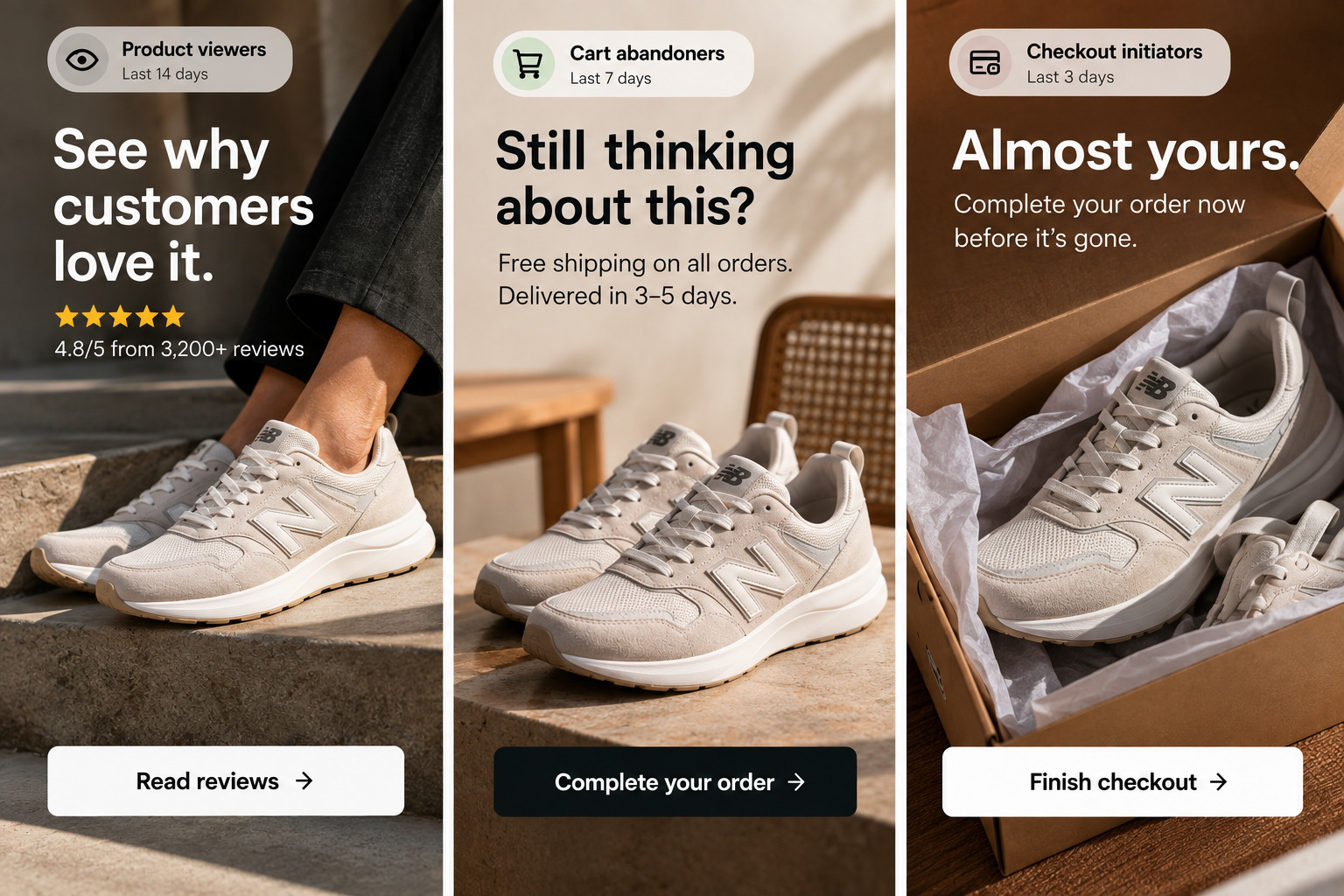
- Product viewers (ViewContent, last 14 days): Show reviews, sizing guidance, or comparisons at a low weekly frequency, since many are still researching.
- Cart abandoners (AddToCart, last 7 days): Feature the exact product and answer a likely objection, such as shipping cost or delivery time.
- Checkout initiators (InitiateCheckout, last 3 days): Use the shortest window and the highest exposure ceiling, because these shoppers stopped closest to the order.
- Recent purchasers (Purchase): Treat this audience as an exclusion list for every recovery tier.
Treat those windows as defaults. For furniture, electronics, and other considered purchases, extend the viewer and cart windows to 30–60 days. Use conversion lag in your analytics to set the right length; it shows the typical time between a first visit and a purchase. Website custom audiences can retain people for up to 180 days, but longer windows include more shoppers who may have already bought elsewhere.
Layer the exclusions so each shopper sits in one tier at a time. A shopper who started checkout qualifies for the viewer and cart audiences too, so skipping this step stacks three ad sets on the same person. Layering also keeps tier-level reporting accurate.
Each tier also depends on complete event data. Retargeting with Facebook Pixel events alone misses shoppers whose ad blockers, browser privacy restrictions, or consent choices block browser-side tags. Pair the Meta Pixel with the Conversions API (CAPI) so consented purchase, cart, and checkout events still reach Meta from your server. Deduplicate both with a shared event ID.
Make Facebook Ads Retargeting More Relevant With Better Creative
A retargeting ad should give the shopper a reason to reconsider the purchase, not simply remind them that they visited your site. Baymard's survey shows that among shoppers who abandoned for reasons other than browsing, 40% cited extra costs such as shipping, taxes, or fees, while 20% cited slow delivery.
Use the creative to address the concern most likely to have stopped the purchase. For example:
- Extra costs: Show the full delivered price, free-shipping threshold, or an offer that makes the total cost clearer.
- Slow delivery: Put the expected delivery date or order cutoff directly in the ad.
- Payment concerns: Use verified reviews, trusted payment options, or a clear guarantee to reduce hesitation.
Keep the product recognizable, but change the message to match the shopper's concern. Use the same product across different ads, but vary the proof, benefit, or objection each one addresses. This gives shoppers a reason to engage with the next ad instead of seeing another version of the same reminder.
Meta dynamic product ads can reinforce this approach by showing shoppers the products they previously viewed while the ad copy addresses the concern that may have stopped them from buying.
Use Meta Ads Retargeting to Build Buyer Confidence
Not every shopper who visits a product page is ready for a sales pitch. Someone still comparing options may need more information before a discount or purchase reminder makes a difference. Retargeting can give that shopper something useful to consider instead of showing another version of the same product ad.
For these lower-intent shoppers, use customer testimonials, educational content, or creative that shows how the product fits into the buyer's needs. The message can still feature the product, but its job is to reduce uncertainty and build confidence rather than push for an immediate purchase.
The closer a shopper is to completing the purchase, the more direct the message can become. Earlier in the journey, Facebook ads retargeting should help answer questions and reduce hesitation; closer to checkout, the message can focus on the specific barrier keeping the shopper from placing the order.
How to Set Up Retargeting Ads on Facebook With Exposure Limits
For warm audiences, Facebook ad optimization starts with structure rather than bids, because frequency in a Sales ad set depends on the settings below. Configure them before launch.
Verify Event Quality
Confirm that ViewContent, AddToCart, InitiateCheckout, and Purchase events are triggering correctly and sending content IDs that match your catalog. Review event match quality in Events Manager.
Respect Consent
Send Pixel and Conversions API events only for shoppers whose consent status allows it under the privacy laws in your markets.
Build Tiered Custom Audiences
Create separate website custom audiences for product viewers, cart abandoners, and checkout initiators using the event and lookback window defined for each stage.
Lock the Audience
Switch each retargeting ad set to original audience options. Advantage+ audience treats a custom audience as a suggestion and can expand delivery beyond it, while custom audience exclusions apply in both modes.
Exclude Recent Purchasers
Apply a Purchase-based exclusion with a window that matches your repurchase cycle. A coffee brand that ships a 30-day supply, for example, can exclude buyers for 21 days and then reach them with a reorder message.
Review Placements
Start with Advantage+ placements, then review the placement breakdown once each tier has enough delivery to compare. Meta Ads placements such as Feeds, Stories, and Reels use different aspect ratios, so provide creative in formats suited to each placement, including 9:16 versions for Stories and Reels.
Choose the Attribution Model
Where your account supports it, choose incremental attribution, which optimizes toward conversions Meta predicts the ads influenced. On standard attribution, remove view-through from retargeting ad sets, because view-through credit can overstate results among shoppers who were already likely to buy.
A Weekly Governance Workflow for Frequency and Fatigue
Retargeting stays efficient when one owner reviews the same signals on a fixed weekly schedule and acts on defined thresholds. The workflow below sets those thresholds.
1. Set the Budget Based on Audience Size
Start with how many shoppers are in the retargeting audience and how often you want each person to see the ad. For example, reaching 4,000 shoppers five times a week at a $15 CPM would require about $300 per week. If the audience shrinks, reduce the budget rather than letting the same shoppers see the ad more often.
2. Track Frequency Against CTR
Review weekly frequency and click-through rate by tier. When frequency rises while CTR falls for two consecutive weeks, refresh the creative or shorten the window.
3. Read the Quality Signals
Check the quality ranking once an ad passes 500 impressions, and read comments for complaints about repetition. A below-average quality ranking on a warm audience calls for new creative rather than more budget.
4. Refresh the Exclusion Lists
Confirm that server-side Purchase events populate the purchaser exclusion, so every buyer moves out of the recovery tiers after ordering.
5. Compare Standard and Incremental Results
Add the incremental attribution column through Compare attribution settings. If incremental conversions are a small fraction of attributed ones, the tier is mostly paying for purchases that would have happened anyway. Assess each tier on purchases rather than clicks, because bot traffic can inflate click counts in ad reports.
6. Queue Replacement Creative
Keep the next objection-led variants ready, and launch them into existing ad sets when step two flags fatigue.
Scale makes the workflow harder. When retargeting runs alongside broad prospecting, catalog campaigns, and seasonal promotions, exclusion lists and budgets can diverge across campaigns. A Meta Ads case study can provide an example of how different campaign elements work together across the funnel.
Match Retargeting Budgets to Warm Pool Size
Budget beyond what the pool can absorb buys repetition, and retargeting ads cost more as frequency climbs. The pool itself grows only as prospecting and other channels send new visitors to the site. Fixed percentages ignore that inflow.
- Seasonal peaks: Raise retargeting budgets after prospecting has grown the pool, and recalculate each tier with the budget formula.
- Slow months: Reduce retargeting spend in proportion to the smaller pool, so frequency holds at each tier's ceiling.
Turn Retargeting into Recovered Margin
Cart abandonment leaves room for recovery, but not every abandoned cart needs the same follow-up. The strongest retargeting campaigns use that window carefully, giving shoppers a relevant reason to return while there is still a real opportunity to convert.
Facebook ads retargeting works best when the campaign knows the difference between staying visible and becoming repetitive. Recover the sale when there is still buyer intent, change the message when the shopper needs something different, and let the ad stop working once the purchase is made.
Comments
Comments are available to signed-in users and are moderated to keep the discussion useful and respectful. Spam, automated submissions, and low-value promotional comments are removed. Outbound links may be approved when they are relevant and genuinely helpful to readers, but they are displayed as plain text rather than clickable hyperlinks.
No comments have been published yet.
Please sign in to submit a comment.