

How to Fix Blurry Images After Removing Text with an AI Upscaler in 2026
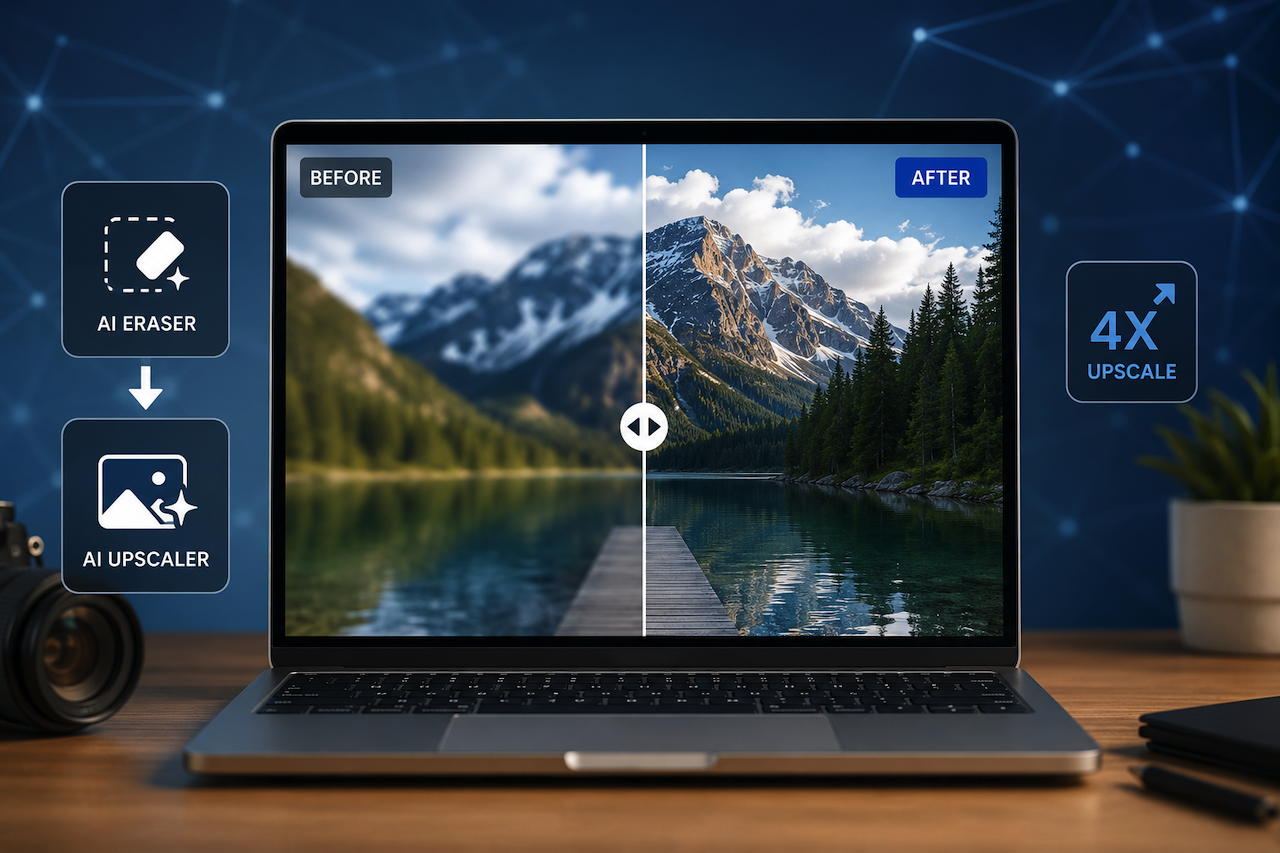
In the fast-paced world of e-commerce and social media content creation, editing images is a daily necessity. You might need to erase a distracting mark from a product photo, remove a stray price tag from a screenshot, or clean up unwanted text overlays from a banner. AI-powered eraser tools make object removal surprisingly easy, but they often leave behind a frustrating side effect: the area where text or objects were removed can look soft, pixelated, or blurry compared to the surrounding image.
For content creators and online sellers who need pixel-perfect visuals, this drop in quality can be difficult to ignore. Fortunately, modern AI image upscalers make it possible to restore sharpness and improve image clarity with minimal effort. Tools such as Photiu.ai allow users to upscale image quality automatically after removing text, or other unwanted elements.
What Is an AI Image Upscaler?
An AI image upscaler is an online tool designed to improve image clarity and resolution using artificial intelligence. Unlike traditional upscaling methods that simply stretch pixels and create jagged edges, AI-based systems analyze image patterns, textures, and colors to reconstruct finer details and produce a cleaner, sharper result.
These tools are commonly used to fix blur caused by object removal, image compression, screenshots, or low-resolution uploads. Many modern platforms run directly in the browser, allowing users to enhance images without installing editing software or manually adjusting complex settings.
How AI Image Upscalers Work
Many online AI upscalers now offer free access without requiring advanced editing skills or expensive software subscriptions. Some tools allow users to upload an image directly in the browser, process it automatically, and download an enhanced version within seconds.
For content creators, e-commerce operators, and casual users who regularly clean up and repurpose images, browser-based upscaling tools provide a convenient way to improve image quality without investing in professional design software.
Why Do Images Get Blurry After Removing Text?
When an AI eraser removes text, logos, or small objects from a photo, it reconstructs the background by sampling surrounding pixels. While this often works well for simple backgrounds like solid colors or gradients, the process can struggle with detailed textures, fabric patterns, skin tones, or reflective surfaces.
The reconstructed area may appear softened, blurred, or artificially smooth, making it stand out from the rest of the image. This is especially common when removing dense text such as timestamps, labels, or promotional overlays because the AI has limited surrounding reference data to rebuild the missing section naturally.
How AI Upscalers Help Restore Clarity
AI upscalers process the entire image instead of targeting only the edited region. Deep-learning models analyze edges, textures, lighting, and color transitions to reconstruct finer details and improve overall sharpness.
This approach helps the previously blurred section blend more naturally with surrounding areas while also improving the quality of the full image. Modern upscalers are typically automated, meaning users do not need to manually select blurry regions, adjust sharpening settings, or configure scaling ratios.
Use Cases for Post-Removal Image Enhancement
1. E-Commerce Product Listings
Online sellers often work with supplier images that contain foreign-language text or unnecessary branding. After removing these elements, surfaces such as packaging, tabletops, or fabrics may appear smudged or soft. AI upscalers can help restore texture and improve presentation quality for marketplace listings.
2. Social Media Graphics and Thumbnails
Content creators frequently repurpose screenshots, memes, and user-generated content that contain unwanted overlays or captions. Once removed, the affected area may look noticeably softer than the rest of the image. Upscaling tools help sharpen the final image and maintain consistent quality across platforms.
3. Marketing Banners and Flyers
Designers sometimes work with older campaign assets or low-resolution files where outdated promotional text must be removed. AI upscaling can improve overall clarity and reduce visible editing artifacts without requiring extensive manual retouching.
4. Document and Screenshot Cleanup
Professionals sharing screenshots, scanned documents, or receipts may need to erase sensitive information before publishing or sending files. While AI erasers simplify the process, edited areas can sometimes appear blurred. Upscaling tools can help maintain more consistent image quality after cleanup.
Features Commonly Found in AI Upscaling Tools
1. Automatic Enhancement
Many AI upscalers automatically determine the best sharpening and scaling approach for each image without requiring manual adjustments.
2. Browser-Based Accessibility
Modern tools often work entirely online, allowing users to enhance images from laptops, tablets, or smartphones without downloading software.
3. Quick Processing
Most AI upscaling systems generate enhanced images within seconds, making them useful for fast-paced editing workflows.
4. Multi-Purpose Image Improvement
In addition to fixing blur from object removal, AI upscalers are frequently used for improving compressed web images, restoring old photos, and enhancing low-resolution graphics.
A Practical Workflow for Cleaner Images
For e-commerce sellers, designers, and social media managers, a common workflow involves first removing unwanted text or objects using an AI eraser tool, then running the edited image through an AI upscaler to restore sharpness and improve consistency.
This combination helps reduce visible editing artifacts while producing cleaner images suitable for product listings, promotional graphics, social posts, and digital publishing.
Conclusion
AI image upscalers have become a practical solution for restoring clarity after removing text or unwanted objects from images. By improving sharpness, rebuilding textures, and reducing visible editing artifacts, these tools help content creators, online sellers, and designers maintain more professional-looking visuals. Tools such as Photiu.ai provide an example of how AI-powered image upscaling can support faster and more efficient editing workflows for producing cleaner, higher-quality images.
Disclaimer
The information provided in this article is for general informational and educational purposes only. Mention of third-party tools, platforms, or websites is provided as an example and does not constitute endorsement, sponsorship, or recommendation. Features, availability, pricing, and performance of AI image upscaling tools may change over time. Users should independently evaluate any platform before uploading sensitive, copyrighted, or personal content. Always ensure that your use of image editing and enhancement tools complies with applicable copyright, privacy, and platform usage policies.
Featured Image generated by ChatGPT.
Related Articles
March 24, 2026
Level Up Your Content Creation with These Powerful AI Enhancers for Images and Videos
In today’s digital landscape, high-quality visuals are no longer optional—they are essential. Whether you’re a content creator, marketer, or business owner, the quality of your ima...
Read More
July 14, 2025
Extracting Text from Complex Images: Tips and Tools
Have you ever tried to photograph a flyer, label, business card, or screenshot, only to have the text turn into an unreadable jumble of fonts, shadows, backgrounds, and irrelevant...
Read More
April 19, 2024
The Impact of Text Extraction From Images on Website Accessibility
Imagine browsing the web for searching essential information, only to encounter an image that holds the key to what you’re looking for, but the text within it is difficult to extra...
Read More
Comments
Comments are available to signed-in users and are moderated to keep the discussion useful and respectful. Spam, automated submissions, and low-value promotional comments are removed. Outbound links may be approved when they are relevant and genuinely helpful to readers, but they are displayed as plain text rather than clickable hyperlinks.
No comments have been published yet.
Please sign in to submit a comment.