

IP Address, Network, Cybersecurity
What Your Public IP Address Reveals to Attackers, and How Small Businesses Can Shrink Their Exposure
Every business with an internet connection has at least one public IP address. It's the number the rest of the internet uses to reach your office, and most owners never think about it after the installer leaves. Attackers think about it constantly. Automated scanners sweep the entire IPv4 address space around the clock, cataloging every device that answers. If something in your office is listening on the internet, there's a good chance it's already been found and recorded.
That isn't a reason to panic. An IP address on its own doesn't hand anyone the keys. What matters is what answers when someone knocks. This guide explains what a stranger can learn from your public IP, which exposed services cause the most trouble, and the practical steps that close the gaps without breaking the tools your staff rely on.
What an IP address does and doesn't reveal
Start with what an outsider can see without touching your network at all.
- Your internet provider and rough area: IP registration records show which provider owns the address block, and geolocation databases estimate a region. For a business line, this is usually accurate to the metro area, not to your front door.
- Whether the address is static or dynamic: Business circuits often have a fixed address, which means anything exposed today will still be at the same place next month. That makes it easier for a scanner's findings to stay useful to an attacker.
- Reverse DNS names: Many providers and routers assign a hostname to the address. Sometimes that name is generic. Sometimes it says "mail", "VPN" or the company name, which tells a visitor exactly where to aim.
Now the part that matters more: what an outsider can see by actually connecting. A basic port scan sends a connection request to each common port and notes which ones reply. A reply reveals that a service is running. A banner or login page often reveals the product, and sometimes the exact version. Search engines that index internet-connected devices do so at scale, allowing anyone to look up an address in seconds.
So the honest answer to "what does my IP reveal?" is: very little about you, and potentially a great deal about the equipment you forgot was facing the internet.
The usual suspects: services that shouldn't face the internet
When we audit small business networks, the same handful of exposures come up again and again. Most of them were opened years ago for a good reason, such as allowing a vendor in or allowing the owner to work from home, and nobody has closed them since.
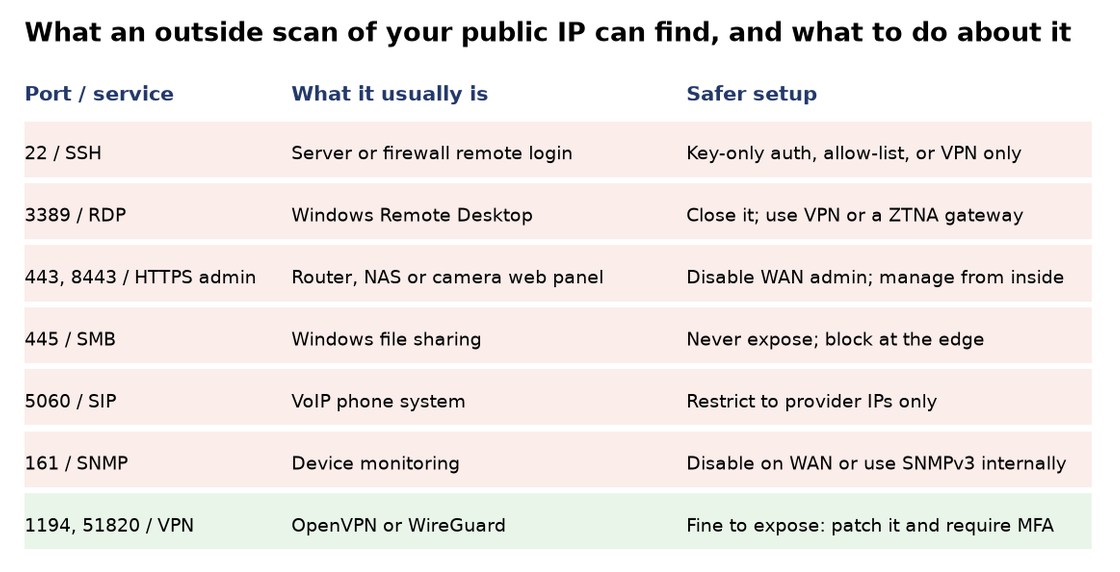
- Remote Desktop (RDP, port 3389): This is the big one. An exposed Windows Remote Desktop login invites endless password guessing, and a single reused or weak password can give an intruder full desktop access on your network. Ransomware crews have used exposed RDP as an entry point for years. If you need remote access to office PCs, put it behind a VPN or a zero-trust access gateway instead.
- Admin web panels (ports 443, 8443, 8080 and others): Firewalls, routers, storage boxes, camera recorders and printers often ship with a web management page. When "remote management" is enabled, the login page is visible to the entire internet. Vulnerabilities in these panels are announced regularly, and attackers scan for unpatched ones within days of a disclosure. Turn off management from the WAN side and manage the device from inside the network or over the VPN.
- File sharing (SMB, port 445): Windows file sharing was never designed to face the internet. Block it at the edge without exception.
- SSH (port 22): Linux servers, firewalls. and network gear use SSH for remote administration. It's far more robust than RDP, but an open port still attracts constant brute-force attempts. Use key-based authentication, disable password logins, and limit which source addresses can connect.
- VoIP and SNMP: Phone systems listening on SIP (port 5060) attract toll-fraud attempts, where criminals try to place expensive international calls through your account. SNMP (port 161), used for device monitoring, can leak configuration details if left open with default community strings. Restrict SIP to your provider's addresses and keep SNMP internal.
A one-afternoon exposure review
You don't need a security team to find out what your own address is showing. You need an hour or two and a list.
- Find your public IP addresses: Check your router or firewall's WAN status page, or your provider's paperwork. Many businesses have more than one, especially if they have a backup line or a block of static addresses.
- Look at what the outside world sees: Use an online port-checking tool or a device search engine to look up each address. Do this from outside your network, since scanning from inside shows a different picture.
- Review port forwarding and firewall rules: Every forwarded port should have an owner and a reason. If nobody knows why port 3389 points at the accounting PC, that's your answer.
- Check device management settings: On the firewall, router, NAS, camera recorder, and phone system, confirm that remote or WAN management is disabled unless there's a documented need.
- Patch what must stay exposed: A VPN gateway or a web server you deliberately publish should be on current firmware and protected by multi-factor authentication.
- Write it down. A one-page record of which ports are open, why, and who approved them makes the next review take ten minutes instead of an afternoon.
Replace open doors with one guarded entrance
Most exposures exist because someone needed access from outside. The fix isn't to remove that access. It's to route it through a single, hardened entry point.
A modern VPN, such as WireGuard or a firewall's built-in client VPN with multi-factor authentication, lets staff and approved vendors reach internal systems without exposing each system individually. Zero-trust network access tools go a step further by verifying the user and device before granting access to a specific application. Either approach shrinks your visible footprint from a dozen listening services to one that's designed to be there.
For vendors, prefer time-limited access. Create an account when a support session is scheduled, and disable it afterward, rather than leaving a permanent door open for a contractor you last spoke to two years ago.
Static or dynamic: does it matter for security?
Some owners assume a dynamic IP address keeps them hidden. It doesn't, really. Scanners re-sweep the address space continuously, so a device that moves to a new address is rediscovered quickly. A static address isn't inherently riskier. It just means mistakes stay visible at the same place for longer.
What a static address does offer is control. You can allow-list it on cloud services, so your Microsoft 365 or line-of-business application only accepts administrative logins from the office. That's a genuine security gain, and it's often worth the small monthly cost.
Don't forget the other half: outbound traffic
An exposure review looks at what can get in. It's worth a quick look at what goes out, too. Infected machines usually "phone home" to an attacker's server, and a firewall that allows any outbound connection to anywhere makes that easy. DNS filtering, which blocks lookups for known malicious domains, and basic outbound rules on the firewall stop much malware from completing its job even after it lands. These controls sit alongside the other common network security challenges small businesses face, such as unpatched devices, weak Wi-Fi segmentation and flat networks where every device can see every other one.
Make it a habit, not a project
Exposure creeps back. A new camera system gets installed, a vendor asks for "just one port", a firmware update quietly re-enables remote management. Put a recurring reminder on the calendar; quarterly is reasonable for most small offices, to repeat the outside check and compare it against your one-page record. Anything new that nobody can explain gets closed.
Your public IP address will always be public. What you say when someone knocks is entirely up to you, and for most small businesses, the right answer is almost nothing.
Comments
Comments are available to signed-in users and are moderated to keep the discussion useful and respectful. Spam, automated submissions, and low-value promotional comments are removed. Outbound links may be approved when they are relevant and genuinely helpful to readers, but they are displayed as plain text rather than clickable hyperlinks.
No comments have been published yet.
Please sign in to submit a comment.