

Virtual Private Network, Network, Privacy
What Is a VPN Protocol? Types, Strengths & How to Choose
A VPN protocol is the set of rules a VPN follows to open a connection, scramble your data and carry it between your device and a VPN server.
You don't need to know those rules to use a VPN. You will see their names, though, and they read like alphabet soup: OpenVPN, WireGuard, IKEv2, L2TP, PPTP.
Open the settings in most VPN apps, whether you pay for a plan or use a free VPN service, and you'll find a Protocol option, often set to Auto, with these names listed underneath.
Here's what each name means, how they compare, and which one to pick for what you're doing.
What Is a VPN Protocol?
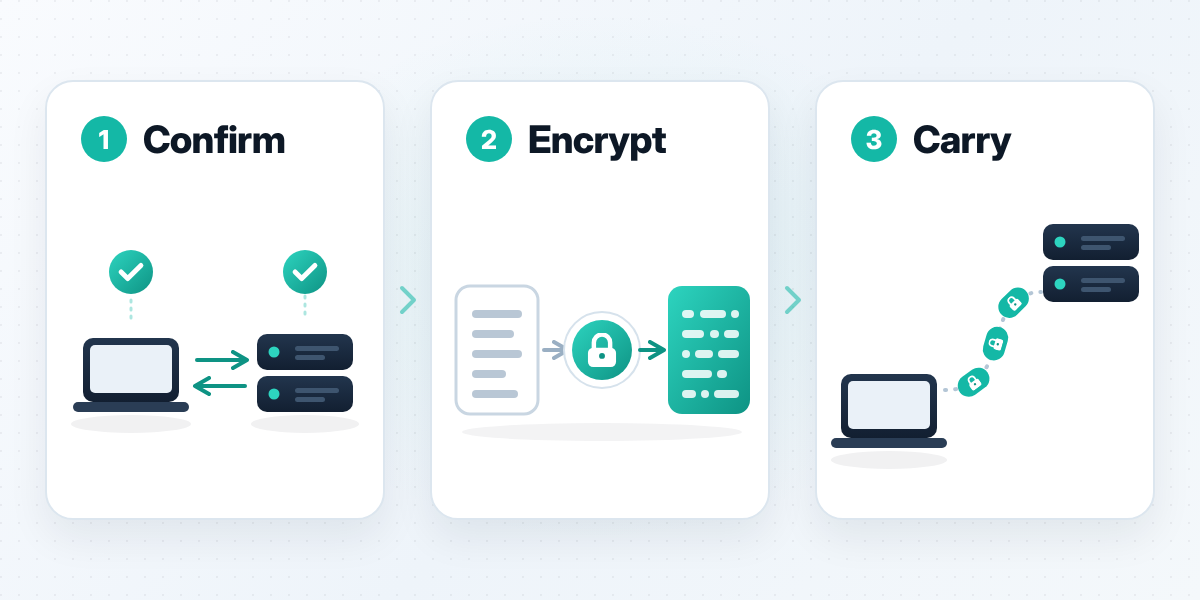
A VPN protocol decides three things: how your device and the VPN server confirm each other, how your data is encrypted, and how the encrypted packets travel across the internet.
Think of the VPN as a private delivery route and the protocol as the courier's rulebook: who signs for the parcel, how it's sealed, and which roads the van takes.
Each rulebook favors something different: speed, support for older devices, or staying connected when your network changes.
The Six Categories of VPN Protocols
Not every name in a VPN settings menu can run a VPN by itself. They sort into six groups:
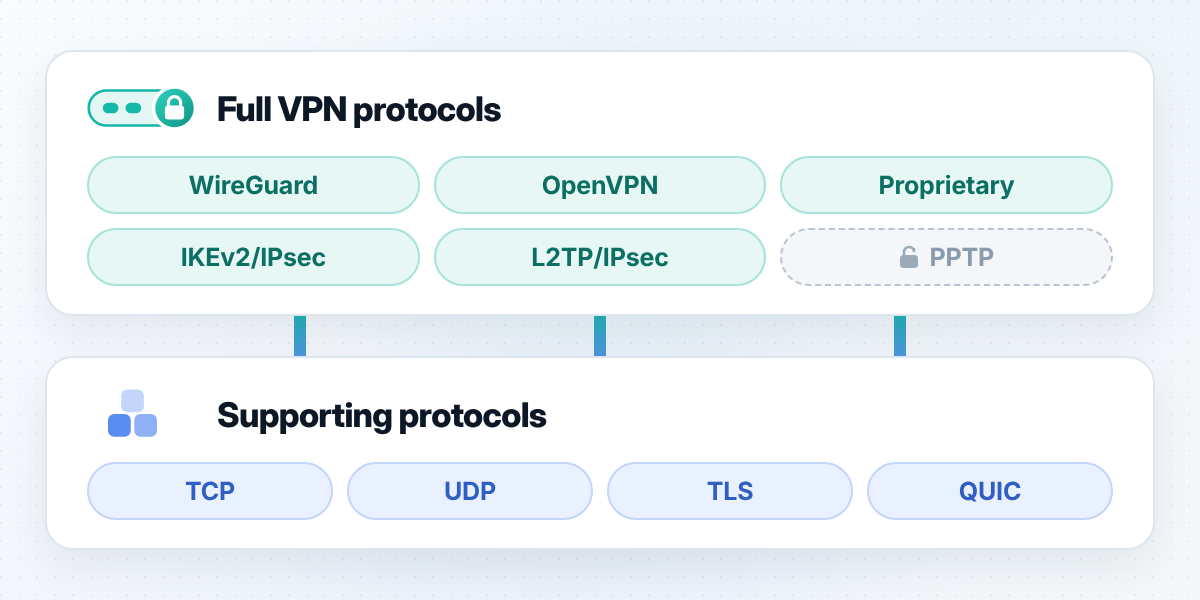
- • Standalone VPN protocols (WireGuard, OpenVPN, proprietary protocols) handle the whole job: handshake, encryption and tunnel.
- • Tunneling protocols (PPTP, L2TP) build the tunnel but add little or no encryption.
- • Encryption protocols (SSL/TLS) protect the data inside other protocols. OpenVPN uses TLS for its handshake.
- • Combination protocols (L2TP/IPsec, IKEv2/IPsec) pair a tunneling or key-exchange protocol with IPsec for encryption.
- • Transport protocols (TCP, UDP) decide how packets move. They carry VPN traffic but aren't VPNs.
- • Proxy protocols relay traffic for one app or browser, not the whole device, so they aren't VPN protocols in the strict sense.
Only standalone and combination protocols can run a full VPN on their own. PPTP is the exception: it bundles its own encryption, now considered weak.
Common Types of VPN Protocols
Here are the six you'll see most often.
1. PPTP: Point-to-Point Tunneling Protocol
PPTP stands for Point-to-Point Tunneling Protocol. A group of vendors, including Microsoft, built it, and it was published as RFC 2637 in 1999.
It's easy to set up and still turns up on older routers, but its login method and encryption both have known weaknesses. In 2024, Microsoft announced plans to deprecate it in future Windows Server releases.
Released: 1999 (RFC 2637) · Category: Tunneling protocol with its own encryption · Strengths: Simple to set up; runs on old devices · Weaknesses: Outdated login method and encryption
2. L2TP/IPsec: Layer 2 Tunneling Protocol Plus IP Security
L2TP stands for Layer 2 Tunneling Protocol, and IPsec for Internet Protocol Security. L2TP builds the tunnel and IPsec encrypts it, a pairing standardized in 2001.
It's built into Windows, macOS and iOS, so it often shows up in manual iOS VPN setup. Wrapping your data twice adds overhead, and some networks block its fixed UDP ports.
Released: 1999; paired with IPsec in 2001 · Category: Combination protocol · Strengths: Built into major operating systems · Weaknesses: Extra overhead; fixed ports
3. OpenVPN
OpenVPN doesn't stand for anything longer. It's an open-source protocol and app, released by James Yonan in 2001, that uses TLS for its handshake and runs over UDP or TCP.
UDP is quicker, and TCP copes better with patchy connections. OpenVPN has a long public track record, but you need a separate app, since Windows, macOS, iOS and Android don't include it.
Released: 2001 · Category: Standalone protocol · Strengths: Open source; runs over UDP or TCP · Weaknesses: Needs a separate app
4. IKEv2/IPsec: Internet Key Exchange Version 2
IKEv2 stands for Internet Key Exchange version 2. It sets up the keys, and IPsec encrypts the traffic. It was published in 2005 (RFC 4306) and updated in 2014 (RFC 7296).
Its strength is reconnecting: when your phone moves from Wi-Fi to mobile data, IKEv2 picks the connection back up fast. iPhones, Macs and Windows PCs support it out of the box. Like L2TP/IPsec, it uses fixed UDP ports that some networks don't let through.
Released: 2005 (RFC 4306) · Category: Combination protocol · Strengths: Quick to reconnect; built into iOS, macOS and Windows · Weaknesses: Fixed UDP ports
5. WireGuard
WireGuard is a name too, not an abbreviation. Jason A. Donenfeld designed it as a leaner alternative to older protocols, and version 1.0 shipped with Linux 5.6 in March 2020. It now runs on Windows, macOS, iOS and Android.
It uses one fixed set of modern cryptography, including ChaCha20 and Curve25519, instead of a menu of options, which keeps the code compact and easier to review. It runs over UDP only.
Released: 2020 (Linux 5.6) · Category: Standalone protocol · Strengths: Low overhead; modern cryptography; compact code · Weaknesses: UDP only; younger than OpenVPN
6. Proprietary VPN Protocols
Proprietary protocols are built by a VPN company for its own apps, from standard parts such as TLS, TCP, UDP and QUIC. The code is closed, so outsiders can't review it the way they can review OpenVPN or WireGuard.
Released: Varies by provider · Category: Standalone protocol · Strengths: Tuned to one provider's apps and servers · Weaknesses: Closed source; harder to verify
Key Supporting Protocols and Related Technologies
These terms show up in VPN settings too, but none runs a VPN alone. They carry or protect data for the protocols above.
- TCP/IP
TCP/IP is the pair of core protocols the internet runs on, both standardized in 1981. IP, the Internet Protocol, routes each packet, and TCP makes sure packets arrive in order, resending lost ones. That reliability costs extra round trips.
- UDP
UDP, the User Datagram Protocol (RFC 768, 1980), sends packets and doesn't wait for confirmation. Delays stay low, but lost packets aren't resent.
- SSL/TLS
SSL (Secure Sockets Layer) and its successor, TLS (Transport Layer Security), are the encryption behind HTTPS. OpenVPN uses TLS for its handshake. The current version, TLS 1.3, dates from 2018.
- QUIC
QUIC runs over UDP with TLS 1.3 built in, cutting the back-and-forth needed to open a connection. Standardized in 2021 (RFC 9000), it powers HTTP/3, and some VPNs now use it as a transport.
- Proxy Protocols
Proxy protocols relay traffic for one app or browser. They're lighter than a VPN but only cover the traffic you route through them.
VPN Protocols Compared
Speed in the table below means the overhead a protocol adds compared with the others, not a gain over using no VPN.
| Protocol | Speed | Security | Stability | Network Compatibility |
|---|---|---|---|---|
| PPTP | High | Low | Medium | Low |
| L2TP/IPsec | Medium-low | High | High | Low |
| OpenVPN | Medium | Very high | Very high | High |
| IKEv2/IPsec | High | Very high | Very high | Medium-low |
| WireGuard | Very high | Very high | Very high | Medium |
| Proprietary | Varies | Varies | Varies | Varies |
Ratings assume current, properly configured versions. Proprietary protocols differ too much between providers to rate as a group.
How to Choose a VPN Protocol
Leave the app on its automatic setting unless you have a reason to change it. When you do, choose by what you're doing.
By Activity
| Activity | What Matters Most | Protocols to Try |
|---|---|---|
| Everyday browsing and messaging | Low overhead | WireGuard, IKEv2/IPsec, OpenVPN (UDP) |
| Video chats and big downloads | Steady throughput | WireGuard, IKEv2/IPsec, OpenVPN (UDP) |
| Online gaming | Least added delay | WireGuard, IKEv2/IPsec |
| Work logins and sensitive accounts | Well-reviewed encryption | OpenVPN, WireGuard, IKEv2/IPsec |
| Unstable connections (trains, hotels, crowded Wi-Fi) | Staying connected | TCP- or TLS-based modes, or Auto |
A VPN adds a hop to the game server, so pick the protocol that adds the least delay rather than expecting a lower ping.
By Protocol
- WireGuard: the default choice for most people on most devices.
- OpenVPN: the pick when you need TCP or the longest public track record.
- •KEv2/IPsec: a good fit for phones that hop between Wi-Fi and mobile data.
- L2TP/IPsec: use it only when it's the one option built into a device.
- PPTP: skip it.
- Proprietary: judge it by the provider's track record, since the code is closed.
Switching Between Protocols in a VPN App
Most VPN apps let you change protocol in settings and offer an automatic mode that picks one for the network you're on.
In X-VPN for example, the default is Auto. On a phone, tap Auto on the main screen to see the list; on a computer, go to Settings, then VPN Settings, then Protocol. Besides its own Everest protocol in UDP, TCP, TLS, HTTP and QUIC-based modes, the app supports WireGuard and OpenVPN, depending on your device and app version.
If a connection keeps dropping, switch to a TCP- or TLS-based mode. For the least delay on a video chat or game, try a UDP-based mode or WireGuard. If everything works, leave it on Auto.
Conclusion
A VPN protocol is the rulebook a VPN uses to connect, encrypt and carry your data. For most people, Auto is the right setting. If you want to choose, WireGuard suits most devices, OpenVPN suits networks that need TCP, IKEv2/IPsec suits phones on the move, and PPTP is best left alone.
FAQ
FAQs
01What's the Best VPN Protocol?
There isn't one. WireGuard suits most everyday use, OpenVPN is the pick when you need TCP, and IKEv2/IPsec suits phones that switch networks.
02What VPN Protocol Should I Use?
Start with your app's automatic setting. Change it for a reason: WireGuard for games and video chats, a TCP- or TLS-based mode on a shaky connection, IKEv2/IPsec on a phone.
03Can I Switch Between Different VPN Protocols?
Yes. In X-VPN for iPhone or Android, tap Auto on the main screen; on a computer, go to Settings, VPN Settings, Protocol. The options depend on your device and app version.
04What Are the Fastest VPN Protocols?
WireGuard adds the least overhead of the common protocols, with IKEv2/IPsec close behind. Server distance and load matter more, and any VPN adds a hop compared with connecting directly.
05What Are the Most Common VPN Protocols?
OpenVPN and IKEv2/IPsec are the most widely supported, and WireGuard has spread fast since 2020. L2TP/IPsec stays common because Windows, macOS and iOS include it.
06What Are the Most Secure VPN Protocols?
OpenVPN and WireGuard, both open source and widely reviewed. IKEv2/IPsec is strong when set up well. PPTP has known weaknesses and shouldn't be used.
07What Are the Latest VPN Protocols?
WireGuard, part of the Linux kernel since 2020, is the newest widely used VPN protocol. QUIC, standardized in 2021, is a newer transport that some VPN apps build on.
Comments
Comments are available to signed-in users and are moderated to keep the discussion useful and respectful. Spam, automated submissions, and low-value promotional comments are removed. Outbound links may be approved when they are relevant and genuinely helpful to readers, but they are displayed as plain text rather than clickable hyperlinks.
No comments have been published yet.
Please sign in to submit a comment.