

Virtual Private Network, Network, Smartphone
Unable to Activate an eSIM Abroad? How Remote Activation Works
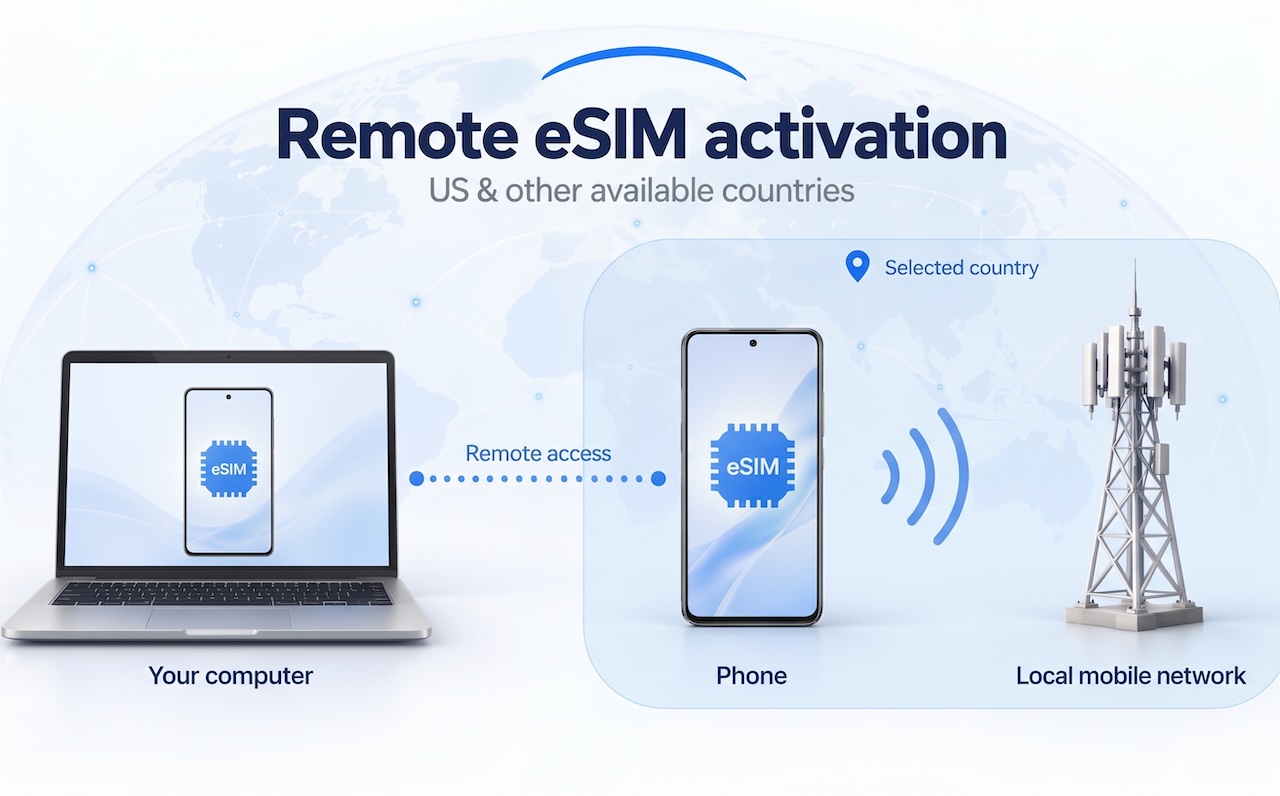
Trying to activate an eSIM abroad, but your carrier requires a connection to a local mobile network? You may already have the plan and QR code. What you still need is a compatible phone in the right country.
A provider such as DroidDesk lets you rent a real Android phone in the US or another available country and control it remotely. Install your own eSIM, follow your carrier’s activation process, and use the line on the rented device—all from your computer.
For people who need access to a phone in a specific location, remote eSIM activation offers a practical way to manage setup. Activation still depends on device compatibility, network coverage, and the carrier’s requirements.
How to Activate an eSIM Remotely
Start by choosing a device in the country required by your provider.
- Find a compatible phone. Look for the Bring Your Own eSIM label and confirm that the provider accepts the exact model and IMEI.
- Choose a rental with eSIM access. Weekly and monthly rentals include it on eligible devices. Three-hour and one-day rentals require the Full Access add-on. One-hour rentals do not support eSIM installation.
- Keep the phone connected to Wi-Fi. Save the network and enable automatic reconnection before changing SIM settings.
- Install your eSIM and complete setup. Use your provider’s QR code or manual activation details, follow its instructions, and check network registration.
The monthly plan includes the same access features as the weekly plan, with a longer rental period. For installation instructions, see a guide like the DroidDesk eSIM activation guide—other providers offer similar steps.
Why eSIM Activation Abroad Can Fail
Buying an eSIM online, installing its profile, and getting a working mobile connection are separate parts of setup. A profile may appear in your settings while the line still needs further activation or network registration.
When you are unable to activate an eSIM, identify which stage has failed. The problem could involve the phone, installation credentials, carrier account, or location.
For some plans, the phone must connect to a network in the provider’s home country during initial setup. Downloading the profile over Wi-Fi does not necessarily complete that requirement.
This is why checking the activation policy before purchasing an eSIM matters—especially if you intend to activate it from another country.
Can You Activate a US eSIM from Abroad?
The answer depends on the provider’s rules and where the phone receiving the eSIM is located.
A US activation requirement can be summarized this way:
You must be physically located within the United States during the initial setup so your phone can connect to local network towers and finalize registration.
For example, Tello’s current guidance states that initial activation requires being in the United States and connecting to a US cell tower.
Access to a compatible phone hosted in the US can provide local cellular connectivity while you operate it remotely. However, any separate requirements applying to the account holder still need to be satisfied. Confirm that your carrier permits your intended setup before renting.
If you plan to activate a US eSIM from abroad and later move it to your personal phone, check the carrier’s transfer and roaming conditions first.
Can a VPN Help with eSIM Activation Abroad?
A VPN can change the public IP address that websites see by routing internet traffic through a remote server. Cloudflare’s explanation of VPN connections describes how this works.
A US IP address does not establish a radio connection between a phone overseas and a US mobile tower. If activation requires local cellular registration, changing the IP address alone cannot complete that step.
For example, a phone in Spain using a US VPN server remains physically in Spain. A compatible phone hosted in the US can connect to a local mobile network within its coverage area. That physical connection is what matters when the carrier requires local network registration.
eSIM Stuck on Activating? Check These Issues First
Location is one possible cause of an eSIM stuck on activating. Use the symptoms to narrow down the problem.
| What you see | What to check |
|---|---|
| The eSIM will not install | Device compatibility, carrier lock, internet connection, and installation method |
| The QR code is rejected | Whether it has already been used and whether the provider needs to issue new installation details |
| Activation remains pending | The carrier’s processing time, account status, and activation requirements |
| The line has signal but mobile data does not work | The selected data line and the provider’s APN or roaming instructions |
US Mobile’s troubleshooting guidance treats installation errors, pending activation, and data problems separately.
If your eSIM is not working because of an invalid code or an account issue, contact the provider. Renting a remote phone is relevant when you need access to suitable hardware in an available location.
FAQ
Frequently Asked Questions
01Can I activate an eSIM in another country?
It depends on the carrier and plan. Check whether installation is allowed abroad and whether the first network connection must happen in a particular country. A remotely controlled phone can provide access to hardware in an available destination, subject to the provider’s requirements.
02Can I complete eSIM activation online?
Online setup can include buying a plan, receiving installation details, and controlling a remote phone. The eSIM profile still needs compatible hardware, and some providers require a local cellular connection to finish activation.
03Can I activate an eSIM without owning a compatible phone?
You can rent an eligible phone and install the profile on that device. This gives you access to compatible hardware while you manage it remotely.
04Will the eSIM appear on my personal phone afterward?
The profile is installed on the rented DroidDesk phone. Moving the line to your personal handset is a separate carrier process. Confirm transfer eligibility before choosing this approach.
05What can I use on the rented phone after activation?
You can use SMS and mobile data when supported by the activated carrier plan and device. Voice calls are currently unavailable on DroidDesk phones.
Need a phone in the right country for your eSIM? Renting a remotely controlled device lets you install your profile on compatible hardware in the required location—just confirm it meets your provider's requirements first.
Comments
Comments are available to signed-in users and are moderated to keep the discussion useful and respectful. Spam, automated submissions, and low-value promotional comments are removed. Outbound links may be approved when they are relevant and genuinely helpful to readers, but they are displayed as plain text rather than clickable hyperlinks.
No comments have been published yet.
Please sign in to submit a comment.