

Cybersecurity, Web Hosting, Web Development
Security Checklist for Embedding a Third-Party Email Editor

An embeddable drag-and-drop email editor, sometimes offered as a plugin or SDK, lets users create email-ready HTML without leaving your application.
For SaaS companies, integrating a white label email builder, embeddable email editor, or email editor SDK is more than a frontend decision. The editor becomes part of your product's data infrastructure, handles customer-generated content, and introduces new requirements for authentication, storage, and access control.
Before you choose an email builder SDK, your CTO and security team need to assess how email templates, uploaded assets, user credentials, and customer data will be handled during the editing process.
Here's a practical security checklist for evaluating any third-party email editor.
1. Choose Between Hosted and Self-Hosted Deployment
What to check: Where does the editor run? Where is customer data processed and stored?
Why it matters: A cloud-hosted editor is easier to integrate but introduces an external infrastructure dependency. For healthcare, fintech, and other regulated sectors, data residency and infrastructure ownership can be hard requirements.
Most vendors offer one or more of the following deployment approaches:
- Hosted in the cloud: The editor infrastructure runs on the vendor's servers.
- Self-hosted or on-premises: Server components are deployed within the customer's infrastructure, often as part of an enterprise subscription.
- Hybrid: The editor interface is vendor-hosted while selected data, assets, or backend services remain in the customer's environment.
Self-hosting may be the right option if your security policy requires data to remain within your infrastructure. In a fully self-hosted deployment, the editor should communicate only with backend services that you control, with external API calls limited or eliminated according to your architecture.
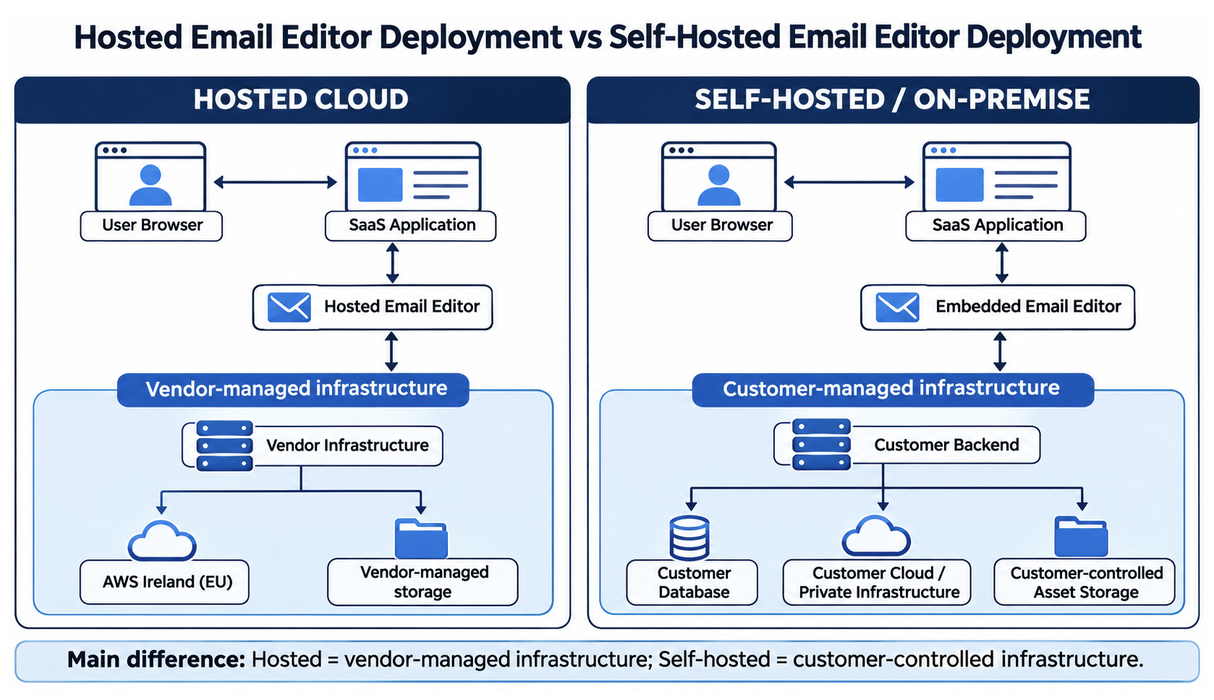
One key architectural question is whether the editor maintains a reference copy of the email or its document state in the vendor's database. Your backend may be able to retrieve the latest HTML, CSS, or JSON and store its own copy, but that does not necessarily mean the vendor stores no data. Always check the exact data flow for the product version and deployment model you're considering.
2. Verify Compliance and Infrastructure Reliability
What to check: What security and compliance credentials can the vendor provide? What uptime commitment does it make?
Why it matters: Security certifications enable your team to assess the vendor's security management practices. Availability is equally important: if the editor becomes unavailable, your customers could lose access to a key part of your SaaS product.
Common credentials to examine include:
- SOC 2 Type II
- ISO 27001
- GDPR documentation and data-processing terms
- penetration-testing summaries
- business continuity and disaster-recovery policies
Your team should evaluate the scope and relevance of those credentials to the deployment model you've selected rather than assuming the vendor's certifications cover your entire application.
For production environments, compare any published availability figure against the contractual SLA. Review support response times, incident-notification procedures, backup policies, and recovery objectives, and implement independent monitoring for your integration.
3. Implement Token-Based Authentication Correctly
What to check: How are users authenticated? How are tokens issued? Where are integration secrets stored?
Why it matters: Embedding an editor should not result in a second, weaker authentication mechanism. Exposed API keys or tokens with inappropriate scopes could be used to gain access to customer resources.
A secure architecture generally follows this flow:
- A user authenticates in your SaaS application.
- Your backend identifies the user and determines their permissions.
- The backend uses vendor credentials to request or generate a short-lived authentication token.
- The token is passed to the frontend and used to initialize the editor.
- The token is refreshed through the backend when necessary.
The critical rule is that secret keys must never appear in frontend code, browser-visible configuration, or public repositories.
For additional protection, associate editor users with their actual application identities, use short token lifetimes, validate token claims, and assign the minimum permissions required for each workflow. SSO and two-factor authentication should be enforced through your host application's identity and account-management layer. Confirm which additional account-level controls are available for your specific subscription.
4. Check IP Allowlisting and Data Residency
What to check: In which geographical regions is information processed? Can source IP addresses be restricted for backend requests?
Why it matters: Data residency requirements are especially important for organizations operating in regulated markets. IP allowlisting adds another layer of control over communication between your infrastructure and external services.
In a hosted configuration, confirm the region or regions used by the vendor and its subprocessors. With self-hosting, determine whether your organization can deploy all required server components within its own infrastructure and select the region based on internal requirements.
For IP allowlisting, ask the vendor to confirm whether source IP restrictions are supported for relevant backend-to-backend API connections. This should be verified with the integration team rather than assumed from the availability of token-based authentication.
Your security review should document:
- the physical region where email data is processed
- the region where uploaded images and other assets are stored
- the source and destination IP addresses involved in backend communication
- whether outbound connections to external services are permitted
- which infrastructure components are covered by your data residency policy
This is particularly important when designing an architecture for customers with strict regional data-processing requirements.
5. Keep Image Assets in Your Own Storage
What to check: Can you store uploaded images outside the editor vendor's infrastructure?
Why it matters: Email templates often contain customer logos, product images, promotional materials, and other proprietary assets. Storing them in your own cloud environment gives your organization greater control over retention, access policies, and CDN delivery.
Look for support for storage options such as:
- Amazon S3
- Azure Blob Storage
- Cloudinary
- a custom server-side file system or storage service
When connecting your own storage, uploaded images should be stored in your infrastructure rather than the vendor's default image storage. This can also prevent vendor storage limits from constraining your capacity, although actual capacity and costs will depend on your cloud provider and configuration.
For production deployments, use dedicated IAM credentials, least-privilege permissions, appropriate bucket access policies, and defined retention rules. Avoid using root cloud credentials for editor integrations.
6. Understand the Template Data Format and Compilation Process
What to check: What is the source of truth for an email design? Can templates be exported, backed up, and compiled on the backend?
Why it matters: A visual editor should not lock your business into an inaccessible document format. Your application needs a reliable way to retrieve, process, validate, and store email content.
Editors may work with HTML and CSS, a structured JSON document state, a proprietary format, or a combination of these. The JavaScript API should provide methods to retrieve template data, while the backend API may support server-side processing and compilation.
Check whether the compilation process can produce final email-ready HTML, inline CSS, and return AMP HTML when the template contains supported AMP components. Also confirm whether you can reconstruct an editable design from stored data rather than retaining only the final HTML.
This separation is useful: your application can maintain its own persistence and publishing workflow while the editor handles visual editing and email generation.
Before launch, establish a documented workflow for:
- saving the original design state
- retrieving updated HTML and CSS
- compiling the final email on the backend
- validating AMP output where applicable
- keeping backups and version history
- migrating templates if you later change vendors
7. Enforce Multi-Tenant Isolation and User Permissions
What to check: Can customers access only their own templates, assets, and reusable modules?
Why it matters: Multi-tenant SaaS products must prevent one customer from accessing or modifying another customer's data. A frontend-only permission check is not sufficient.
Look for user identification, role-based permissions, and backend-managed access controls. Depending on the editor, access may be restricted for content editing, HTML code, modules, version history, export, and other capabilities.
Your team should also maintain its own tenant-level access rules. Every email, module, and asset should be associated with the correct customer or workspace, and authorization should be enforced whenever a resource is read, updated, exported, or deleted.
Explicitly test cross-tenant access, including attempts to retrieve resources using another customer's identifiers.
8. Protect Brand Identity With Locked Elements and Synced Modules
What to check: Can administrators prevent end users from modifying critical brand elements?
Why it matters: A customer-facing editor should provide creative flexibility without allowing users to accidentally change legal disclaimers, approved headers, footers, or brand-critical design components.
Useful governance features include:
- Element locking: Administrators can restrict content editing or style modifications for selected elements.
- Synced modules: Reusable modules can be updated across multiple email templates.
- Role-based permissions: Your backend determines who can edit content, manage modules, or change protected elements.
Ideally, element locking is enforced on the server side so users without the appropriate permissions cannot bypass restrictions by manipulating the editor interface or API requests.
These controls enable you to create brand-locked templates while still allowing users to customize approved content. For example, a SaaS platform could lock a company logo, legal footer, and brand colors while allowing customers to edit promotional text, product images, and calls to action.
9. Treat White-Label Customization as Part of Product Governance
What to check: Can the editor operate without visible third-party branding?
Why it matters: An embedded component should feel like a native part of your application. Unnecessary vendor branding, external links, and inconsistent interface elements can undermine the user experience and create confusion about which company operates the product.
Look for a customizable white-label interface, support for custom CSS or theming, and the ability to remove vendor logos and promotional links. Check which subscription tier includes these capabilities.
For a complete white-label deployment, review the editor's interface, menus, dialogs, help links, image libraries, error messages, and exported content rather than checking only the initial screen.
10. Control Editor Events and the Saving Workflow
What to check: Can your application determine when the editor is ready, when content changes, and when saving finishes?
Why it matters: Data integrity depends on more than having a Save button. Your application must know when a document has changed and avoid publishing incomplete or unsaved content.
The editor should provide callbacks or events for key lifecycle stages, including:
- the template or editor has loaded
- content has changed and unsaved changes exist
- saving has started
- saving has completed or failed
These callbacks let your product control loading states, save indicators, navigation warnings, retries, and publishing workflows. Also confirm support for your frontend framework, whether React, Vue, Angular, Next.js, or Vanilla JavaScript.
For implementation details, API methods, authentication flows, and callback configuration, consult the official documentation for the vendor you are evaluating—for example, the Stripo Plugin documentation—and test the actual behavior in a proof of concept.
11. Separate Email Editing From Email Delivery
What to check: Does the editor handle sending, or does your application remain responsible for email delivery?
Why it matters: Email creation and email delivery are separate infrastructure responsibilities. Your architecture should define where templates are generated, where messages are sent, and where sender-domain authentication is configured.
Many embedded editors create and export email-ready HTML but do not send emails on your behalf. Your existing Email Service Provider (ESP) remains responsible for message delivery and the associated sending infrastructure.
SPF, DKIM, DMARC, and sender-domain authentication should be configured on the ESP side. Confirm whether the editor integrates directly with your preferred ESP or whether your application must handle the transfer through an API.
This separation keeps the editor focused on content creation while your application retains control over sending and delivery operations.
Third-Party Email Editor Comparison: Security and Deployment
The following comparison summarizes publicly documented capabilities of five popular solutions. Features and deployment conditions should always be checked against the specific subscription, current documentation, and contract.
| Platform | Deployment | Certifications | Own Storage | Authentication | Framework Support |
|---|---|---|---|---|---|
| Stripo Plugin | Cloud / Enterprise self-hosted | SOC 2 Type II, ISO 27001, GDPR | S3, Azure Blob, custom storage | JWT tokens, backend authentication | React, Vue, Angular, Vanilla JS |
| Beefree SDK | Cloud / Self-hosted / On-premises | SOC 2 Type II, ISO 27001, GDPR | Own S3, custom file system | OAuth2, MFA | React, Vue, Angular |
| Unlayer | Cloud / On-premises | SOC 2 Type II, GDPR | Custom file storage | HMAC identity verification, API keys | React, Vue, Angular, Vanilla JS |
| Chamaileon | Hosted SDK / API | ISO 27001, GDPR | Customer database, hosted assets | API key, access tokens, domain allowlisting | JavaScript SDK |
| Easy Email Pro | Self-hosted | No public certifications listed on its product page | Customer infrastructure | Host-managed authentication | React, Vue, Next.js, Vanilla JS |
The Good / The Catch
1. Stripo Plugin
The Good: Hosted and Enterprise self-hosted deployment, custom asset storage, AMP support, brand governance, and integration with numerous ESPs.
The Catch: Full self-hosting requires an Enterprise plan. Lower-tier plans limit the number of unique emails that can be created or modified each month.
2. Beefree SDK
The Good: Multiple deployment options, established compliance credentials, OAuth2 authentication, MFA, and custom storage.
The Catch: Some advanced self-hosted content-management features require additional implementation effort and higher-tier plans.
3. Unlayer
The Good: Cloud and on-premises deployment, server-generated identity signatures, and enterprise security features.
The Catch: On-premises deployment is an enterprise offering. Confirm the availability of planned identity features before incorporating them into your architecture.
4. Chamaileon
The Good: JSON-first architecture, ISO 27001 certification, GDPR compliance, and enterprise data-residency options.
The Catch: Pricing is based on monthly active users and generator calls. Full infrastructure self-hosting is not clearly documented as a standard deployment option.
5. Easy Email Pro
The Good: Self-hosted architecture, customer-controlled template data, and extensive customization possibilities.
The Catch: Public product materials do not list compliance certifications. Self-hosting also means your team takes greater responsibility for infrastructure and integration maintenance.
Pricing and Scalability: What Should SaaS Teams Consider?
Security is important, but the commercial model also affects the long-term architecture of an embedded editor.
Vendors may base pricing on:
- monthly active users or editor seats
- unique emails created or modified
- API or email-generation calls
- storage and bandwidth
- feature tiers, such as white labeling or self-hosting
- enterprise licensing and support
For products with many users but a relatively predictable number of email templates, an email-based model may be easier to budget than per-user pricing. For products with fewer users who generate a high volume of designs, the opposite may be true.
Model your expected usage over at least 12 to 24 months. Include growth in users, templates, assets, API traffic, storage, support needs, and any enterprise features required for security or compliance. Avoid choosing an editor based solely on the entry-level plan if your production architecture requires a higher tier.
Final Security Checklist Before Launch
Before releasing any third-party email editor to your SaaS customers, make sure your team can answer these questions:
- Do we know exactly where templates, assets, and editor data are stored?
- Have we selected the correct hosted, hybrid, or self-hosted deployment model?
- Have we reviewed the vendor's documented security credentials and contractual commitments?
- Are authentication secrets kept exclusively on the backend?
- Have we verified data residency, subprocessors, and IP access requirements?
- Can we store uploaded images in our own infrastructure?
- Do we have a documented process for exporting, compiling, backing up, and migrating templates?
- Are tenant boundaries and user permissions enforced server-side?
- Can we lock brand-critical elements and synchronize approved modules?
- Have we tested saving, error handling, and the editor lifecycle?
- Does our ESP handle email delivery and domain authentication?
- Does the pricing model remain sustainable as usage grows?
Conclusion
The right embedded editor should give your users a powerful design experience without compromising your infrastructure, data ownership, or brand governance.
Choose the product that best matches your deployment requirements, security controls, preferred storage model, framework, email-output needs, and long-term pricing—not simply the editor with the longest feature list.
Comments
Comments are available to signed-in users and are moderated to keep the discussion useful and respectful. Spam, automated submissions, and low-value promotional comments are removed. Outbound links may be approved when they are relevant and genuinely helpful to readers, but they are displayed as plain text rather than clickable hyperlinks.
No comments have been published yet.
Please sign in to submit a comment.