

IP Address, Network, Internet of Things
RF vs Wi-Fi vs Bluetooth: How Home Remote Controls Work
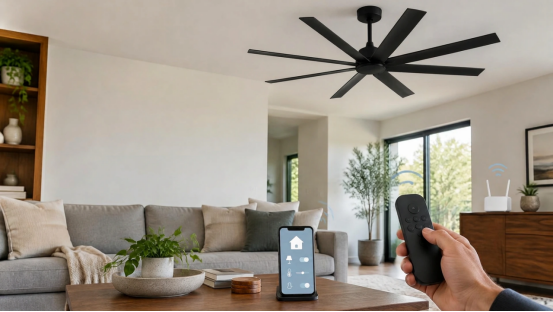
A wireless remote does not necessarily connect to the internet. A ceiling fan can respond to a dedicated handheld transmitter even when the home’s router is switched off, whereas a Wi-Fi-connected light may communicate over the local network or via a cloud service. Both are wireless, but their communication paths differ significantly.
Understanding those differences makes it easier to choose equipment, diagnose a connection problem, and avoid confusing a remote-pairing issue with an IP-network issue. The key is to distinguish radio technology from the protocol and network architecture running over it.
What Is the Difference Between RF, Wi-Fi and Bluetooth?
Radio frequency (RF) describes electromagnetic signals used for wireless communication. Wi-Fi and Bluetooth are both RF technologies. In everyday product descriptions, however, “RF remote” often means a dedicated, non-Wi-Fi radio controller that communicates with a compatible appliance receiver.
Wi-Fi usually connects devices to a local area network using an access point, often the home router. A Wi-Fi device commonly receives an IP address and can exchange data with other devices or online services. Its ability to work during an internet outage depends on the product and whether its control functions operate locally.
Bluetooth is designed for relatively short-range wireless connections and can enable direct device-to-device control. Bluetooth Low Energy (BLE) is often used for sensors and battery-powered accessories. Standard Bluetooth connections do not require the device to join the home Wi-Fi network or obtain an IP address for ordinary local operation.
A dedicated RF remote and receiver may use a manufacturer-specific radio protocol. Neither component needs an IP address simply to exchange a command. Its frequency, pairing method, feedback capability, and range are specific to the equipment; there is no universal RF-remote standard.
How Wi-Fi Home Controls Use IP Addresses
When a Wi-Fi smart device joins a home network, a router or another DHCP server commonly assigns it a local IP address. That address helps the network deliver packets to the correct device. Commands from an app may travel directly across the local network, through a hub, or through an internet-based service, depending on the design.
An IP address is not the same thing as an exact physical location. A local private address identifies a device within a particular network, while the public address seen by outside websites typically represents the internet connection. IP geolocation services estimate the location associated with a public address and cannot reliably identify the room or precise address of a particular smart-home appliance.
A common misconception is that every Wi-Fi light or switch stops working whenever the internet goes down. Some continue to respond to local controls while the router and Wi-Fi network remain active. Others depend on cloud authentication or cloud-based automation. The only reliable answer is found in the device documentation and a test of its offline behavior.
How Dedicated RF Remotes Work Without Wi-Fi
A typical dedicated remote sends an encoded radio command when a user presses a button. A compatible receiver in or near the appliance recognizes the signal and passes the instruction to the appropriate control electronics. That path can work independently of a router, internet connection, or IP address.
The receiver still needs electrical power, and the handheld transmitter may need a functioning battery. Certain systems require the transmitter to be paired or matched with the receiver before commands will be accepted. Pairing may involve a learning window after power is restored, code switches, or another model-specific procedure.
Ceiling fans provide a practical example of how dedicated RF remotes operate. Proper ceiling fan remote pairing depends on receiver power, transmitter compatibility, and manufacturer-specific pairing procedures. Because these requirements vary by model, pairing instructions for one fan should not be assumed to apply to every remote system.
Dedicated RF does not always mean one-way communication. Simple remotes may transmit commands without an acknowledgment, but other proprietary radio systems can return status or use two-way messaging. Likewise, a phone cannot automatically operate an arbitrary RF receiver merely because the phone has Wi-Fi and Bluetooth; it needs compatible radio hardware and a supported protocol or bridge.
RF vs Wi-Fi vs Bluetooth: Technical Comparison
| Consideration | Dedicated RF remote | Wi-Fi control | Bluetooth control |
|---|---|---|---|
| IP address | Not ordinarily required | Commonly used on local IP networks | Not normally needed for direct Bluetooth control |
| Typical connection | Compatible transmitter to receiver | Device to access point or local peer | Nearby paired devices or compatible gateway |
| Internet required? | No for basic local commands | Depends on local vs cloud implementation | No for basic local communication |
| Pairing or setup | Model-specific code or learning process | Wi-Fi credentials and possibly app account | Bluetooth pairing or provisioning |
| Range | Varies with band and hardware | Varies with access point and environment | Varies with Bluetooth class and environment |
| Feedback | Depends on protocol | Often supports status reporting | Depends on device/profile |
Actual frequency bands, propagation, responsiveness, and power use depend on the specific hardware. For example, Wi-Fi can use several supported frequency bands, and proprietary RF products need not operate at the same frequency as one another.
How Wireless Controls Manage Multiple Home Functions
A remote-control receiver can translate different button presses into commands for different components. One key might change motor speed while another operates a light. This is a function of the control circuit and receiver design, not evidence that the appliance is connected to Wi-Fi.
In a fan-and-light assembly, a wall switch may simply provide or interrupt supply power while a compatible receiver manages motor and lighting commands. Other systems use separate switched circuits or specialized wall controllers. Because the wiring arrangement varies, a familiar-looking remote does not prove that the same electrical configuration is safe or compatible.
Understanding ceiling fan receiver wiring and control helps clarify the distinction between direct-switch wiring and arrangements using a control receiver. Electrical connections and any modifications should follow the equipment manufacturer's instructions and applicable electrical codes, with work performed by a qualified professional where required.
This distinction also matters when someone adds a smart-home hub. A hub may bridge one supported wireless protocol to an IP network, but a generic Wi-Fi router cannot translate every manufacturer-specific RF command. Compatibility needs to be verified on both sides of the connection.
What Happens When Wi-Fi or Internet Access Fails?
Three failure scenarios are often mistaken for one another: loss of internet service, loss of the local Wi-Fi network, and loss of power to the appliance. They do not have identical consequences.
If the internet connection fails but the router and access point remain powered, local Wi-Fi controls may continue to work. Cloud-based voice assistants, remote access, or automations that require an online service may not. If the access point fails, even locally controlled Wi-Fi devices may lose their communication path. A basic standalone RF remote can remain usable in either situation as long as its transmitter and receiver still function.
Bluetooth products can often communicate locally without an internet connection, though phone apps or integrations may use cloud services for additional features. For any control system, an outage test is more informative than labels such as “wireless” or “smart.”
Common RF and Wi-Fi Remote Problems
Start by identifying the actual control type. For a dedicated RF remote, check its battery, the appliance power supply, receiver compatibility, and documented pairing procedure. Do not repeatedly apply random button combinations: some devices use narrow pairing windows, and others require physical code settings.
For a Wi-Fi-connected controller, confirm that the device is powered, the wireless network is available, and the product supports the router configuration in use. Some devices support only specified frequency bands or security modes. Check whether the problem affects local control, app access, or cloud-based functions; this helps narrow down the likely cause.
Metal enclosures, dense building materials, electrical noise, distance, and crowded radio environments may degrade wireless communication. The extent of interference depends on antenna design, radio band, transmit power, and installation. It is inaccurate to assume that all dedicated RF products always travel farther or penetrate walls better than Wi-Fi.
If a device requires opening an electrical enclosure to inspect a receiver, do not attempt troubleshooting on energized wiring. Disconnect power as instructed by the manufacturer and use qualified service personnel when inspection or electrical repair is necessary.
Choosing the Right Home Control Technology
Choose a dedicated RF remote when straightforward local operation, minimal network setup, and compatibility with a specific appliance are the priorities. Choose Wi-Fi when the product genuinely supports the local network, remote access, and integration features you need. Bluetooth may fit nearby control, setup, and low-power accessories, while gateways can connect some non-IP devices to a broader automation system.
Before buying, ask four questions: Will basic control work without internet access? Does the equipment require a particular receiver or hub? How is it paired or provisioned? Can it still be operated safely when network services are unavailable? Clear answers are more useful than treating one radio protocol as universally superior.
Conclusion
Ultimately, “wireless” describes how a signal travels, not whether a device uses the internet. Understanding the difference between dedicated RF links, Bluetooth connections, and IP-based Wi-Fi networks helps homeowners choose more reliable controls and troubleshoot them with less guesswork.
Comments
Comments are available to signed-in users and are moderated to keep the discussion useful and respectful. Spam, automated submissions, and low-value promotional comments are removed. Outbound links may be approved when they are relevant and genuinely helpful to readers, but they are displayed as plain text rather than clickable hyperlinks.
No comments have been published yet.
Please sign in to submit a comment.