

Cybersecurity, Software, Productivity
How to Choose Presentation Tools: A Practical Guide for Teams

Presentation software has changed more in the last two years than in the previous twenty. AI slide makers grew fast in 2025, and Gamma alone reported more than $100 million in annual revenue and 70 million users. Speed now gets the headlines, but speed is only one part of the decision. Many AI-generated decks still need cleanup when they open in PowerPoint: text shifts, charts flatten into images, and fonts go missing. Security documentation also varies a lot from vendor to vendor.
This guide explains what modern presentation tools do, which factors matter most when you compare them, and how to run a short trial that shows the real cost before you commit.
The main types of presentation tools
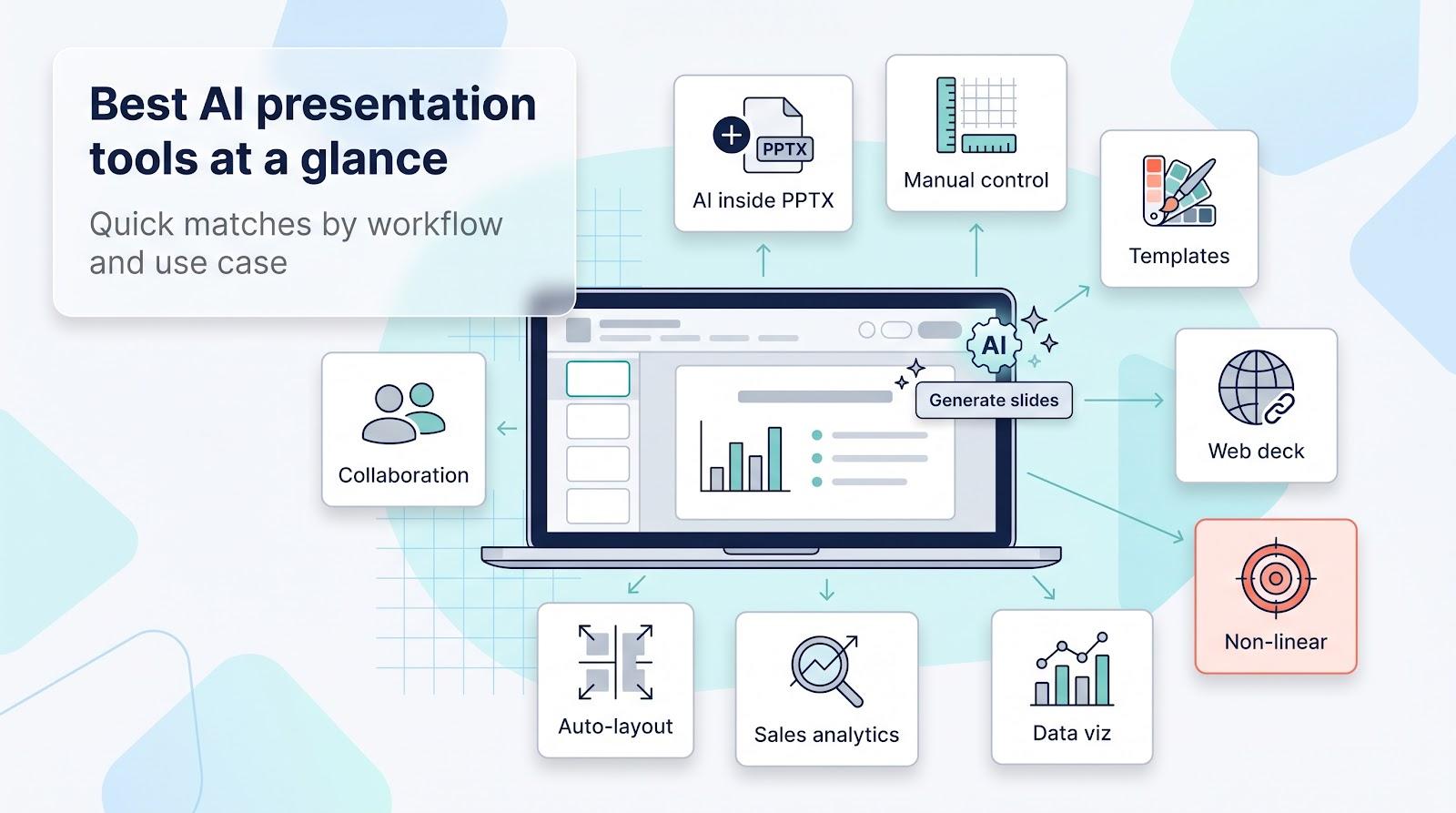
Most presentation software falls into four groups. Each group makes a different trade-off between control, speed, and how the finished deck reaches its audience.
Native slide editors.
Microsoft PowerPoint and Google Slides are still the standard file formats for business. PowerPoint gives deep manual control, offline editing, and mature enterprise compliance. Google Slides gives real-time co-editing in the browser at no cost for personal accounts. Both now include built-in AI (Copilot and Gemini) that can draft slides from a prompt or a document.
AI add-ins for native editors.
Some tools add generative AI inside the editors that teams already use, instead of asking them to move to a new platform. PlusAI is one example: it works as an add-in for PowerPoint and Google Slides, so the deck it generates is a normal, editable PPTX or Slides file. This approach keeps comments, version history, and brand masters in place.
Design suites.
Canva, Visme, and Beautiful.ai treat a presentation as one output among many. They give large template libraries, brand kits, and exports to PDF, video, and social formats. Visme focuses on interactive charts and data widgets, and Beautiful.ai uses automatic layouts that keep every slide on brand.
Web-first presentation platforms.
Gamma, Pitch, and Prezi deliver decks mainly as live links. Gamma builds responsive "cards" that viewers scroll, Pitch adds slide-level viewer analytics for sales teams, and Prezi uses a zoomable, non-linear canvas for live talks. You can export from them, but the live link is their main strength.
Start with the final deliverable
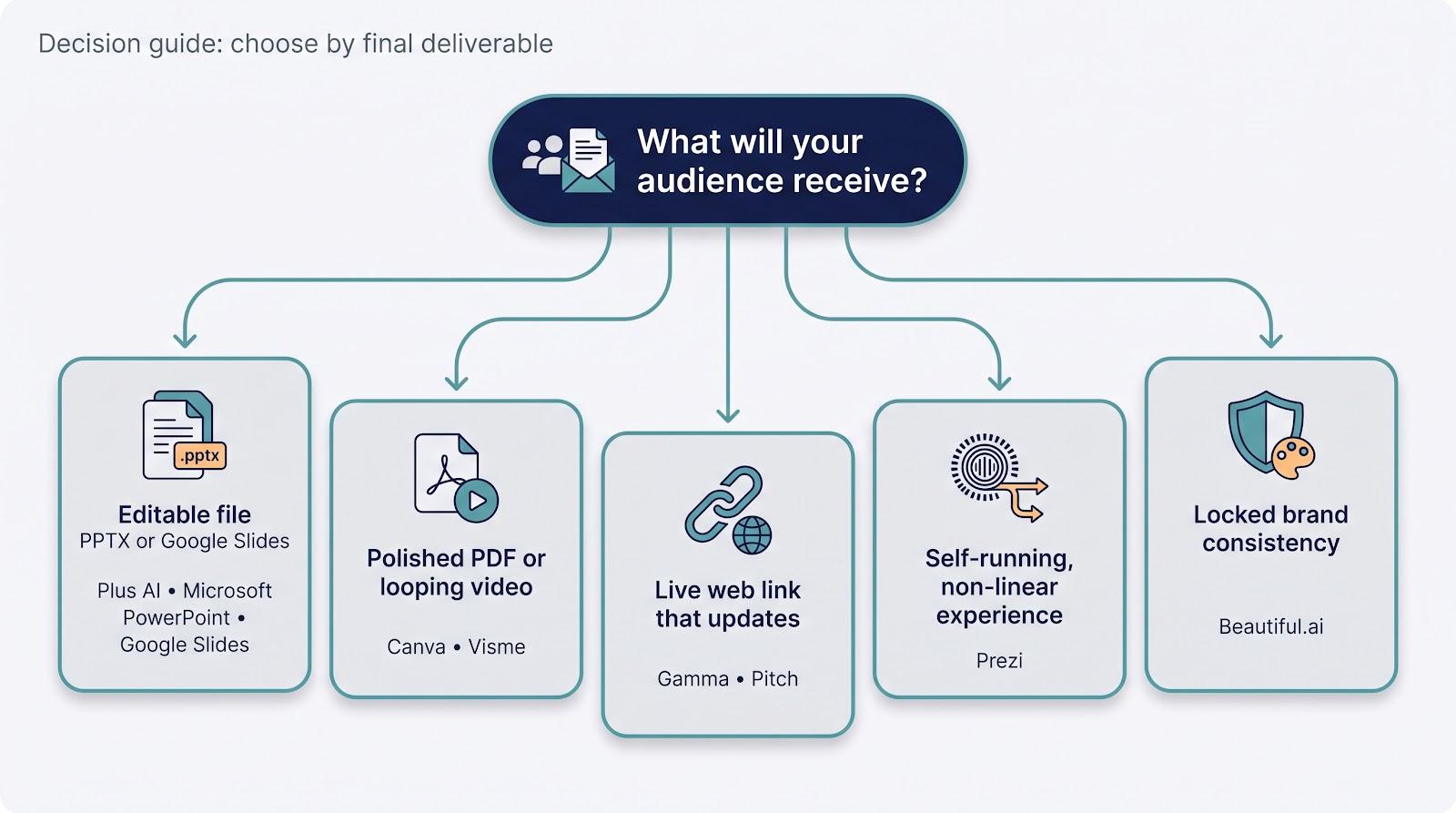
The most useful question is simple: what will your audience receive? The answer removes most options before you compare a single feature.
- An editable file (PPTX or Google Slides). Colleagues and clients must be able to change numbers minutes before a meeting. Native editors and the add-ins that work inside them keep text boxes, charts, and masters intact.
- A polished PDF or looping video. Board packets, handouts, and lobby screens need a fixed, high-quality output. Design suites usually export PDF and MP4 without extra software.
- A live link that updates after you share it. Web-first platforms let you correct a headline after you send the link, and some show who viewed each slide.
- A non-linear, interactive session. Training sessions and keynotes that depend on audience questions benefit from zoomable canvases with built-in polls and quizzes.
When you know the deliverable, you can usually reduce the field to two or three tools and save hours of trial downloads.
Why file compatibility matters more than generation speed
A tool that drafts ten slides in 20 seconds is impressive in a demo. The real cost appears later, when someone must edit the deck in another application.
Common problems after export include:
- Charts and tables that become static images, so a late data change means going back to the original tool.
- Fonts and spacing that shift when a PPTX opens in desktop PowerPoint.
- Animations that flatten or disappear.
- No support for slide masters, so a global change to text or layout needs a manual pass on every slide.
For this reason, measure the time until a deck is ready to present, not the time until the first draft appears. If a fast draft needs an hour of cleanup, it is not fast. Teams that exchange files with clients, finance, or legal usually get the best results from tools that produce native files from the start.
How AI changes the slide-building workflow
AI features in presentation tools now cover three main jobs:
- Drafting from a prompt. You describe the deck ("10-slide quarterly business review for a SaaS company") and the tool returns a structure with titles, bullet points, and sometimes speaker notes.
- Converting a document. You upload a Word file or PDF, and the tool turns its headings and key points into slides. This is useful for strategy memos, reports, and training material.
- Rewriting existing slides. You select a crowded slide and ask the tool to shorten the text, change the layout, or move key metrics into the headline.
When you compare AI features, check how each tool meters usage. Many plans include a fixed number of AI credits per month or a one-time pool on free tiers. Heavy users can reach the limit before the month ends, especially if image generation uses the same allowance.
Collaboration and brand control
Presentations are rarely the work of one person. Check these points before you choose:
- Real-time co-editing. Several people should be able to edit the same deck at the same time without lag or conflicts.
- Comments and version history. Reviewers need to leave notes, and you need a fast way to undo a mistake.
- Brand kits and locked templates. Larger teams benefit from locked fonts, colors, and logo placement so that off-brand slides do not reach customers. These controls are often available only on higher-priced plans.
- Approval workflows. Sales and legal teams may need to lock a slide after sign-off.
Native editors keep collaboration inside the systems that IT already manages. Design suites and web-first platforms add their own workspaces, which can be easier for small teams but adds one more system to manage.
Hidden costs to budget for
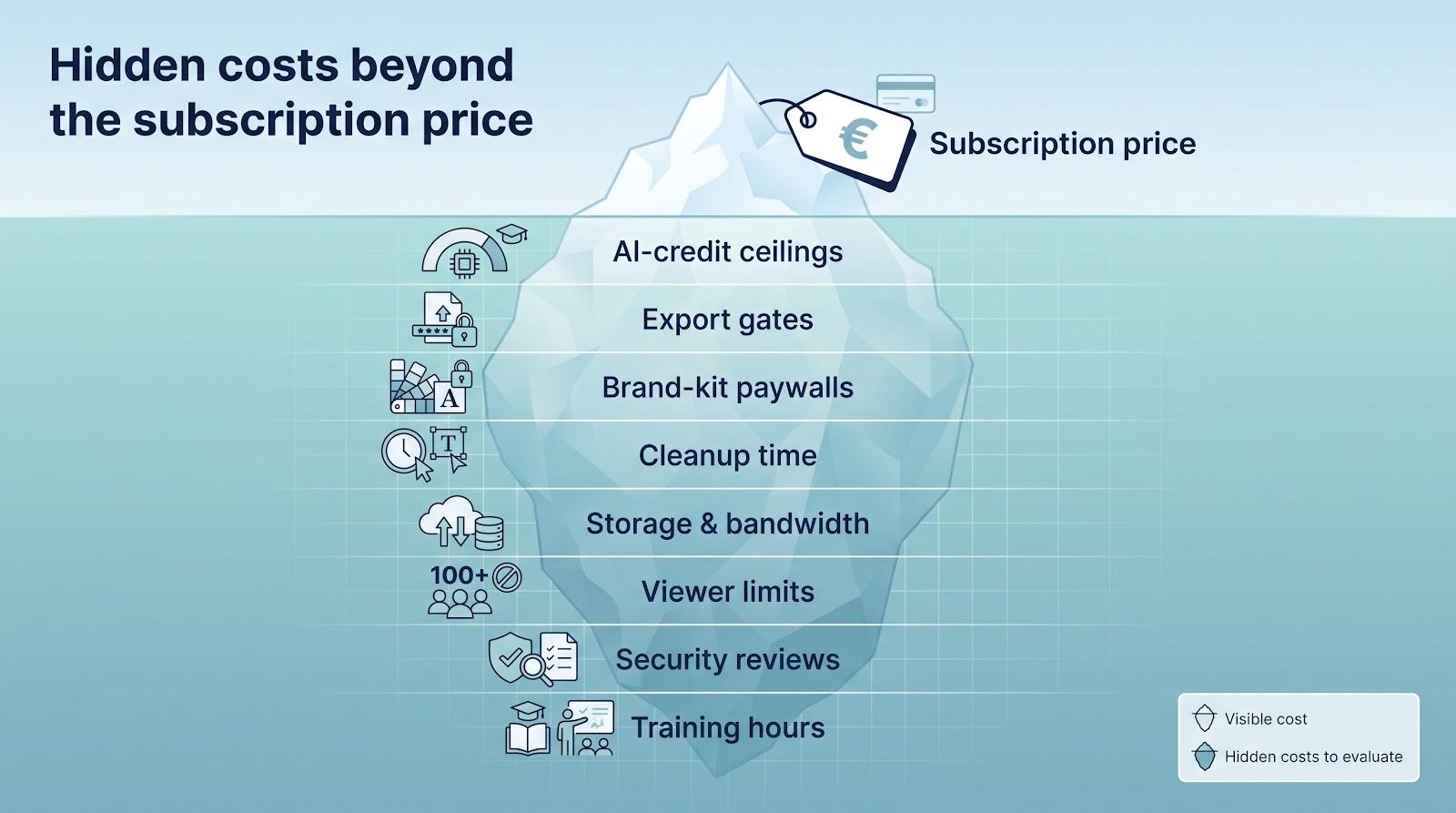
The monthly price per user rarely shows the full cost. Review these items before you approve a new tool:
- AI-credit limits. Monthly or one-time credit pools can run out quickly during busy periods.
- Export restrictions. Some formats, such as PPTX, HTML5, or MP4, are available only on paid tiers.
- Brand-kit upgrades. Locked templates and shared asset libraries often require a team or business plan.
- Cleanup time. Fixing layouts after export is labor. Track one pilot project and multiply the hours by your team's hourly rate.
- Storage and file size. A long deck with embedded 4K video can exceed 250 MB, which some email gateways block.
- Viewer and audience limits. Free plans may cap analytics, collaborators, or live poll responses.
- Training time. Tools that work inside familiar editors need almost no ramp-up. A non-linear canvas needs rehearsal.
Security and procurement questions
Security review can stop a purchase long after a successful demo. Ask every vendor these questions early:
- Encryption. Does the vendor document AES-256 encryption at rest and TLS 1.2 or later in transit? Treat vague phrases such as "industry-standard encryption" as a reason to ask for details.
- Independent audit. Is there a current SOC 2 Type II or ISO 27001 report? Some vendors publish their audit status publicly, and others supply it only on request.
- SSO and SCIM. Single sign-on reduces password risk, and SCIM automates off-boarding. Some vendors offer these only on enterprise plans.
- Data retention and deletion. Can you delete user content within a fixed period after the contract ends?
- AI training policy. Does the vendor use your slides to train its AI models? Check whether you can opt out, and whether the opt-out applies to free plans.
- Data residency. If you operate under GDPR or handle health data, confirm where the vendor stores content.
- Audit logs. Regulated industries need detailed activity logs, not only "last edited" timestamps.
- Support levels. Fast-growing startups often offer email support only. Mission-critical teams may need 24/7 chat or a named account manager.
How to run a fair trial
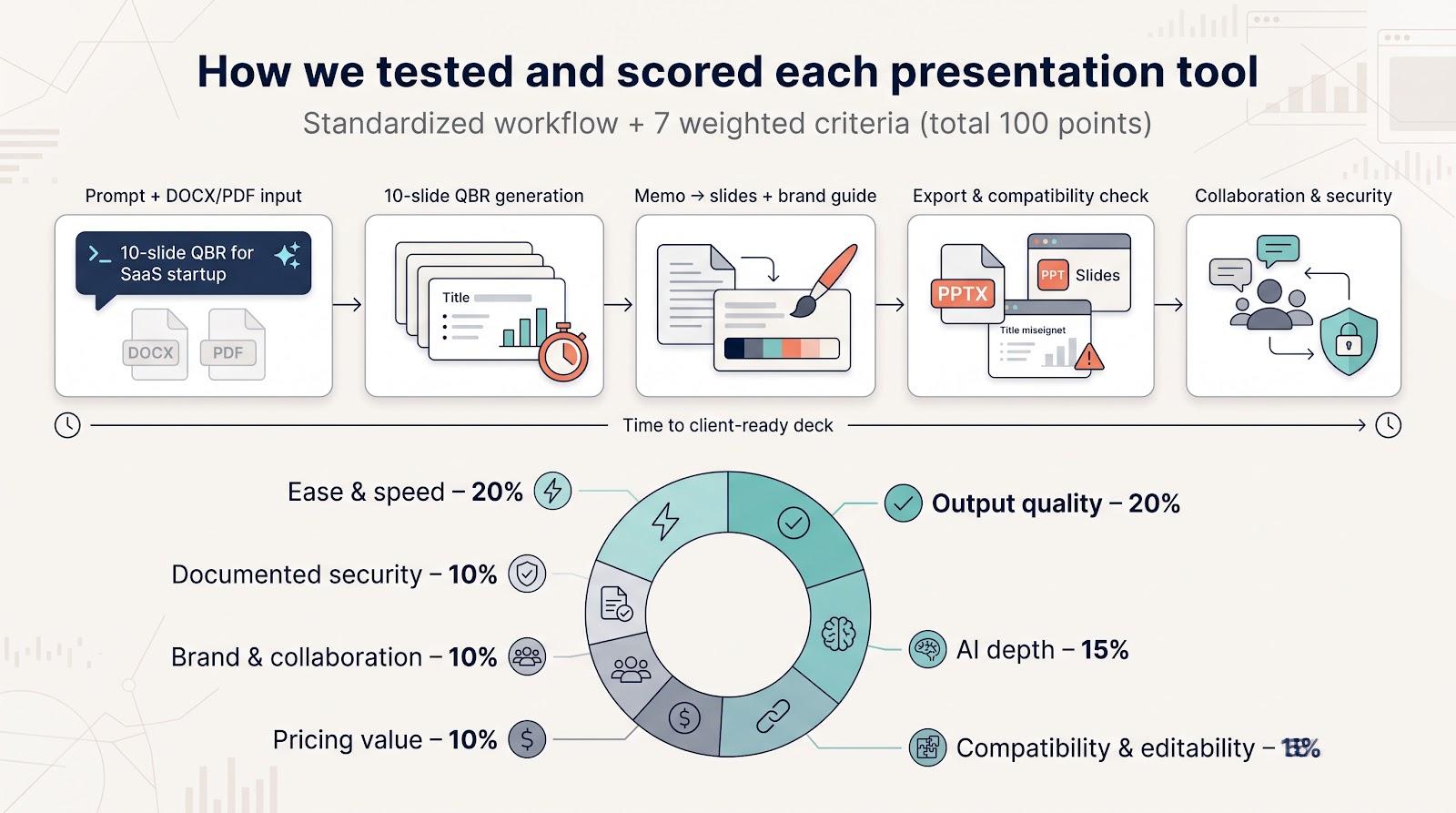
Feature lists and vendor demos do not show how a tool performs with your own content. A short, structured trial gives a better answer. Give each shortlisted tool the same tasks:
- Generate a 10-slide deck from one prompt and record the time until it is ready to present, not only until the first draft appears.
- Convert the same long document (in both DOCX and PDF) into slides.
- Restyle an existing, messy deck with your brand guide.
- Export to PPTX and open the file in desktop PowerPoint and Google Slides. Look for shifted text, flattened charts, and missing fonts.
- Invite a second editor and check comments, version history, and the available security controls.
Score each tool against the factors that matter most to your team, for example ease of use, output quality, AI depth, compatibility, price, collaboration, and documented security. Give more weight to the factors that match your main deliverable.
Conclusion
The right presentation tool depends less on the length of its feature list and more on how your team works. Start with the final deliverable, check how well files survive export, and include cleanup time, AI-credit limits, and security review in the real cost. A short trial with your own content will show which tool produces decks that are ready to present, and which tool only produces fast first drafts.
Comments
Comments are available to signed-in users and are moderated to keep the discussion useful and respectful. Spam, automated submissions, and low-value promotional comments are removed. Outbound links may be approved when they are relevant and genuinely helpful to readers, but they are displayed as plain text rather than clickable hyperlinks.
No comments have been published yet.
Please sign in to submit a comment.