

IP Address, Cybersecurity, Geolocation
How Organizations Can Detect Suspicious Login Activity Using IP Intelligence

An employee logs in from a network they have never used before, even though the same account was active minutes before on another network. This could indicate an attacker, but it might also indicate a change in the employee's mobile network or a workplace VPN. Ignoring odd logins can put accounts at risk, but blocking every new IP address can prevent regular work. Security teams can determine whether the IP address is genuinely suspicious by comparing what changed before and after the login, as well as the account activity.
A Login Alert That Could Mean Two Different Things
An employee usually signs in from a home internet connection. One afternoon, the employee logs in normally. Shortly afterward, another successful login for the same account appears from a hosting network in a different country.
The second incident is worth looking into, but it doesn't resolve the matter. The password and authentication could have been stolen by an attacker. Additionally, the employee may be using an authorized VPN whose traffic exits through that hosting network.
Identify What Triggered the Alert
First, the analyst checks:
- Is the location new?
- Is the network new?
- Did the logins happen very close together?
- Was another device used?
Set the Question for the Investigation
The first step in a good suspect login detection process is to ask a useful question: What should the team look for before approving, rejecting, or limiting this session? The response is contingent upon the account's actions after getting access, the authentication outcome, and the login history.
What IP Intelligence Adds to a Login Record
A login record usually contains a source IP address. IP intelligence provides details about the network associated with that address. Those details can help an analyst decide what to examine next.
Read the Network Details
An IP lookup may provide:
- Approximate location: The country or region associated with the address.
- Network owner and ASN: The organization operating the network and its identifying number.
- Connection type: Whether the address seems to be part of a hosting, mobile, or residential network.
- Privacy services: VPN and proxy detection indicators or Tor exit node indicators.
- Reputation: Reports related to the address's past activity.
When more red flags emerge, a login from an unusual hosting infrastructure might warrant further investigation. Network information does not demonstrate that the account has been compromised, but it does help explain why the login is unusual.
Know What the Address Cannot Prove
The person who entered the password cannot be identified by their IP address, nor can their location be determined. A VPN can make a nearby employee appear to have signed in from a different country because IP geolocation is only approximate. Additionally, IP address reputation data may be outdated or insufficient.
The lookup should be compared to the team's own device, account, and authentication records. The organization's data demonstrate how the IP's description of a connection relates to the employee's activities.
Three Login Patterns Worth Investigating
One unusual sign may have an ordinary explanation. Several signs appearing together give the team a stronger reason to investigate.
An Unusual Location With Other Warning Signs
A new login location does not always mean an account was hacked. Employees may travel, change networks, or connect through a company gateway, so the login requires closer review.
Check for a Second Warning Sign
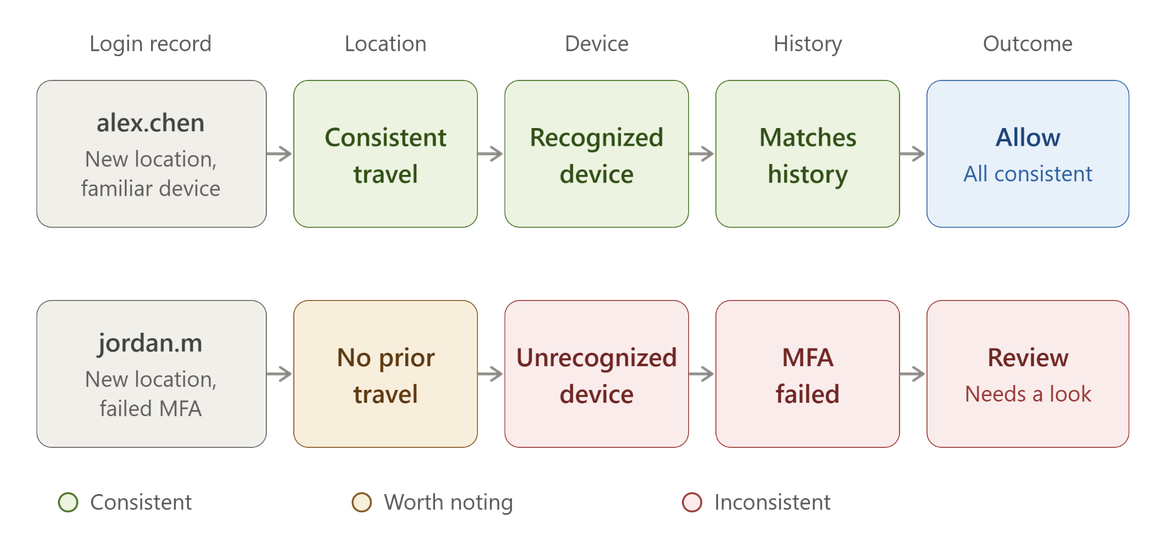
A new location should be given more consideration when it coexists with:
- An unknown apparatus
- Several unsuccessful password attempts
- An unexpected MFA prompt for the employee
- Access to a program the worker hardly ever uses
After correlating the IP geolocation with the last few sign-ins, the analyst can look into the device and authentication details. A possible reason could be a known managed device and a new location. Failed MFA attempts, an unrecognized device, and a new location also lead to another.
Distant Logins Close Together
Impossible travel detection compares a location and time of a sign-in against another sign-in. For example, if one account signs in from a location in one country and then, 10 minutes later, from a network that's reported to be in another country on the opposite side of the world. The employee would not be able to travel from one location to the other in 10 minutes.
Check How the Locations Were Reported
The two network locations do not have to be where the employee is. A company VPN can route the call through a remote exit point while the person surfs the web from home. The mobile network could take the call somewhere else.
An impossible travel alert needs to be followed up by checking both networks, devices, and sessions. If the second login used a company VPN and the same managed device, there is probable cause for investigation. If the device is unknown and the account switches immediately, the alert should trigger a different response.
Failed Attempts Across Accounts or Networks
If one account keeps failing, it may be a sign that someone is attempting to figure out the password. Password spraying, which involves attempting multiple passwords on numerous accounts, may be indicated by multiple failures across accounts. Attempts to use previously acquired credentials are referred to as "credential stuffing."
Password spraying and credential stuffing are common cybersecurity threats that may first appear as scattered login failures, so the team needs to review attempts across accounts and networks.
Look Beyond One IP Address
The analyst should determine which accounts were targeted, the frequency of tries, the relatedness of the addresses, and whether any efforts were successful.
The pattern might cover a number of IP addresses. One address's bad reputation rating cannot reveal the fate of the company's accounts. When the team can link a successful login after multiple failures to a broader pattern of attempts, it becomes more significant.
Follow the Alert Through an Investigation
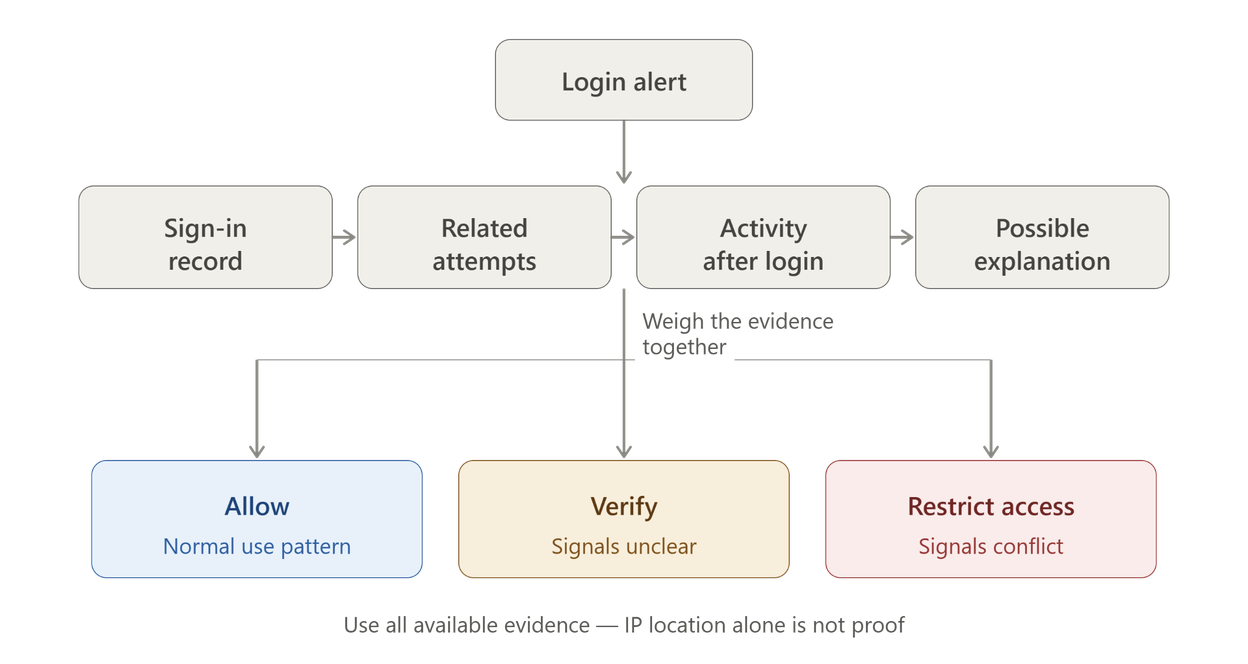
Give the employee back two successful logins. One originated from a well-known network, while the other came from hosting infrastructure elsewhere. The team must now ascertain whether the employee owns the second session and whether it was utilized for any odd purposes.
Check the Sign-In Record
For each event, record the time, account, outcome, source IP, network, device, and authentication information. Determine whether the device was previously seen and if there was a successful second-factor multifactor authentication.
Compare It With Earlier Logins
Ask yourself if the hosting network is new to the employee but common to the company. Determine whether the device has been used on this employee’s previous workdays and whether the same authentication method has been used before.
This comparison provides an explanation for the alert. The analysis of the login activity is more valuable when it discovers a change rather than a simple unknown location. If the second login was performed on the employee’s most likely device via an authorized gateway, this could explain the given location. However, be sure to double-check the gateway in the records before deeming the alert false.
Look for Related Login Attempts
Prior to the successful login, look for unsuccessful ones. Check whether additional accounts were attempted to be logged in from the same IP or a nearby network.
Examine the Timing and Reach
Several attempts against various employees would modify the outcome, even if the initial story had only one failure. The systematic nature of the attack could indicate some form of automation, whereas a single guess and a successful password might have a reasonable explanation. In that matter, it is essential not to impute actions to people solely based on attempts from the same email since there could be a logical explanation behind those attacks.
Therefore, the team should review the accounts, time, devices, and outcomes of those incidents before concluding that all of them are the work of one cybercriminal.
Check What Happened After the Login
A successful sign-in is only the start of the review. Look for:
- Changes to account recovery details
- Registration of a new authentication method
- Creation of new credentials
- Downloads that seem unusual
- Sensitive files opened more than usual
Give Later Actions Their Proper Weight
Activity post-access is frequently more indicative than the originating IP address. An example of this would be a new hosting network login, followed by a new credential and a large download. It is recommended that the team investigate the credential’s access and verify whether the download is associated with the new session.
A session that only accessed the application the employee used to perform their job could be viewed as non-suspicious, but it still requires additional investigation. Either way, analysis of post-login activity can help the responder determine whether the compromised account was actively misused.
Ask What Would Explain the Alert
Verify the gateway and authorized VPN records. Verify that the employee's session went across the network at the recorded time if it is a company service.
Verify the Explanation
If travel is possible, check through a company process. When the policy advises, contact the employee via a known channel and ask whether the login was expected.
While the employee’s response may be helpful, take it with a pinch of salt. Confirmed travel, a matching device, and anticipated work activity provide better context for the situation than any single piece of information.
Decide Whether to Allow, Verify, or Escalate
Risk-based authentication analyzes the situation of the request to choose the response. For example, a known device that is appearing on a new network might be asked for additional verification. Unusual activity might be restricted immediately, such as logging in from a new device, multiple failed multifactor authentication attempts, or other irregular behaviors.
Match the Response to the Evidence
Step-up authentication provides an added level of assurance when the risk level increases. This could be useful on an uncertain login where there is no evidence or signs of abuse. If there are indications of compromise, a further prompt might not be enough, and the sessions might need to be terminated and accounts investigated.
Use These Responses as Examples
| What was found | Check | What to do |
|---|---|---|
| New location, known device | Check travel or VPN use | Allow access or ask for verification |
| New network, failed MFA | Check other login attempts and account activity | Block access and investigate |
| Unusual activity after login | Check other sessions and accounts | Limit access and report the case |
These are examples only - the decision may have to be made based on company policy and the evidence available. A combination of login association to subsequent activity and investigation into associated accounts is likely to be the most effective means of detecting account takeovers.
Reduce False Alarms Without Ignoring Real Attacks
Before labeling an IP as an issue, make sure the network and work configuration are in order.
Recognize Common Causes of False Alarms
- A company VPN can give many employees the same IP address.
- A mobile network can change the IP during a work session.
- A shared network can be used by many unrelated people.
- Travel can make a normal login appear unusual.
- IP reputation data may not reflect recent changes.
VPN or proxy detection is a reason to check the login more closely, not to block it right away. An IP linked to past abuse may now be used for normal work. A new IP used by an attacker may also have no bad history yet.
Record Why the Team Made Its Decision
For the detected incident that alerted the investigation, it is advisable to document the reasons why the team allowed, challenged, or denied login. Document the results of the investigation and the data that helped determine the incident, e.g., a verified company gateway or an anomaly.
An analysis of the decisions will help you identify the policies the organization appears to enforce consistently that deny legitimate users access. Therefore, it is possible to determine if past alerts had early warnings that should have been considered. The information on the user’s IP gives an explanation for all decisions made. It establishes a procedure for analyzing, examining, and understanding the problem at hand.
Build a Login Review Process the Team Can Repeat
A consistent process makes each alert easier to handle and easier for another analyst to review.
Follow the Same Six Steps
- Record the login event, its time, and authentication result.
- Add IP intelligence about its approximate location, network, and connection type.
- Compare the device and authentication details with the user’s history.
- Check related attempts and activity after access.
- Allow, challenge, restrict, or escalate according to the evidence and company policy.
- Document the reason, then review false alarms later.
Pass on a Clear Record
The team that manages sign-in alerts should triage the case first. In addition, if the account accessed sensitive information or systems, or affected other users, the case might require involvement from an incident response team.
A good note on the case should describe the incident, the investigation, and the rationale for the action taken. This way, it will help the next person working on the case avoid repeating the same steps, better understand the context, and identify whether there is a chain of incidents that require investigation.
Conclusion
Suspicious login activities are frequently initiated by an unrecognized IP address, but it might just be another lead. This alert is frequently triggered when the network or the location the user claimed to be at during the incident was new to the system. However, an IP address will never reveal who was at the wheel or what their intentions were. To make the right choice, several factors need to be considered. Specifically, data from the unknown IP should be combined with device, authentication method, auxiliary activities, and post-login behavior to obtain the complete picture and ensure the login is not fraudulent. In this way, the process helps security teams nullify potential threats and allow only legitimate users through.
Comments
Comments are available to signed-in users and are moderated to keep the discussion useful and respectful. Spam, automated submissions, and low-value promotional comments are removed. Outbound links may be approved when they are relevant and genuinely helpful to readers, but they are displayed as plain text rather than clickable hyperlinks.
No comments have been published yet.
Please sign in to submit a comment.