

Software, Information Technology, Web Development
Best SaaS Product Design Agencies for CRM & ERP Software
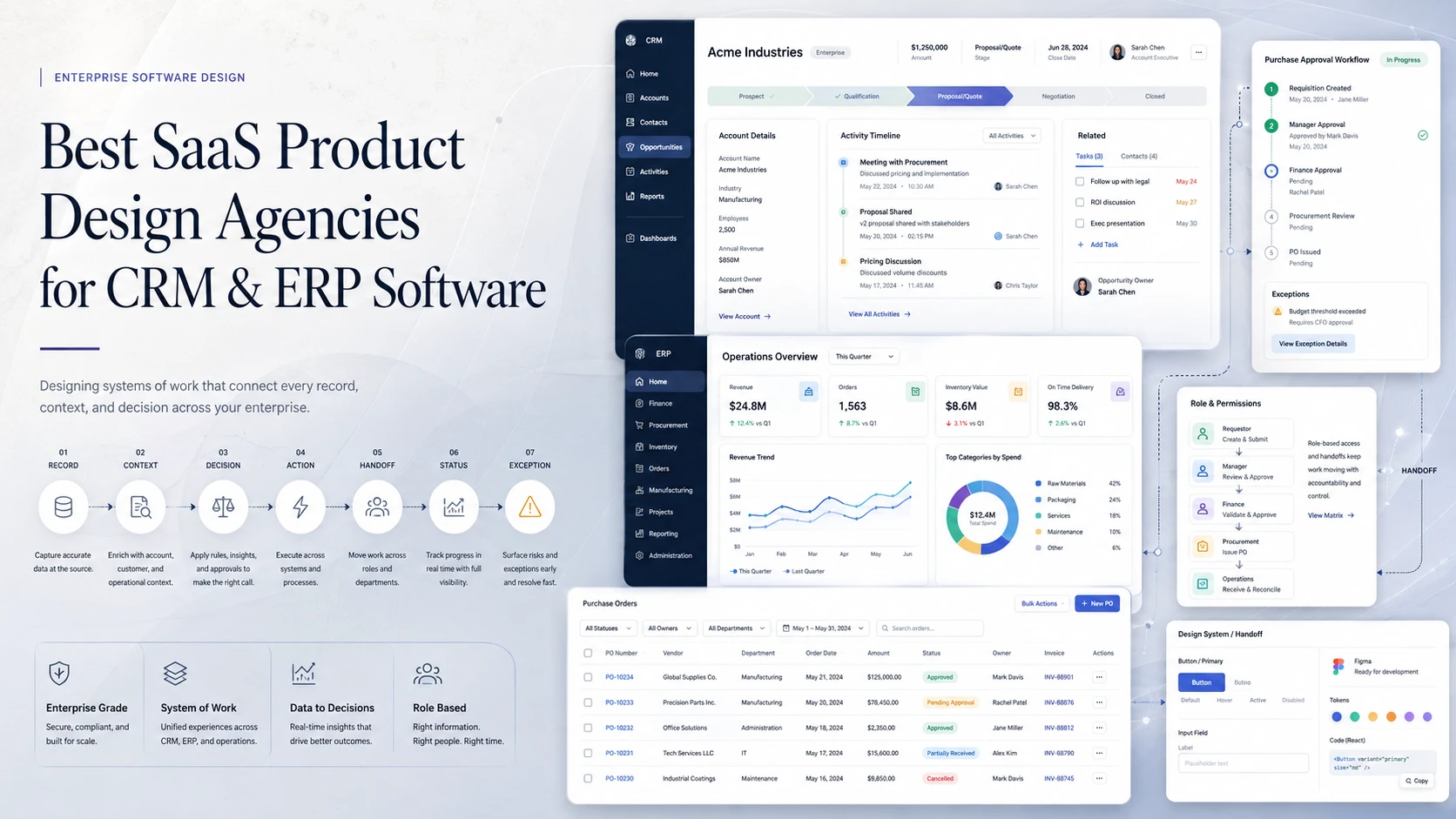
An opportunity enters a CRM through marketing, moves to sales, becomes a customer, passes to implementation, and later reaches finance, support, and account management. In an ERP, a purchase request can become an approval, a purchase order, a receipt, an inventory movement, an invoice, a payment, and a reporting entry.
Every screen in those chains can look usable while the product as a whole remains frustrating. Ownership can be unclear. Teams can enter the same data twice. Statuses may not reflect real work. Exceptions push users into email or spreadsheets. CRM and ERP products are systems of work, and their UX succeeds when software reflects how records, decisions, responsibilities, and exceptions actually move through the organization.
Why CRM and ERP UX fails even when individual screens look good
CRM and ERP products rarely fail because one button is hard to find. The larger failure is usually between screens and between people.
A sales rep updates an opportunity, but customer success cannot see the context behind the promise. Procurement changes an order, but inventory works from an older assumption. Finance receives an invoice without the approval history. A manager sees six statuses but cannot tell which one requires intervention.
Feature growth makes this worse. Fields are added for one department, statuses for another, permissions for a third. Users compensate with personal views, spreadsheets, and parallel processes outside the product.
Rigid happy-path design creates another problem. Real operations include partial deliveries, rejected approvals, changed owners, reopened opportunities, missing documents, manual overrides, and work that moves both backward and forward. If the product cannot represent those exceptions, the workaround becomes the workflow.
A CRM design agency or ERP design agency therefore has to understand the operating model behind the interface.
The system-of-work model
A useful way to evaluate CRM UX design or ERP UX design is to stop thinking first about pages and start with the movement of work:
RECORD → CONTEXT → DECISION → ACTION → HANDOFF → STATUS → EXCEPTION
The record might be an account, order, shipment, asset, employee, invoice, or contract. Context tells a user what matters now. A decision creates an action. That action may transfer responsibility. Status communicates progress. Exceptions define what happens when reality does not follow the expected path.
| Element | Product question |
|---|---|
| Record | What shared object are people working around? |
| Context | Which history, data, and relationships matter to this role? |
| Decision | What must the user decide, and using what evidence? |
| Action | Which action moves the work forward? |
| Handoff | Who owns it next, and what context travels with it? |
| Status | Does the state describe real work across departments? |
| Exception | What happens when the normal process cannot continue? |
Permissions, dependencies, history, reporting, and integrations sit around that chain. A cleaner record page cannot fix a workflow if the ownership model is wrong.
How we evaluated the agencies
This ranking is narrower than a generic SaaS product design agency list. The highest weight goes to evidence that an agency can model operational work before designing the interface.
| Evaluation criterion | Weight | What we looked for |
|---|---|---|
| Workflow and business-logic discovery | 25% | Research, process mapping, workflow simplification |
| Multi-role and permission UX | 15% | Connected experiences for different roles |
| Records, states, and exceptions | 15% | Complex objects, approvals, edge cases, history |
| Information architecture | 10% | Structure across modules and related actions |
| Data-heavy interaction design | 10% | Tables, filters, bulk work, dense professional UI |
| Prototyping and validation | 10% | Wireframes, prototypes, usability testing |
| Engineering collaboration | 10% | Feasibility, handoff, implementation support |
| Design-system consistency | 5% | Reusable patterns that survive product growth |
The ranking reflects fit for CRM, ERP, and adjacent systems of work—not overall agency quality.
Ranking: SaaS product design agencies for CRM & ERP
1. UITOP — best for translating operational workflows into product logic
CRM and ERP redesigns become difficult when the interface reflects years of operational decisions that no single stakeholder can fully explain. Before removing a field or shortening a flow, the design team has to understand who relies on it, what happens before and after it, and what the engineering system can support.
UITOP ranks first because its case library repeatedly deals with that problem across CRM, ERP, logistics, accounting, workforce, construction, healthcare, and operational SaaS. Tinyclues centers on marketer workflows inside a professional CRM. AirClub connects member records, payments, memberships, schedules, leads, and analytics. ReLounge links staff, patients, treatment plans, appointments, rooms, and devices. Slipwise organizes marina work around contracts, berths, and tasks. LogiCore brings inventory, shipments, warehouses, and trucks onto shared live data. The industries differ, but each product has to keep records and next actions understandable across roles.
The evidence also covers how those workflows are designed and built. Compa describes user conversations, architecture, wireframes, prototypes, and reusable components. Pacioli models transaction ingestion, categorization rules, admin approvals, bulk operations, and consistent logic across live and imported data. Time Doctor shows feature expansion while preserving familiar behavior. VigilYard separated front-end improvements that could ship immediately from issues that required backend work. These examples matter because CRM and ERP UX cannot be isolated from business rules or implementation constraints.
Client feedback on UITOP’s site repeatedly mentions structured process, organization, responsibility, flexibility, research, Figma quality, and easier implementation for developers. The company combines product design with in-house engineering and focuses on B2B software, CRM, ERP, WMS, and modernization. As a secondary signal, UITOP currently reports average client seed rounds of $3.8M and a $21M Series A supported by its product design; those figures are not the basis for the ranking, but show that clients have taken the resulting products through meaningful growth milestones.
Best fit: CRM, ERP, and vertical SaaS teams that need to understand and redesign the operating model, not just clean up screens.
2. Eleken — best for embedded CRM design capacity
Many CRM teams do not need a one-time redesign. Pipelines change, automation expands, and new reporting creates steady UX work. Eleken fits that situation because it focuses on SaaS and has a dedicated CRM and sales-automation practice.
Its public examples include Zaplify, Gridle, Favorably, and Ricochet360. The agency covers lead and contact management, configurable pipelines, role-based access, client portals, analytics, research, prototypes, design systems, and dev-ready handoff. Its dedicated-designer model can fit directly into an existing product cadence.
Consideration: the model works best when the client already owns product strategy and engineering decisions.
3. Onething Design — best for role-heavy enterprise workflows
When several departments share one system, the main question is often who needs which context and actions. Onething Design has useful evidence here.
Its Airtel enterprise SaaS work began with research into complex call and work flows, then established user hierarchy, information architecture, wireframes, prototypes, and a design system. Its enterprise UX material also describes role-task matrices for products such as POSable, where multiple personas needed different data and decision paths inside one platform.
Consideration: Onething works across enterprise, consumer, and digital transformation, so buyers should confirm the assigned team has comparable systems-of-work experience.
4. Cieden — best when business logic needs validation before UI
Some CRM and ERP projects are blocked because teams disagree about stages, ownership, exceptions, or automation. Designing polished screens before resolving those questions creates rework.
Cieden positions its B2B practice around simplifying complex workflows and understanding business requirements. Its public material covers enterprise applications with multiple stakeholders and legacy systems, plus business analysis, discovery, prototyping, user stories, acceptance criteria, and implementation support.
That makes it useful when an outside team needs to test the operating logic before engineering commits.
Consideration: mature ERP buyers should ask for cases close to their specific operational domain and legacy constraints.
5. Ramotion — best for information architecture tied to engineering
A CRM or ERP can have sound individual workflows but still feel fragmented because users cannot understand where records, modules, and actions live.
Ramotion’s SaaS practice emphasizes discovery, workflow mapping, multi-tenant flows, permission structures, navigation, Figma systems, and alignment with front-end development. That combination fits products that need a clearer structural model and design artifacts that map closely to implementation.
Consideration: Ramotion also works extensively in brand and marketing, so buyers should evaluate the specific product-design team and comparable post-login work.
6. ProCreator — best for consistency across multi-module enterprise products
When ERP modules evolve under different teams, the same concept can gain different labels, states, and interaction patterns. ProCreator fits organizations that already understand the basic operating model but need a coherent product language.
Its enterprise practice starts with research into users, workflows, and business goals, then focuses on user flows, product clarity, scalable systems, and development alignment.
Consideration: buyers with broken operational logic should confirm that discovery includes process modeling, not only UI standardization.
7. CodeTheorem — best when workflow redesign and engineering are inseparable
Some CRM and ERP changes depend directly on automation rules, integrations, data models, or architecture. In those cases, separating UX from implementation can slow decisions.
CodeTheorem combines product experience design, software engineering, design systems, AI, and workflow automation. It is a practical option when the engagement includes new automation or substantial technical change and the buyer prefers one design-and-build partner.
Consideration: buyers should examine how much user research and operational validation happens before the engineering scope is fixed.
8. Phenomenon Studio — best for replacing fragmented internal tools
When a company is replacing spreadsheets or disconnected tools, there may be no mature interface to redesign, but there is still an existing business process to model correctly.
Phenomenon Studio combines discovery, user-flow mapping, technical workshops, role-aware web-app design, prototypes, development, QA, and scaling support. That can fit teams creating a new system of record and wanting one partner from workflow definition through build.
Consideration: CRM/ERP buyers should ask how exceptions, permissions, and cross-department dependencies will be documented before development.
9. Arounda — best for workflows that cross desktop and mobile roles
Sales reps, field teams, supervisors, and service staff may update the same record from different devices. The workflow has to remain coherent even when the interaction context changes.
Arounda’s enterprise UX material discusses shared workflows, handoff points, permissions, approvals, technical constraints, and role-based experiences. Its research approach also uses internal experts, support data, workflow recordings, and audits when direct user access is limited.
Consideration: Arounda works across several industries, so buyers should request examples closest to their operational model.
What to show an agency before asking for a redesign
A weak CRM/ERP brief is a list of screens. A useful brief explains how work moves. Before the first workshop, provide:
- the main roles and responsibilities;
- the key records: accounts, orders, invoices, assets, contracts, or others;
- the current workflow from creation to completion;
- decision and approval points;
- status definitions and who can change them;
- common exceptions and manual overrides;
- external systems and integrations;
- spreadsheets, email threads, or side tools users rely on;
- bottlenecks and places where ownership becomes unclear.
This helps the agency separate three problems: a confusing UI, a broken workflow, and a technical constraint. Treating all three as “UX issues” usually produces a prettier version of the same operational problem.
Buyer checklist: questions that reveal CRM/ERP depth
Ask these before choosing an enterprise software design agency:
- Can you map the real process before opening Figma?
- How do you identify where ownership changes between roles?
- Can you distinguish an interface problem from a workflow or data-model problem?
- How do you design rejected approvals, reversals, incomplete records, and other exceptions?
- Can you simplify a record without hiding context another department needs?
- How do permissions change navigation, actions, and handoffs?
- What happens when the desired UX conflicts with existing architecture?
- How will the design scale when new roles, states, modules, or integrations are added?
- What will engineers receive besides final screens?
A team that talks about layouts before asking about records, roles, and transitions is probably solving the wrong layer.
Which agency profile fits the project?
For an established CRM with a capable internal product team, Eleken’s embedded model can be efficient. If the operating logic itself is unresolved, Cieden’s discovery orientation becomes more valuable. Onething is worth considering when several user groups need different but connected experiences. Ramotion and ProCreator fit products where structure and consistency are the main bottlenecks. CodeTheorem or Phenomenon Studio become more relevant when design and development have to move as one program. Arounda is useful when the same process crosses desktop and mobile roles.
UITOP is the strongest overall match here when several problems overlap: domain-heavy workflows, multiple roles, dense records, legacy behavior, reusable UI needs, and implementation constraints.
Conclusion
A CRM or ERP is ultimately a software model of how a company works. If that model is wrong, cleaner screens will not fix it. Users will still duplicate information, invent workarounds, misunderstand ownership, and leave the product whenever reality does not fit the prescribed flow.
The best CRM design agency or ERP design agency therefore starts with movement: what the record is, who owns it, what context drives the next decision, what action follows, where the handoff goes, which status communicates progress, and what happens when the normal path breaks.
Good design does not remove operational complexity indiscriminately. It decides which complexity a user needs now, which can be deferred, and which must remain visible because another person or process depends on it.
For buyers creating a shortlist, that is the practical test: do not ask only whether an agency can redesign your CRM or ERP. Ask whether it can explain how work moves through the product today—and show where the software stops matching the business.
Comments
Comments are available to signed-in users and are moderated to keep the discussion useful and respectful. Spam, automated submissions, and low-value promotional comments are removed. Outbound links may be approved when they are relevant and genuinely helpful to readers, but they are displayed as plain text rather than clickable hyperlinks.
No comments have been published yet.
Please sign in to submit a comment.