

AI Tools for Web Development That Are Actually Changing How We Build in 2026

Web development has always moved fast. But the last two years? It's been a different kind of fast. AI tools for web development aren't just helping developers write code quicker; they're changing what's even possible in a given workday. Entire UI components get generated in seconds. Security vulnerabilities get caught before code reaches production. CMS platforms now understand what you're trying to build and help you structure it.
According to Stack Overflow's 2024 Developer Survey, over 76% of developers are already using or planning to use AI tools in their development workflows. That's the whole industry moving at once. If you're building websites or web apps and you haven't seriously looked at what's available, you're likely spending hours on work that could take minutes. This post walks through 8 tools worth knowing — what they do, who they're for, and where they actually fit in a real workflow.
8 AI Tools for Web Developers in 2026
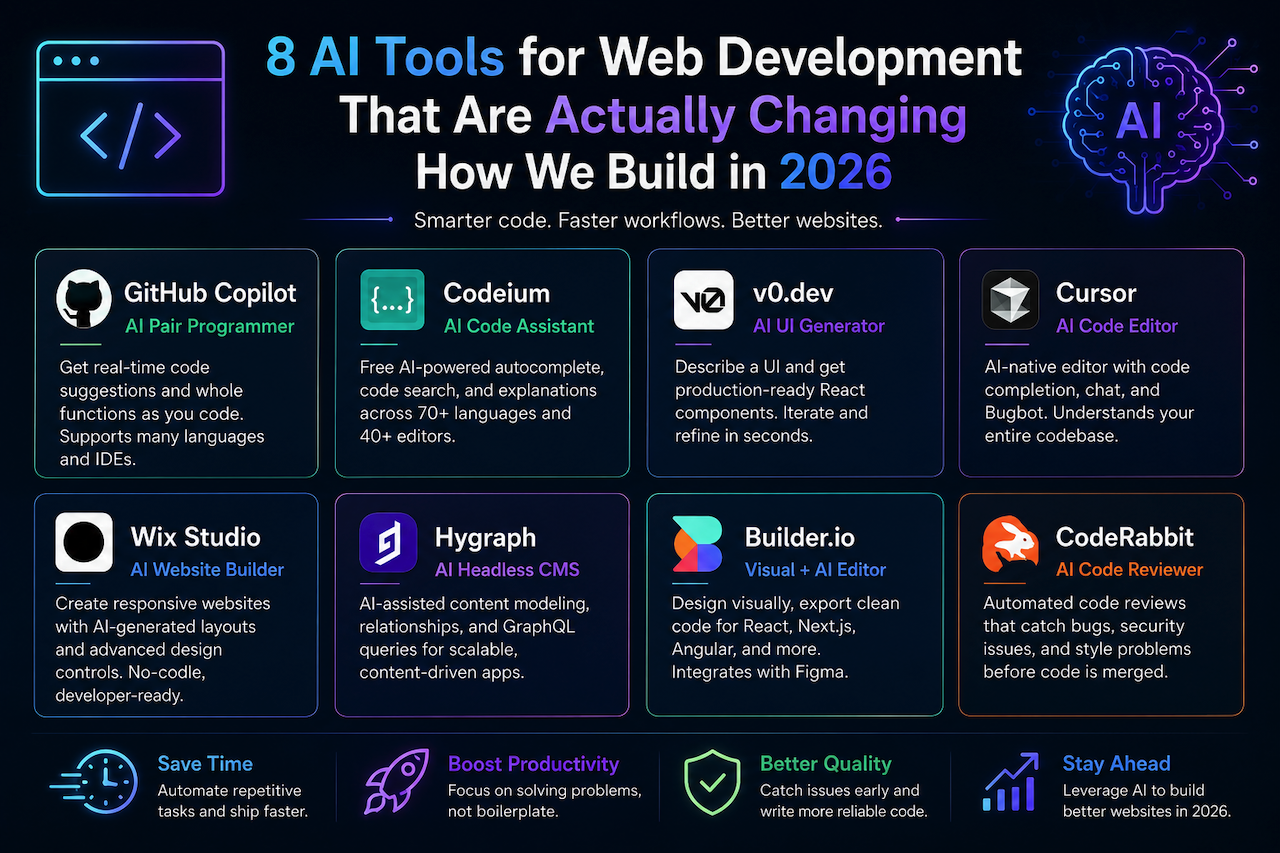
1. GitHub Copilot
GitHub Copilot is probably the tool most developers encounter first, and for good reason. It sits right inside VS Code, JetBrains, and other popular editors. You write a comment or start typing a function, and it suggests the rest.
It's not always right. Sometimes it misreads what you're going for. But it's right often enough that you'll catch yourself trusting it more than you expected to.
Copilot works especially well for boilerplate-heavy tasks — setting up API routes, writing test cases, and generating utility functions. It also handles multiple languages well, so whether you're writing TypeScript, Python, or Go, the experience is consistent.
Best for: Individual developers and teams already working inside GitHub's ecosystem.
2. Codeium
Codeium is worth a serious look if Copilot's pricing puts you off. It's free for individual developers and covers most of the same ground, including autocomplete, code search, and explanation features, across 70+ languages and 40+ editors.
The suggestions are quick. The search feature is genuinely useful when you're working across a large codebase and can't remember where a specific function lives.
It's not as deeply integrated as Copilot in some areas, but for freelancers or smaller teams watching costs, Codeium punches well above its price point.
Best for: Solo developers, students, or anyone who wants AI code assistance without a monthly fee.
3. v0.dev by Vercel
This one's a bit different. v0.dev allows you to describe a UI in plain text and get back working React components: structured, styled, and ready to drop into your project. Type something like "a dashboard card with a graph and a CTA button," and it provides you with code. You can iterate from there by asking it to adjust the layout, make it responsive, or change the style. It's not perfect on the first pass, but it moves fast.
For developers who hate the blank-canvas problem or designers who want to sketch ideas in code without writing them from scratch, this tool genuinely speeds things up.
Best for: Front-end developers and designers building React or Next.js projects with Vercel.
4. Cursor
Cursor is developed from the ground up as an AI-native editor. Think VS Code, but with AI woven into how it actually works, not bolted on. It involves code completion, a chat interface that understands your whole codebase, and a Bugbot feature that catches issues during code review.
The codebase awareness is the real differentiator here. You can ask it questions like "where is the auth logic handled?" and it actually knows.
AI automation in web development starts to make sense at a different level when the tool understands context across your entire project, not just the file you have open.
Best for: Developers who want a fully AI-integrated editing experience, not just autocomplete.
5. Wix Studio / Wix AI Website Builder
Wix has moved well past drag-and-drop. Wix Studio now provides developers and designers with a robust environment featuring responsive controls, CSS-like layout tools, and AI features that help generate site structures from a brief description.
It's no-code on the surface but has enough depth for real customization. The AI handles the tedious parts while you focus on what actually needs your judgment. You might notice it's especially useful for agencies building multiple client sites on tight timelines.
Best for: Web designers, agencies, and developers building content or marketing sites without needing custom backends.
6. Hygraph
Hygraph is a headless CMS, and its AI features are built around making content modeling less painful. Setting up schemas, managing relationships between content types, querying via GraphQL — all of it gets a little smarter with AI assistance.
For content-heavy applications where the CMS choice really matters, such as documentation sites, media platforms, and large product catalogs, Hygraph provides strong architectural flexibility without sacrificing usability.
AI in web development is pushing CMS platforms to think beyond just storing content, and Hygraph is a clear example of that shift.
Best for: Developers building content-driven apps who need a scalable, API-first backend.
7. Builder.io
Builder.io sits in interesting territory; it's a visual editor that outputs real, production-ready code in Next.js, React, Angular, or web components. Designers can work visually, developers get clean output, and the gap between the two teams shrinks.
The AI features help translate designs directly into components, reducing the back-and-forth that usually occurs between design and development. It also integrates with Figma, enabling the design-to-code pipeline to be nearly automatic in many cases.
Best for: Teams where designers and developers need to collaborate without constantly converting work between tools.
8. CodeRabbit
Code quality and security may not always be the primary focus during fast-moving development cycles, but they remain essential. CodeRabbit analyzes pull requests to identify bugs, style inconsistencies, and potential issues before code is merged into production.
The platform works with minimal disruption to existing workflows and provides automated review feedback directly inside pull requests. In many cases, it can feel similar to having an additional reviewer consistently checking code quality across a project.
Best for: Teams that want automated code review and quality control without building a full QA process from scratch.
Conclusion
Here's the practical truth — you don't need all eight of these tools. You need the right two or three for how you work.
If you're a solo developer, Codeium plus Cursor covers a huge chunk of the workflow. If you're on a team shipping product fast, Copilot, CodeRabbit, and Builder.io together address code speed, quality, and design-dev handoff all at once. The best AI tools for programmers aren't the ones with the most features. They're the ones you actually reach for without thinking twice.
Start with one tool and add others as your workflow evolves. Most developers who are successfully integrating AI into web development are not adopting every platform at once. Instead, they focus on identifying which tools genuinely improve productivity and fit naturally into their process. The web development industry continues to move quickly, and AI-powered tools are increasingly becoming part of everyday development workflows rather than optional experiments.
Featured Image generated by ChatGPT.
Related Articles

March 11, 2025
Web App Development Made Easy: Build Webapps Without Developers
Building a web application was once a daunting task, requiring skilled developers, long hours of coding, and substantial financial investment. However, thanks to technological adva...
Read More
December 16, 2024
Code That Learns: How AI Enhances Web Development with Adaptive Algorithms
In the ever-evolving landscape of web development, staying ahead requires more than just mastering traditional coding and design techniques. As demands for personalization, efficie...
Read More
October 1, 2024
AI and Web Development: The Unexpected Partnership That’s Changing Everything
Imagine a web development company that employs Artificial Intelligence (AI) to produce a completely personalized website in a matter of minutes rather than months. That is the real...
Read More
Comments
Comments are available to signed-in users and are moderated to keep the discussion useful and respectful. Spam, automated submissions, and low-value promotional comments are removed. Outbound links may be approved when they are relevant and genuinely helpful to readers, but they are displayed as plain text rather than clickable hyperlinks.
No comments have been published yet.
Please sign in to submit a comment.