
If you're evaluating AI-connected SEO platforms, the right solution can help automate reporting, connect analytics tools, and reduce manual data collection. Different tools focus on different use cases, from rank tracking and technical audits to traffic analysis and competitor research.
- SE Ranking includes features such as competitor analysis, position tracking, and site audits within an LLM workflow.
- Google Search Console integration is useful for users already working heavily within Google's ecosystem.
- Other platforms focus on more specialized use cases, such as traffic analysis, rank monitoring, or raw SEO data access.
This guide compares several AI-connected SEO platforms and highlights the types of workflows and SEO analysis each platform is best suited for.
Comparison Table
| Feature | SE Ranking | GSC MCP | Analytics MCP | Nightwatch | DataForSEO |
|---|---|---|---|---|---|
| Rank Tracking | Yes | No | No | Yes | Yes |
| Site Audits | Yes | No | No | Limited | Limited |
| Backlink Data | Yes | No | No | No | Yes |
| GSC Integration | Yes | Native | No | No | No |
| GA Integration | Yes | No | Native | No | No |
| Competitor Analysis | Yes | No | No | No | Yes |
| SERP Tracking | Yes | No | No | Yes | Yes |
| Price (Entry) | $50/mo | Free | Free | $39/mo | API-based |
| API Rate Limits | High | Standard | Standard | High | Very High |
| Best For | SEO workflows | Google Search Console users | Traffic analysis | Rank monitoring | Large-scale SEO data access |
1. SE Ranking
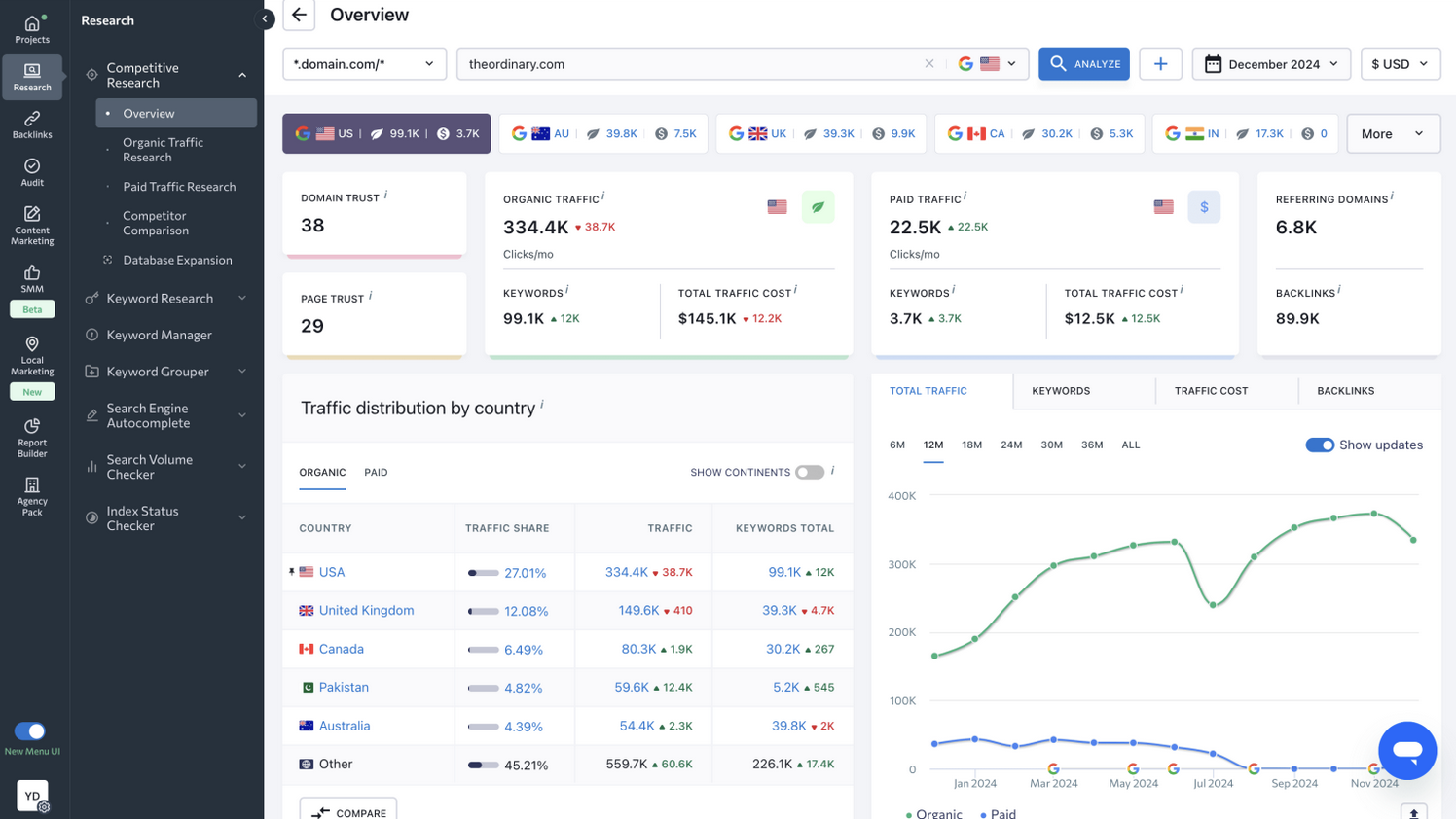
SE Ranking is a comprehensive SEO platform with integration support for AI-assisted workflows. You connect your SE Ranking account once, then query rank positions, site health metrics, and competitor data through your LLM. It supports workflows involving multiple websites, SEO projects, and reporting tasks. The integration reduces the need to switch between multiple dashboards and tools. Your AI assistant pulls the numbers you need, then writes recommendations based on real data.
Key Features
- AI visibility tacking across Gemini, ChatGPT, Perplexity, Google AI Mode, Google AI Overviews
- Rank tracking across unlimited keywords and domains
- Technical site audits with issue prioritization
- Backlink research and competitor backlink analysis
- On-page optimization recommendations
- SERP feature tracking (featured snippets, local packs, ads)
- Keyword research with search volume and CPC data
- Content marketing module for topic clustering
- Competitor website monitoring and alerting
- Multi-project support and workflow organization
- Custom reporting generation within prompts
Pros and Cons
Pros
- All-in-one platform — no need for multiple tools
- Fast API responses keep AI conversations flowing
- Rank history goes back years; compare performance trends
- Backlink quality filters reduce noise in data
- Mobile-friendly SERP tracking (growing priority)
- Real competitors can be monitored, not just keywords
- Works with local SEO and multi-location tracking
- Supports automated and customizable reporting exports
Cons
- Setup requires an SE Ranking account and an active subscription
- Backlink depth lags behind dedicated tools like Ahrefs at scale
- Local search data is solid, but not as precise as Bright Local
Pricing
- Core Plan ($129/month or $103.20 billed annually): 10 projects and 1 seat, 2,000 keywords + 100 prompts daily, 5 GEO domains, 250k audit pages/month, 25k API credits with MCP access, rank tracking, unlimited keyword/backlink research, site audit, and integrations (GA, GSC, Looker Studio, Matomo)
- Growth Plan ($279/month or $223.20 billed annually): 30 projects and 3 seats, 5,000 keywords + 250 prompts daily, 15 GEO domains, 2M audit pages/month, 100k API credits with MCP access, historical data, collaboration tools, page monitoring, and expanded support features
- Additional Platform Features (+$69/month, annual): Includes expanded project support, white-label reporting tools, scheduled reports, and workflow management features
- AI Search Add-on ($89/month or $71.20 annually): 200 prompts, tracking across AI platforms (ChatGPT, Perplexity, AI Overviews), unlimited competitor research, SE Visible dashboard, and automated reporting
- API Add-on ($149/month, annual): 12M credits, access to backlinks, domain analysis, keyword research, AI search, and website audit APIs for automation
- SMM Platform (from $33/month): Social media scheduling, collaboration workflows, content planning, analytics, and asset management
- SEO Data API (from $179/month): Standalone API with scalable volume, access to backlinks, domains, AI search queries, MCP integration, and automation via tools like Looker Studio, n8n, and Make
- 24M Credits Plan ($318/month effective): 24M credits/year (billed $3,816/year upfront), suitable for large-scale API usage and automation workflows
Use Cases
- Managing and monitoring multiple SEO projects
- Tracking keyword rankings and search visibility trends
- Running technical SEO audits and backlink analysis
- Performing competitor research and SERP analysis
- Integrating SEO data into AI-assisted workflows
- Reviewing rank history and long-term performance trends
2. Google Search Console (MCP-gsc)
Google Search Console, also called MCP-gsc, connects Google's native data to your LLM prompts. Every click, impression, and position change GSC tracks become available in your AI conversations. You don't need to install another tool or pay subscription fees. If you already use Google Search Console, this integration can help bring search performance data directly into your workflow.
Key Features
- Real-time click and impression data from Google Search
- Average position tracking for all your queries
- Search appearance metrics (mobile usability, coverage, etc.)
- Link report showing inbound domains
- Manual actions and security issues alerting
- Indexing statistics across all pages
- URL inspection for individual page status
- Query filter and grouping by page, device, and country
- Free integration with Google properties
- OAuth authentication for multi-property access
Pros and Cons
Pros
- Free — zero subscription cost
- Data is authoritative; it comes straight from Google
- Updates faster than rank-tracking tools
- Easy multi-property management
- Mobile performance data built in
- No API key management outside your Google account
- Integrates with BigQuery for advanced analysis
- Privacy-first; no third-party scraping
Cons
- No historical rank positions (GSC redesign removed this)
- Limited competitor intelligence
- Can't track organic performance without GA integration
- Impressions are aggregated; no per-position breakdown
- No keyword suggestions or CPC data
- Mobile usability report is basic
- A data delay of 24-48 hours is normal
- No technical audit features
Pricing
- Cost: Free
- Limits: No formal rate limits; standard Google API quotas apply
- Requires a Google account and property ownership
- No paid tier or upgrade path
Use Cases
- Monitoring search clicks, impressions, and average positions
- Improving click-through rates and search visibility
- Managing and reviewing data across multiple websites
- Combining GSC with Analytics for broader SEO analysis
- Reviewing indexing and coverage issues
- Supporting workflows that rely heavily on Google Search data
3. Google Analytics
Google Analytics pulls traffic, user behavior, and conversion data into your AI assistant. You ask questions about session duration, bounce rate, or product page performance — the server queries GA4 and returns the metrics. It is useful for workflows that combine SEO performance data with traffic, engagement, and conversion analysis.
Key Features
- GA4 event tracking and custom dimension queries
- Session and user metrics across dimensions (source, device, page)
- Conversion funnel analysis and goal completion rates
- Real-time traffic monitoring and alerting
- Landing page performance and scroll depth
- E-commerce transaction and revenue attribution
- Audience segmentation based on behavior
- Cross-domain and app+web tracking
- Custom event parameter filtering
- Historical data retrieval (GA4 retention: 14 months free, 4 years paid)
Pros and Cons
Pros
- Direct connection to your GA4 property
- Real-time data reduces guesswork
- Free tier available if using GA4 standard
- Tracks conversion attribution by channel
- Custom events let you define business metrics
- No vendor lock-in; data belongs to Google property, you own
- Works well paired with GSC for organic insights
- Geo and device segmentation available
Cons
- GA4 learning curve; requires migration from Universal Analytics
- Sampled data at high traffic volumes without a paid tier
- No rank position data or keyword difficulty metrics
- Attribution models can be opaque or overstated
- Setup requires GA4 implementation (not trivial for legacy sites)
- Cross-domain tracking requires additional configuration
- Requires Google Analytics 360 for advanced features
- Useful for traffic and conversion analysis, but limited for broader SEO tasks
Pricing
- Cost: Free (GA4 standard)
- GA4 360: $12,500+/month for advanced enterprise features and larger data exports
- No additional cost beyond your existing Google Analytics subscription
- Limits apply per property and session quotas
Use Cases
- Tracking traffic, engagement, and conversion trends
- Measuring organic search performance and user behavior
- Analyzing landing page and content performance
- Combining SEO and analytics data for broader website insights
- Reviewing e-commerce and conversion-related metrics
- Monitoring multi-channel traffic sources and user journeys
4. Nightwatch
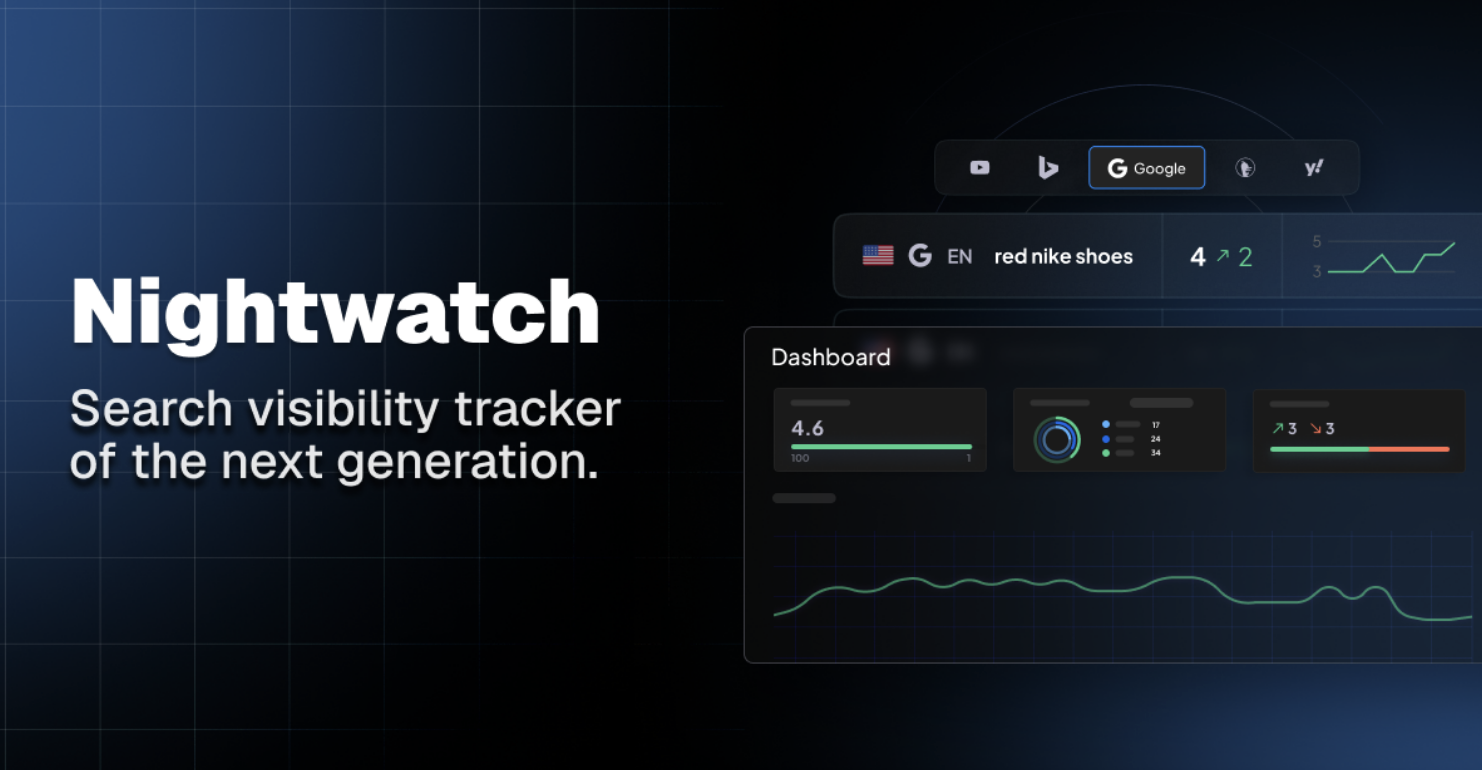
Nightwatch is a monitoring-focused SEO platform that tracks rank changes, SERP shifts, and algorithm updates in real time. This platform gives you alerts and position data without opening the dashboard. It's purpose-built for teams that need to know rank movements immediately, especially when Google releases core updates.
Key Features
- Rank tracking with an hourly refresh option
- Algorithm update tracking and correlation
- SERP feature distribution (snippets, PAA, etc.)
- Rank drop alerts and competitor movement notifications
- Mobile vs. desktop position tracking
- Geographic rank tracking by location
- Keyword grouping and clustering
- Historical rank data for trend analysis
- Local pack tracking and visibility
- Rank volatility scoring
Pros and Cons
Pros
- Excellent rank tracking speed and accuracy
- Algorithm update tracking is best-in-class
- Affordable entry point ($29/month starter)
- Real-time alerts prevent being blindsided
- Mobile and desktop ranking separated (matters more now)
- No huge enterprise pricing — scales fairly
- Good UI for quick glancing between queries
- Integration with Slack for instant notifications
Cons
- No site audit or technical SEO features
- Limited competitor analysis beyond rank comparisons
- Backlink data not included
- Can't pull historical GA or GSC data
- No keyword research functionality
- Rank data is less actionable without a broader context
- Dashboard UX is simpler than SE Ranking or Semrush
- Useful for rank monitoring, though more limited for broader SEO workflows
Pricing
- Starter: $39/month (up to 5,000 keywords)
- Growth: $99/month (up to 15,000 keywords)
- Pro: $299/month (up to 50,000 keywords)
- Annual billing saves 20%
- MCP access is included at all tiers
Use Cases
- Monitoring keyword ranking movements and SERP volatility
- Tracking algorithm updates and visibility changes
- Reviewing mobile and desktop ranking differences
- Monitoring local SEO rankings across locations
- Tracking competitor ranking changes
- Analyzing historical ranking trends over time
- Receiving alerts for sudden ranking fluctuations
5. DataForSEO
DataForSEO is an API-first platform that offers raw SERP data, rank tracking, and backlink information at a massive scale. The platform exposes this API to your LLM prompts. It's the choice when you need millions of API calls per month or custom queries that existing platforms don't support. It is often used for large-scale SEO data workflows, custom reporting, and API-driven analysis.
Key Features
- SERP API with real-time search results from any Google location
- Rank tracking across unlimited keywords and domains
- Organic backlink database with quality metrics
- Search intent classification and SERP feature detection
- Domain rating and authority scoring
- On-page SEO metrics extraction
- Keyword difficulty and competition analysis
- PPC and ad copy intelligence
- Website status monitoring
- Custom data extraction via API
Pros and Cons
Pros
- Extremely high API rate limits; can handle enterprise volume
- Flexible pricing based on actual usage; no overages
- Raw API access means custom queries are possible
- SERP data is fresh and frequently updated
- The backlink database is comprehensive
- Supports searches from any country and language
- Good documentation for custom implementations
- Works with automation and scripting workflows
Cons
- No visual dashboard; requires coding or integration
- Steeper learning curve than point-and-click tools
- Best MCP for SEO experts, not beginner-friendly
- Pricing scales up fast with heavy usage
- Requires understanding API rate limits
- Backlink data is less contextualized than Ahrefs
- No rank history as deep as dedicated trackers
- Implementation takes longer than pre-built platforms
Pricing
- Starter: $299/month (up to 150,000 API calls)
- Growth: $799/month (up to 500,000 API calls)
- Business: $1,999/month (up to 2,000,000 calls)
- Enterprise: Custom (unlimited calls, SLA guaranteed)
- Pay-as-you-go options available at $0.01-$0.05 per call
- Volume discounts for 1M+ monthly calls
Use Cases
- Handling large-scale SEO data collection and analysis
- Building custom SEO dashboards and reporting workflows
- Analyzing SERP changes across multiple regions and languages
- Supporting programmatic SEO and automation workflows
- Tracking rankings across high keyword volumes
- Integrating SEO data into custom systems and applications
- Running advanced SEO research and API-driven workflows
Implementation Strategy for MCP-Based SEO Workflows
After choosing a platform, implementation requires planning. One common mistake is connecting too many tools at once and becoming overwhelmed by the amount of data returned. It is usually better to start with a single workflow or SEO task first. For example, users focused on competitor analysis may begin with SE Ranking server, while those focused on traffic attribution may start with Google Analytics server paired with GSC.
The integration process typically takes 10–30 minutes, depending on the complexity of the tool. SE Ranking and DataForSEO require API key setup. Google Search Console server uses OAuth authentication, while Nightwatch connects through an API token. Once connected, testing smaller queries first can help confirm the accuracy of the returned data and ensure it matches the native platform dashboard.
Common integration issues include:
- Rate limiting on large queries
- Cached data returning outdated metrics
- Timezone mismatches in reporting
These issues are usually manageable when identified early. Testing workflows with real SEO data before relying on them heavily can help improve reliability. It is also useful to document query structures and reporting patterns that work consistently well.
Measuring efficiency improvements after implementation can also be valuable. Many users find that MCP integrations reduce repetitive reporting tasks and simplify SEO analysis workflows over time.
The Workflow Integration Layer
The value of these SEO integrations is not limited to a single metric or feature. One of the main benefits is workflow consolidation. Traditional SEO analysis often requires separate tools for position tracking, technical audits, analytics, Search Console data, and competitor research. Switching between multiple dashboards can slow down analysis and make workflows more fragmented.
An MCP server centralizes these workflows inside an AI-assisted environment. Instead of manually exporting data between tools, users can ask questions directly inside their LLM interface and receive responses based on connected SEO data sources. Questions such as “Which keywords are ranking but not converting?” become easier to answer without manually cross-referencing multiple reports.
This type of integration can help reduce repetitive analysis tasks and improve efficiency across SEO, analytics, and content optimization processes. It can also be useful for SaaS companies managing large amounts of search, traffic, and conversion data across multiple products or websites.
Scaling SEO Integrations Across Multiple Tools
- Phase one: Start with a single integration and become familiar with its query structure, reporting capabilities, and limitations.
- Phase two: Add a second data source if needed. For example, combining SE Ranking with Google Search Console can provide both ranking and click data within the same workflow.
- Phase three: Build prompts that combine multiple connected data sources for broader SEO analysis and reporting.
- Phase four: Introduce automation features such as scheduled reporting, ranking summaries, or recurring SEO monitoring workflows.
- Phase five: Expand integrations gradually based on actual workflow needs rather than connecting every available tool at once.
Testing different combinations is often helpful because different MCP servers focus on different strengths, including search visibility tracking, analytics, technical SEO, or large-scale API access.
Choosing the Right Platform
The right platform depends on your workflow, reporting needs, technical requirements, and budget.
- SE Ranking: Suitable for users looking for rank tracking, competitor analysis, site audits, and broader SEO workflow integrations.
- Google Search Console: Useful for workflows centered around clicks, impressions, indexing, and Google Search data.
- Google Analytics: Helpful for traffic analysis, conversion tracking, and user behavior reporting.
- Nightwatch SEO: Focused primarily on rank monitoring, SERP tracking, and algorithm visibility changes.
- DataForSEO: Designed for large-scale API access, custom SEO data extraction, and advanced automation workflows.
Many users combine multiple SEO integrations depending on their workflow. For example, combining SERP monitoring tools with Search Console and analytics platforms can provide broader visibility across rankings, traffic, and conversions.
Conclusion
The best platform depends largely on the type of workflows and SEO analysis being performed. Some platforms focus on position tracking and competitor monitoring, while others prioritize analytics, technical SEO, or large-scale data access.
Testing multiple options alongside existing workflows can help determine which platform best fits a specific use case. Factors such as reporting needs, API access, workflow automation, and data integration capabilities are often more important than feature count alone.
For users already working with platforms such as SE Ranking, Google Search Console, Google Analytics, Nightwatch, or DataForSEO, MCP integrations can help centralize SEO data and reduce manual reporting tasks inside AI-assisted workflows.
 FAQs
FAQs
MCP stands for Model Context Protocol. MCP integrations connect SEO tools directly to AI assistants and LLM workflows. Instead of manually exporting data between tools, users can retrieve rankings, analytics, backlinks, or Search Console data directly inside AI-assisted prompts.
Yes. Many LLM platforms support multiple connected SEO integrations simultaneously. Combining keyword monitoring, analytics, and Search Console data can create more complete SEO workflows.
Yes. Google Search Console itself is free to use, although standard Google API quotas still apply.
Platforms that combine search visibility tracking, technical SEO, analytics, and conversion data are often useful for e-commerce workflows. The best option depends on the specific reporting and analysis requirements.
No. Many users begin with a single integration and expand gradually based on workflow requirements and reporting needs.
The main advantage is workflow consolidation. These integrations can centralize SEO data from multiple platforms into AI-assisted workflows, reducing manual reporting and repetitive analysis tasks.
In most cases, no. Modern integrations typically use caching and optimized API responses to keep workflows responsive, although very large queries may introduce slight delays.
The best choice depends on whether the primary need is ranking visibility, analytics, Search Console integration, technical SEO, competitor analysis, or large-scale API access.
Featured Image generated by ChatGPT.
Share this post
Author

Leave a comment
All comments are moderated. Spammy and bot submitted comments are deleted. Please submit the comments that are helpful to others, and we'll approve your comments. A comment that includes outbound link will only be approved if the content is relevant to the topic, and has some value to our readers.



Comments (0)
No comment