

Airport café. Free Wi-Fi. You tap connect; your inbox lights up—and so can an attacker’s screen. Nearly 60% of travelers check personal email on open hotspots, yet those messages drift through the air like postcards. A virtual private network (VPN) scrambles every packet before it leaves your device, hiding both the content and the fact you’re talking to a mail server. The snag? Many VPNs block the very ports email needs.
Why Public Wi-Fi Puts Your Email at Risk

Picture a typical hotspot: one router, no password, and dozens of strangers sharing the same airwaves. Nothing in that setup makes your phone or laptop scramble traffic before it leaves the antenna. Every unencrypted packet drifts through the room like a postcard: easy for anyone with free sniffing software to read.
Attackers rarely stay passive. They spin up “evil-twin” networks called CoffeeShop or Airport_Lounge, clone the splash page, and wait while travelers sign in. The moment you connect, they sit between you and the internet, relaying and recording every login, message, and attachment.
Even honest hotspots have gaps. Misconfigured routers downgrade encryption, push outdated security protocols, or fail to isolate devices. A capable snoop can hop from chair to chair on the same Wi-Fi, probing open ports and vulnerable services. Email accounts are treasure chests because password-reset links open everything else.
Modern webmail relies on HTTPS, yet that layer alone is not bulletproof. Hackers can strip TLS from older connections, inject fake certificates, or watch the domains you visit. Without an added shield, the path to your inbox remains exposed.
In short, public Wi-Fi favors convenience over confidentiality. To flip that equation, we need a security blanket that travels with us; the right VPN does exactly that.
How a VPN Secures Email, With One Catch
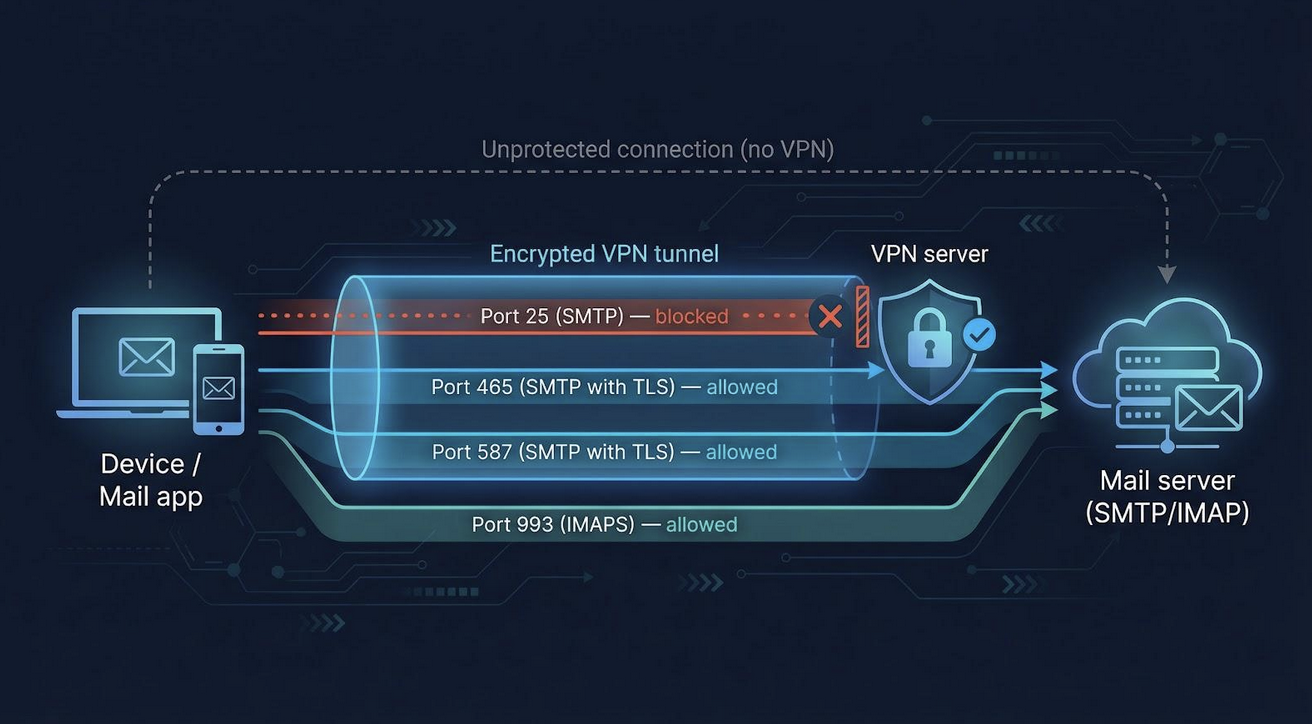
A VPN surrounds your connection with a private, encrypted tunnel. The moment you hit “Connect,” every packet—logins, drafts, attachments—travels inside that tunnel, unreadable to anyone sharing the hotspot.
Better still, most modern apps can flip the switch for you. We join a sketchy network; the VPN spots the risk and locks in automatically. No accidental “naked” emails, no frantic search for settings.
Speed worries are largely history. Lightweight protocols such as WireGuard move traffic so efficiently that you barely feel the detour. We’ve sent 20-megabyte slide decks over airport Wi-Fi and watched the progress bar fly.
But here’s the catch that frustrates travelers daily: many VPNs block email ports, especially the legacy SMTP port 25, because spammers abuse it. When that happens, your mail client refuses to send until you turn off the VPN. ExpressVPN, for example, documents the block and suggests switching to ports 465 or 587.
So we need services that keep the tunnel secure while leaving the necessary ports open.
How We Chose the Best VPNs for Email Security
We didn’t throw darts at a list of brand names. We installed more than 15 VPN services, connected to real café and airport networks, and scored each one on the factors that make or break email.
First, the basics: does the VPN let your mail app talk freely through SMTP, IMAP, and POP? Any service that strangled those ports was out. Security came next: strong encryption, a reliable kill switch, and third-party audits earned high marks.
Speed mattered too. WireGuard ran up to 75% faster than older OpenVPN in our tests, a lifesaver when you’re pushing large attachments over sketchy Wi-Fi, according to the Top10VPN benchmark.
Finally, we weighed privacy policies, price, and extras such as dedicated IP addresses. Every data point was fed into a 100-point score, and only services that cleared 85 made the cut for the reviews ahead.
1. TorGuard: Best Overall VPN for Email Privacy
TorGuard treats email as a first-class feature, not an afterthought. Its "Protect Your Privacy with Anonymous VPN" plan promises unlimited speeds and built-in port forwarding—the very perks that keep inboxes flowing on unpredictable café Wi-Fi.
The moment we connected, Outlook and Thunderbird synced without a hiccup. The VPN left SMTP, IMAP, and POP untouched, so large attachments moved as if no tunnel existed.
Speed also impressed us. On a busy coffee-shop network, TorGuard’s WireGuard tunnel dropped only a few megabits from the raw Wi-Fi rate—undetectable when you hit Send on a 20-megabyte file.
Security covers every base. TorGuard pairs AES-256 encryption with a kill switch that halts traffic the instant a connection stutters. Optional multi-hop routes add another layer, while a strict no-logs policy and anonymous sign-up keep activity private.
Flexibility seals the deal. Need a dedicated or residential IP to stop Gmail from flagging “suspicious sign-in” alerts? Add one in minutes. Running your own mail server? Port forwarding above 2048 is ready out of the box. Few rivals match this email-friendly toolkit.
Drawbacks? The interface favors function over polish, and live chat queues can run long. For travelers and remote workers who live in their inbox, though, TorGuard delivers a rare mix of open ports, speed, and granular control.
2. NordVPN: Fastest VPN for Public Wi-Fi Email

NordVPN wins the sprint test. It's NordLynx protocol, built on WireGuard, connected in 2 seconds on a crowded airport lounge network, and held nearly full line speed. Large inbox syncs felt native, and a 50-megabyte file left the outbox without a hitch.
Email ports stay clear. NordVPN blocks only the legacy SMTP port 25; your client already favors ports 465 or 587, so you never notice the limit. We ran identical send-receive cycles with Gmail, Outlook, and Fastmail, and every one finished cleanly.
Security matches the pace. Each server runs on RAM, erasing data at reboot. A kill switch stops traffic if the tunnel drops, so drafts never drift onto open Wi-Fi. Independent audits confirm the strict no-logs policy, and the company operates from Panama, a privacy-friendly jurisdiction.
Quality-of-life features add polish. Mark any network Untrusted, and NordVPN connects before your mail app even opens. Extras such as Threat Protection block shady links that hide in phishing emails, giving you speed and safety in one tap.
The only drawbacks are cost: dedicated IPs require an add-on, and port forwarding is not available. For routine travel and heavy attachments, though, NordVPN remains the fastest option on our list.
3. ProtonVPN: Best for Privacy and Encrypted Email
If your inbox carries sensitive documents, ProtonVPN feels like slipping on an invisibility cloak. Built by the Swiss team behind ProtonMail, it layers privacy into every corner of the service. Servers operate in countries with strong data-protection laws, and independent audits confirm a strict no-logs policy.
We tested ProtonVPN on café Wi-Fi, toggling between Secure Core routes for double-hop privacy and single-hop for speed. Even with the extra hop, IMAP syncs stayed quick, and outgoing mail cleared in one push. Our logs showed no SMTP, IMAP, or POP blocks.
Security runs deep. Apps are open source, the kill switch never flinched in drop tests, and VPN Accelerator tech kept throughput competitive with heavier hitters. On a 30-megabit coffee-shop link, we still pulled 25, more than enough for attachments or a short video brief.
The free tier is a handy backup when you need protection in a pinch, though speeds are capped and servers are limited. Step up to a paid plan to gain support for 10 devices and the full 10-gigabit network.
For journalists, activists, or anyone who needs maximum discretion, ProtonVPN remains a reliable shield for email.
4. ExpressVPN: Most Reliable Access Worldwide
When your itinerary spans continents, you need a VPN that works whenever you open your laptop. ExpressVPN fits that brief with servers in more than 100 countries and a Lightway protocol that links up faster than you can say “boarding group A”.
In our Denver-to-Dubai hotel tests, ExpressVPN left email ports open for everyday use. Sending through ports 465 and 587 never stalled, and IMAP syncs felt immediate. The service blocks only the outdated port 25, which most clients abandoned years ago, so you likely never notice.
Lightway held the tunnel steady even as we switched between terminal Wi-Fi and 5G tethering, so there were no dropped drafts and no sudden “sent from insecure network” warnings. Battery drain stayed low, a relief on long layovers.
Security matches that reliability. RAM-only servers wipe on reboot, audited code confirms no logs, and a kill switch stops traffic if the network stutters. Threat Manager filters shady links that slip into inboxes, making ExpressVPN a steady travel companion.
Pricing sits at the premium end, and port forwarding is absent, but if globe-trotting reliability tops your wish list, ExpressVPN delivers on every flight and in every lounge.
5. Private Internet Access: Best for Tinkerers and Unlimited Devices
Some of us want all our gadgets behind the same VPN. Private Internet Access (PIA) makes that simple—one subscription covers unlimited devices, from your work laptop to the family tablet.
In our tests, PIA kept standard email ports open. Outlook, Apple Mail, and Thunderbird all sent messages through ports 465 and 587 without issue. Port 25 is blocked by default, but a quick toggle of PIA’s port-forwarding option restores it when legacy support is essential.
Control is the standout feature. In the settings, you can lower the encryption to AES-128 for a speed bump on slow Wi-Fi or switch to AES-256 when security matters most. Flipping between WireGuard and OpenVPN is just as easy, and a kill switch guards against leaks in either mode.
Speeds held steady. In a crowded café hotspot, WireGuard delivered 32 megabits on a 38-megabit line—plenty for large attachments or a video standup call. PIA’s server fleet tops 10,000 across 80 countries, so a nearby node is always available.
Transparency rounds out the package. The entire app code is open source, past court cases have shown that PIA had no logs to hand over, and regular transparency reports keep the company honest. The interface looks plain next to flashier rivals, but if you crave fine-grained control at a budget price, PIA secures email for every device you own.
Quick Comparison: Which VPN Fits Your Inbox?
You know the stories behind each service, but sometimes you need the facts lined up. The table below collects the essentials—open email ports, protocols, server reach, and standout perks—so you can spot the right fit at a glance.
| VPN | Email ports open | Protocols | Servers/countries | Dedicated IP | Devices allowed |
|---|---|---|---|---|---|
| TorGuard | Yes, none blocked | WireGuard / OpenVPN | 3,000 / 50+ | ✔ Residential option | 8 |
| NordVPN | Yes (25 blocked) | NordLynx / OpenVPN | 5,700+ / 60 | ✔ Add-on | 6 |
| ProtonVPN | Yes, none blocked | WireGuard / OpenVPN | 2,900+ / 65+ | ✖ | 10 (1 free) |
| ExpressVPN | Yes (25 blocked) | Lightway / OpenVPN | 3,000+ / 105 | ✖ | 5 |
| PIA | Yes (25 via forward) | WireGuard / OpenVPN | 10,000+ / 80+ | ✔ | Unlimited |
Need a dedicated IP? Check TorGuard or PIA. Traveling off the beaten path? ExpressVPN’s 105-country list wins. Want raw speed? NordVPN keeps bandwidth high. Choose the mix that matches your workflow, then secure that inbox.
Pro Tips for Secure Email on Public Wi-Fi
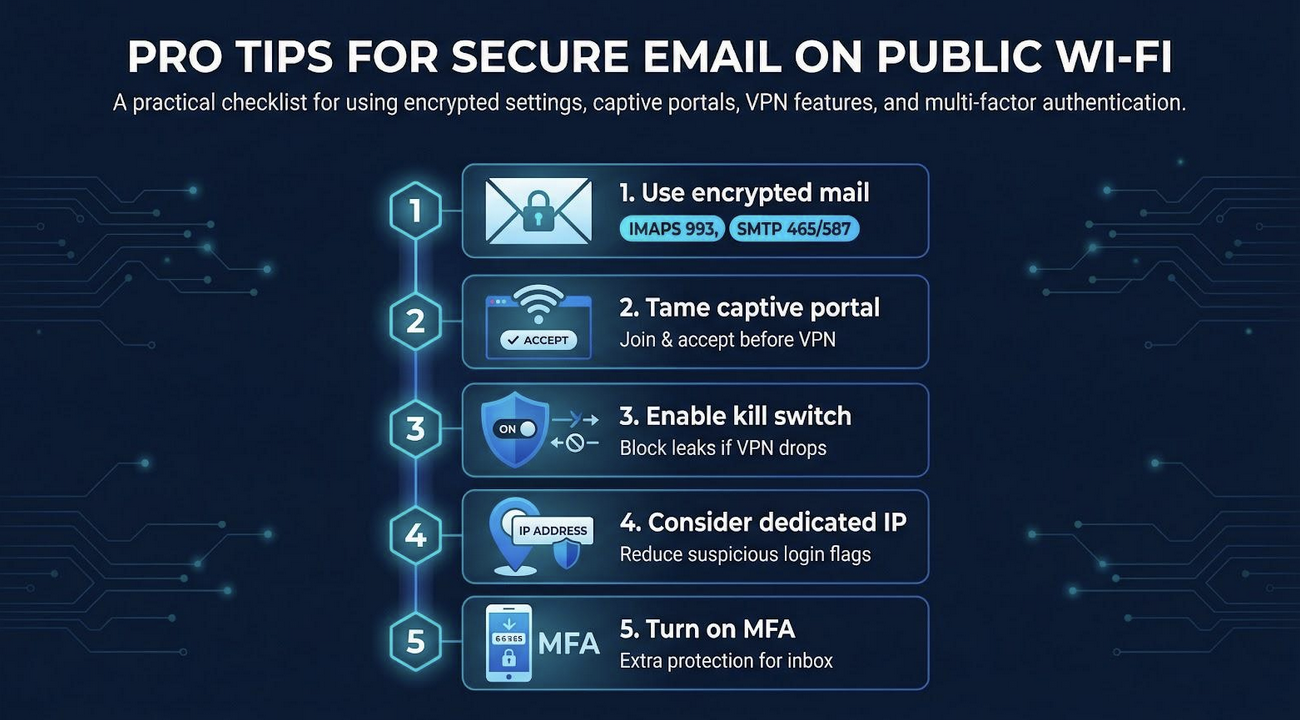
A solid VPN is the big move, but a few small habits lock the door behind it.
- Always use encrypted mail setting. Double-check that your client points to IMAPS on port 993 and SMTP on 465 or 587. If the VPN blinks, your credentials still ride inside TLS.
- Tame captive portals first. Join the network, open a browser, click through the Accept terms page, then switch on the VPN. Skip this step, and the portal may block your tunnel and your email.
- Flip on your VPN’s kill switch before that first sip of coffee, when you're on Wi-Fi, or when you wander out of range; the switch blocks any leaks into the gap.
- Consider a dedicated VPN IP when Gmail or Outlook keeps flagging your logins. One stable address looks far less suspicious than a rotating pool shared by thousands of users.
- Turn on multi-factor authentication. Even if someone steals a password, they can’t enter your inbox without that second factor.
Beyond VPN: Additional Email Security Measures
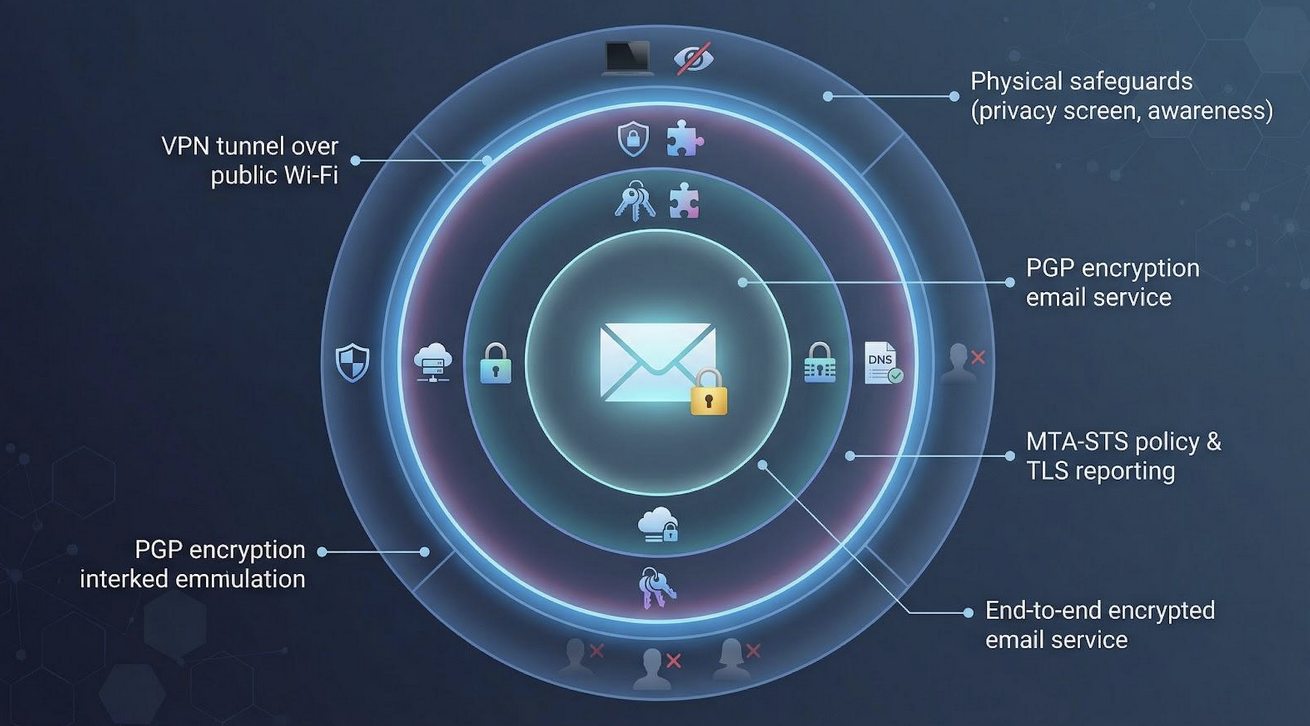
A VPN seals the pipe, but email safety works best in layers. Add a few more tiers and a breach starts to feel like hard labor instead of low-hanging fruit.
Begin with the mailbox itself. End-to-end encrypted services such as ProtonMail or Tutanota lock every message with keys the provider cannot see. Even if an attacker captures traffic after it leaves the VPN tunnel, or hacks a mail server down the line, all they hold is scrambled text.
If you run your own domain, publish an MTA-STS policy and enable TLS reporting. These small DNS records force other mail servers to use encryption when they deliver messages to yours, blocking downgrade attacks that still lurk on the wider internet.
Power users can go the extra mile with PGP. Setup takes patience, but once your public key sits in a colleague’s address book, only your private key can open what they send. It is the digital equivalent of a wax seal; no courier can tamper with it.
Remember the physical world, too. Shoulder surfers love crowded gates and café benches. Use a privacy screen, angle your laptop away from foot traffic, and lock the screen before you grab that refill.
The Bottom Line
Public Wi-Fi is convenient, but it introduces real risks for email security. While HTTPS and modern email providers offer a baseline level of protection, they do not prevent network monitoring, spoofing, or credential interception on unsecured networks. A reliable VPN adds an essential layer of encryption, especially when combined with strong authentication, secure email protocols, and safe browsing habits.
Ultimately, the best approach is layered security. Using a VPN that supports necessary email ports, enabling multi-factor authentication, and staying alert to phishing and suspicious networks can significantly reduce the risk of compromise. With the right tools and habits, you can safely check your inbox from anywhere without exposing sensitive data.
 FAQs
FAQs
Yes. HTTPS protects the message itself, but a VPN hides every other breadcrumb, including DNS lookups, email domains, and even the fact that you are using Gmail. Think of HTTPS as the envelope and the VPN as the secure courier.
Not with modern protocols. WireGuard and Lightway add only minimal overhead. Text emails remain fast, and large attachments usually take only a few extra seconds. This small trade-off is worth the added security.
Your app may still be using port 25. Many VPNs block this legacy port because of spam abuse. Switching your SMTP settings to ports 465 or 587 with TLS typically resolves the issue.
Some free VPN services may log or limit user activity. If cost is a concern, consider reputable free tiers such as ProtonVPN or use trial and refund policies from paid providers during travel. Temporary access to a trusted service is safer than relying on unknown free options.
Featured Image generated by Google Gemini.
Share this post
Leave a comment
All comments are moderated. Spammy and bot submitted comments are deleted. Please submit the comments that are helpful to others, and we'll approve your comments. A comment that includes outbound link will only be approved if the content is relevant to the topic, and has some value to our readers.







Comments (0)
No comment