

There is a standard reassurance that circulates whenever IP addresses come up in privacy discussions: your IP does not reveal your identity. Technically, that is true. Your IP address, on its own, does not contain your name, email address, or home address. What it does contain, however, is far more useful to the people who collect it than that framing suggests.
Your IP address reveals your approximate geographic location, typically accurate to the city level with around 80–90% precision. It identifies your internet service provider. It also creates a persistent, recognizable signal that follows your device across websites, services, and ad auctions — often without your knowledge or active participation. In the real-time bidding infrastructure that powers much of online advertising, it can be shared with hundreds of companies in the milliseconds it takes a webpage to load.
That is nothing. It is worth understanding in some detail.
What Your IP Address Actually Reveals
IP geolocation works by mapping IP address ranges to physical locations using databases maintained by specialized vendors. Country-level accuracy approaches 99%. City-level accuracy is roughly 80–90%, meaning that for many users, any website they visit can determine the city they are browsing from without any interaction on their part. This information is routinely used for content localization, pricing decisions, access controls, and advertising targeting.
Beyond location, your IP address identifies your ISP, the company that supplies your internet connection. That information, combined with your approximate location, narrows the field considerably. Your ISP knows exactly who you are and which IP address was assigned to your account at any given time. If your IP address is associated with activity that prompts a legal data request, the path from IP to identity runs directly through your ISP’s records.
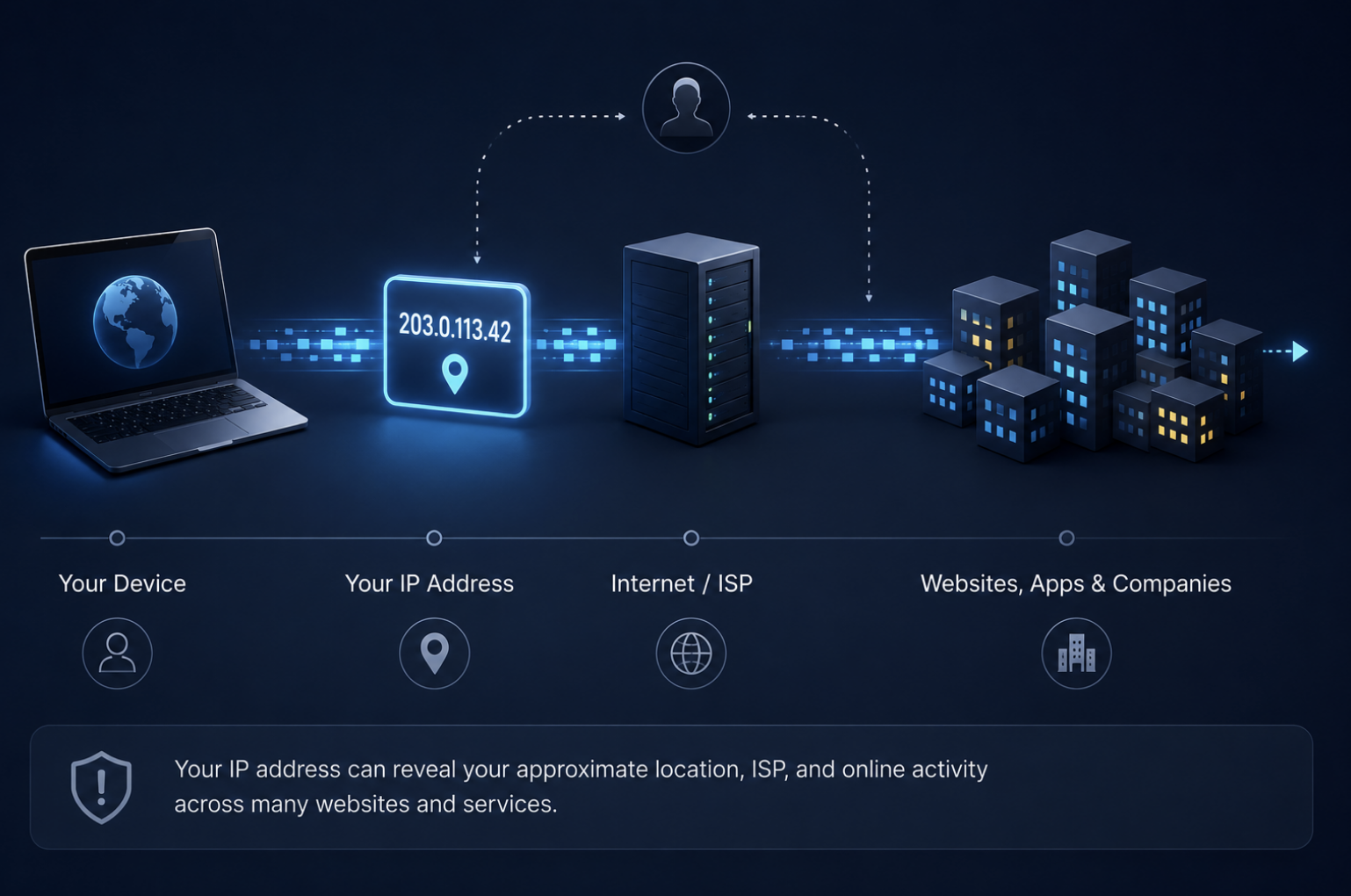
Dynamic IP addresses, the kind most home internet connections use, change periodically and offer some practical privacy benefit. But “periodically” often means days or weeks in practice, and during that window, your IP functions as a stable identifier that links browsing sessions across websites, services, and time. Under GDPR, the European Court of Justice has ruled that dynamic IP addresses constitute personal data when a website operator has legal means to obtain identifying information from an ISP, which many do under the right circumstances.
The Real-Time Bidding Problem Most People Do Not Know About
This is where the scale of IP-based data collection becomes genuinely surprising. In the milliseconds between a webpage beginning to load and an ad appearing on your screen, an automated auction takes place. Your browser sends a bid request to an advertising exchange containing what is known as bidstream data, a package of information that includes your IP address, device type, approximate GPS location, browser fingerprint, and browsing behavior. That bid request is then broadcast to dozens, sometimes hundreds, of demand-side platforms representing advertisers bidding for the right to show you an ad.
Here is the part that received regulatory attention in early 2026: every company that receives the bid request gets access to your data, not just the one that wins the auction. Losing bidders in real-time auctions still walk away with your bidstream information, including your IP address. The Electronic Frontier Foundation and others have documented this as a mechanism by which data brokers can systematically harvest personal data on an enormous scale, simply by participating in advertising auctions as nominal bidders.
“Unlike a typical auction, where a winning bidder walks away with a product, real-time bidding leaves every participant holding something: your data.” — IAPP, 2026
In January 2026, a proposed class-action settlement with Google included a requirement for a new privacy control, the “RTB Control,” that would prevent IP addresses and other identifying signals from being included in bid requests for users who opt in. The fact that this had to be litigated into existence says something about how the system was designed to operate by default.
ISP Visibility and What It Means in Practice
Your ISP occupies a uniquely privileged position in this picture. Because all of your internet traffic flows through its infrastructure, it can see every connection your device makes — which services, at what times, and how often — regardless of whether those connections are encrypted. HTTPS protects the content of what you send; it does not hide the fact that you are communicating with a particular service.
In many jurisdictions, ISPs are legally permitted to log this connection-level data and, in some markets, to share or sell it. The result is that your browsing activity — not the content, but the pattern — may be monetized independently of anything you have agreed to with the websites you visit.
See What Your Connection Currently Shows
Before making any adjustments, it is useful to see what information is actually visible when you connect to a website. An IP lookup tool shows what your current connection reveals to any site you visit: your public IP address, the ISP it is registered to, your approximate location, and in some cases your autonomous system number — the network identifier that specifies which provider’s infrastructure you are on. Running this check takes less than a minute and makes the abstract concrete. Many people are surprised by the specificity of the location data.
It is also worth running a WebRTC leak check separately. WebRTC is a browser feature used for real-time communications, such as video calls and peer-to-peer file transfers, that can expose your real IP address even when you are connected to a VPN because it uses a different communication path. If your browser has WebRTC enabled and your VPN does not block it, a website can request your real IP alongside the VPN’s IP and compare them.
How a VPN Changes What Others Can See
A VPN for Windows addresses IP-based tracking at the network layer. When you are connected, websites and advertising exchanges see the VPN server’s IP address rather than your own. The bid request sent in a real-time auction contains the VPN server’s location, not yours. Your ISP sees an encrypted tunnel to the VPN server rather than a list of services you are connecting to.
This does not make you untraceable. If you are logged into Google or Facebook, those platforms know who you are regardless of your IP address. Cookies, device fingerprints, and account-level tracking persist independently of IP masking. What a VPN does is remove one of the most persistent cross-site identifiers from the picture, reducing the completeness of the profile that advertising networks can build about your browsing behavior without your participation.
Final Thoughts
Your IP address may not contain your name, but in the modern advertising and data brokerage ecosystem, it functions as a highly useful behavioral identifier. It reveals where you are connecting from, which network you use, and helps link browsing activity across websites and services over time. In systems like real-time bidding, that information can circulate far beyond the site you intentionally visited.
Privacy online is rarely about becoming invisible. It is usually about reducing unnecessary exposure and limiting how easily separate pieces of data can be connected into a detailed profile. Understanding what your IP address reveals, and how tools such as VPNs change that visibility, is part of making more informed decisions about how you move through the internet.
Share this post
Leave a comment
All comments are moderated. Spammy and bot submitted comments are deleted. Please submit the comments that are helpful to others, and we'll approve your comments. A comment that includes outbound link will only be approved if the content is relevant to the topic, and has some value to our readers.
 DNS Lookup
 Search a Person
 Inspect suspicious links
 Data Breach Check





Comments (0)
No comment