

Community Security: Why In-App Hosted Chats are Safer than External Platforms for User Data Privacy
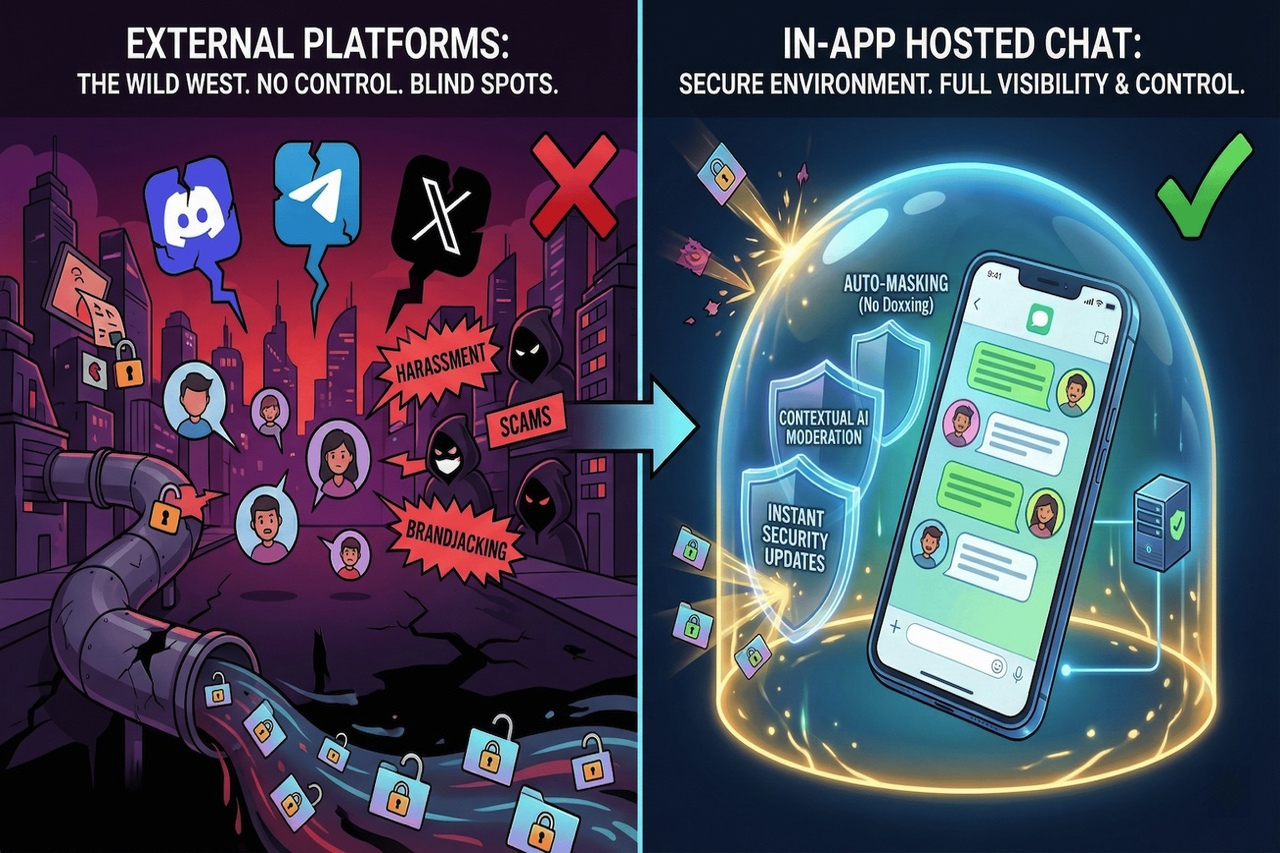
The answer to community-building over the last five years was, “Just create a Discord server or a channel on Telegram.” This is everything you could want as a shortcut—not to write code, not handle servers, and no development cost.
However, the same trick has turned into a security risk for product owners.
But when you port your community over to a third-party platform, it is not just a conversation you are outsourcing; it is your users’ safety and privacy, and the in-app community you could have kept under your own rules. You are putting your loyal customers into a “wild west” environment that you have little to no control over and limited visibility into what happens to them there.
Here's why: It’s not just that moving that conversation back inside your app is better for engagement. It’s one of the most practical ways to improve security and privacy.
The Data Black Hole of External Platforms
The problem with hosting your community on social platforms is that you are flying blind. For example, if a user is being harassed on X (Twitter) or is being scammed in a Telegram group, you may have no visibility into it. You also can’t reliably connect that incident to the user profile in your own system.
By hosting the community inside your app, you get the full context. You take scattered signals and turn them into actionable insight. You know who the user is, and you can enforce your own safety standards instead of relying on someone else’s.
The “Block” Button Isn’t Enough for Real Safety
It becomes toxic in no time without AI chat moderation. If you have tried moderating large Discord servers before, you will understand what I mean. Moderating at scale is not feasible. You cannot monitor it all day. It requires too much hands-on workforce.
This is where integrated in-app solutions differ from the usual “text box” system. The system is developed with layered moderation intended to prevent threats from reaching the screen.
1. Preventing Oversharers
One of the most prevalent areas where users are at risk isn’t hate speech; it’s users unintentionally doxxing themselves. This can occur where a person writes ‘This is my credit card for payment for the subscription’ or ‘This is my phone number.’
A robust in-app layer can automatically identify and mask this information, reducing fraud risk. This kind of protection isn’t typically provided out of the box for most community setups. Also, it is possible to prevent sending phone or bank account numbers in chat to inform users at once; oversharing is not good.
2. Context Over Keywords
The “dirty word” filter is no longer effective. Trolls can still cause harm without using obvious trigger words. That’s where contextual AI moderation matters: it can evaluate intent and sentiment in milliseconds, not just match a list of terms.
The Brandjacking Threat
There is a risk specific to external platforms that very few people talk about: Brandjacking.
When your users are gathered on a platform you don’t control, they’re naturally exposed to competitor outreach and aggressive acquisition tactics—links, offers, and “better deals” posted right next to your own content.
By keeping the community inside your app, you create a more protected environment. Your users can engage with your content and your brand with less exposure to scams, spam, and competitor funneling.
The Tech Edge: Why WebView Updates Faster than SDKs
Security risks change rapidly. A new kind of spam bot, a new means of harassment, could emerge overnight.
If your chat solution relies on traditional SDK updates, it can be painful to respond quickly. You update the code, ship an app store release, and then wait for users to update. Until then, many users remain exposed.
Some architectures address this challenge by using WebView-based components, which allow security rules, moderation logic, and analytical models to be updated on the server side. This approach makes it possible to deploy changes more quickly, without requiring end users to install an application update.
Conclusion
Safety isn't something nice to have; it's a retention factor. Users don’t stay in a toxic space.
By bringing your community into the app rather than relying on third-party services, you regain control of the environment. You reduce scam risk with auto-masking, protect your brand with contextual moderation, and keep the most critical signals where they belong: under your control.
Related Articles
July 1, 2026
How Manifest V3 Is Reshaping the Browser Extension Ecosystem in 2026
Manifest V3's shift from dynamic filtering to declarative rules weakened Chrome ad blockers and pushed filtering to network-level tools and alternative browsers by 2026.
Read More
June 30, 2026
How to Block YouTube on Android, iPhone, Windows, and Mac
Step-by-step guide to blocking YouTube on Android, iPhone, Windows, Mac, and using monitoring apps.
Read More
June 27, 2026
7 Best Parental Control Apps for Families in 2026
Qustodio handles screen-time and web filtering well but lacks messaging visibility. Here are seven alternatives that address that and other gaps.
Read More
Comments
Comments are available to signed-in users and are moderated to keep the discussion useful and respectful. Spam, automated submissions, and low-value promotional comments are removed. Outbound links may be approved when they are relevant and genuinely helpful to readers, but they are displayed as plain text rather than clickable hyperlinks.
No comments have been published yet.
Please sign in to submit a comment.