

IP Reputation & Risk Scores: What They Reveal About Users

Most security decisions are made automatically before a user logs in to the website. Long before a click, scroll, or form submission, a connection already carries technical signals that describe how a user may behave, where traffic comes from, and more. These underlying signals often provide additional context that complements early on-site behavior.
IP reputation and risk scores provide context about network history, infrastructure type, request consistency, and abuse patterns of incoming traffic. This information helps your safety tools protect you from fraudsters, without blocking legitimate users. Let’s examine how IP lookup tools can help businesses analyze traffic, interpret user intent, and strengthen both security and overall online trust.
What Is an IP Risk Score & How To Determine It
An IP risk score is a numerical rating (typically 0-100 or 0-1) indicating the likelihood that an examined IP address is involved in malicious activity. IP lookup tools review addresses based on key parameters, such as network type, geolocation signals, and VPN usage.
IP lookup tools provide context about the addresses being examined, helping businesses distinguish legitimate users from potential fraudsters. A low score indicates there is no cause for concern. When the score climbs, it doesn’t automatically indicate abuse or a poor IP reputation, but it does justify an extra check before the request is treated as legitimate.
Network Type and ASN
IP addresses don’t exist on their own. Each one is part of a larger network. That’s why it’s crucial to analyze Autonomous System Numbers (ASNs), as they show the broader network behind a connection. By examining it, IP lookup tools help teams judge whether requests are likely human or automated.
Traffic from residential and mobile ISPs has irregular interaction patterns and varied session lengths. As strange as it sounds, this irregularity is often a strong indicator of human-driven traffic.
Traffic from corporate networks may originate from legitimate business users, internal research, or competitor analysis. You should examine other parts of their behavior to determine their actual intentions.
Data center IPs, by contrast, are almost exclusively used by bots and automated scripts. It might be a harmless scraper, but it's definitely not a person sitting in a cafe with a laptop.
Request Behavior
Request behavior is essentially the "digital body language" of an IP address. By analyzing user behavior signals, you can quickly separate organic curiosity from programmed logic.
The best way to spot traffic from actual humans exploring your website or app is to look for inconsistencies. People browse at an uneven pace, pause between clicks, and move through pages slowly as they curiously examine each page.
Automated traffic generates requests at short and consistent intervals, repeats the same actions, or moves through pages far faster than a person realistically could.
Just like in other cases, it’s just another level of context. A high volume of requests from a known data center IP address looks very different from similar behavior originating from a residential network. By analyzing request behavior alongside other signals, IP risk-scoring systems can identify traffic that warrants closer inspection.
Geolocation Signals
IP lookup tools can get geo information from a user’s IP address, ranging from country and city to, in some cases, ZIP code level. Geolocation data measures the stability of users’ "digital footprint."
When an IP consistently maps back to the same city, it usually indicates that the user is browsing your website from a stable location — their home, office, favorite cafe, etc. Knowing the approximate geo data of visitors is especially important for local businesses.
Imagine you provide plumbing services in NYC and run paid ads targeting its residents. But during the audit, you discover that nearly a third of your incoming traffic comes from Albany. While it’s technically still in New York state, those users live too far to be considered your target audience. This situation illustrates why accurate geospatial data is critical.
Sometimes a user may still be located in your area, even if their IP suggests otherwise. Sudden location changes often indicate VPN or proxy usage. It’s impossible to open a website in one part of the world (New York, North America) and then open it from a different continent (such as Europe or Asia) a few minutes later.
It’s physically impossible to travel that fast. Noticing this kind of activity is a core part of VPN detection, as that’s how systems automatically identify when users are masking their real location.
But instead of blocking access to users with inconsistent geodata, security systems respond more gently by adding extra verification steps. This approach keeps your platform secure and respects privacy. It also ensures that legitimate visitors aren’t blocked from using a VPN on public Wi-Fi.
Abuse and Blacklist History
During checks, IP lookup tools consult blocklists to determine whether the IP address being reviewed has been associated with spam campaigns, fraud attempts, credential stuffing, or other forms of abuse.
A clean history doesn’t guarantee incoming traffic is entirely safe, but it does reduce the level of concern. Meanwhile, you should take a closer look at IP addresses with poor reputations that repeatedly appear in abuse reports from email providers, security services, or threat intelligence sources.
This kind of history is most useful when viewed alongside current behavior for fraud detection. Clean activity from an IP that has been flagged only once may still pass. But if the system detects suspicious activity from an IP address on multiple blocklists, it immediately performs an additional check.
What Is IP Reputation?
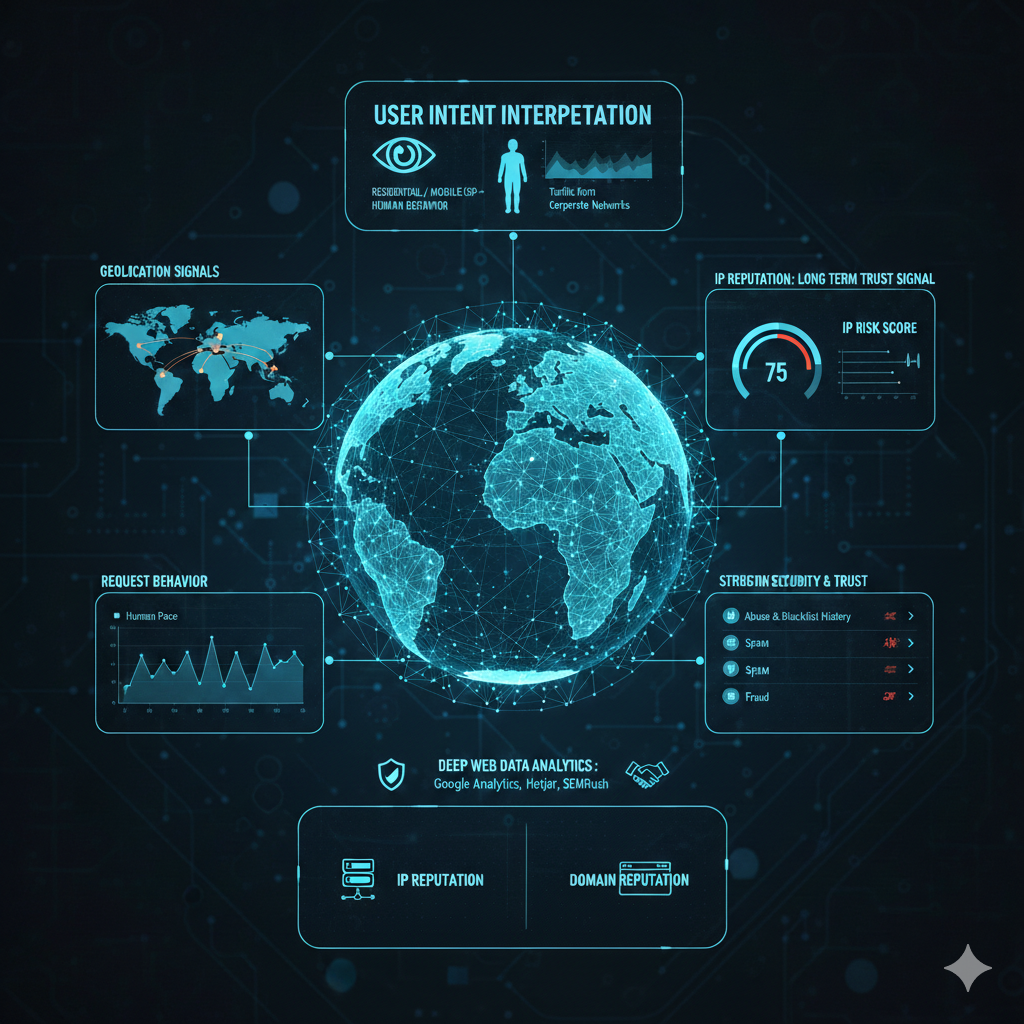
IP reputation is a trust signal that reflects how an examined address has behaved over time. It relies on many of the same signals used in risk scoring, but views them through a historical lens to determine how the inspected IP behaves in the long term.
This historical view adds stability. While risk scores react to short-term signals, IP reputation builds a longer record, helping systems decide how cautiously to treat traffic before it even enters your platform.
How IP Lookup Tools Strengthen Consumer Behavior Analysis
Traditional behavior analysis focuses on what users do on a website: which pages they visit, how long they spend on each page, where they drop off, and so on. While these signals are helpful, they only show first-party data and give limited insight into who the user might be.
IP lookup tools reveal network-level and infrastructure information. They show where the traffic originated and the visitor's potential intent. By connecting on-site behavior with network-level signals and IP reputation, teams can interpret actions more accurately.
This context helps avoid false assumptions in consumer behavior analysis. Basically, the more data your team has about the user, the more precise the picture becomes. Teams can prioritize real leads, tailor messaging, and distinguish genuine interest from automated or low-value traffic.
Understanding IP Signals in the Context of Real User Behavior
Every IP-related parameter should be interpreted with caution, as it provides just a baseline context for your cybersecurity risk analysis. A modern lifestyle creates many “borderline” cases in which even legitimate users can exhibit “risky” signals.
It’s a common practice for ISPs to use large-scale NAT (LSN) to assign a single public IP address to multiple households, which can make legitimate traffic appear to originate from a single shared source. This can trigger false-positive risk signals, lowering IP reputation.
The same false-positive case may apply to people who use corporate VPNs, shared IP addresses in coworking spaces, or in hotels. A visitor may browse your website on a device connected to a corporate VPN while placing an order for their team. In such cases, treating any mildly suspicious IP as a threat and blocking it outright backfires.
This is why deep web data analytics is essential for business growth. IP lookup solutions unlock their full potential when used alongside analytics that can track on-site behavior, traffic sources, engagement depth, conversion paths, and purchase flows.
Tools like Google Analytics 4, Search Console, Hotjar, HubSpot, or SEMRush help businesses move beyond isolated technical flags and toward a holistic understanding of how users interact with their website.
Your Site’s IP Reputation Is Part of the Equation
While you are focused on examining incoming traffic, it’s important to remember that your own site’s IP reputation is equally critical. Just as you evaluate visitors by accessing their IP reputation score, the internet evaluates you. If it's too weak, you’ll notice the following outcomes:
- Email deliverability issues: ISPs block emails from businesses whose IP addresses are compromised. You may create the best newsletters, but leads won’t even see them.
- Blocklist listings: Appearing on global blocklists is a public red flag. It triggers browser warnings that tell potential customers your site isn't safe, even if your content is legitimate.
Don’t use the terms "IP reputation" and "domain reputation" interchangeably. While connected, they represent two distinct layers of digital presence.
IP reputation reflects a server's history and the legitimacy of the underlying network. Domain reputation is an evaluation of your brand's specific track record across the web.
While a clean IP reputation is essential, it won’t save a domain that has been flagged for poor email practices or security vulnerabilities. You need both to maintain a high trust score with modern browsers and ISPs.
Domain and IP reputation are invisible trust signals that shape how your business is perceived online, often before a user ever interacts with your brand. As part of online reputation management, maintaining a clean IP and domain reputation helps ensure your messages are delivered, browsers and ISPs trust your site, and your brand is not penalized due to infrastructure-level issues.
Conclusion
IP reputation and risk scores help businesses look beyond first-party data by providing critical background context on every user. Each examination parameter adds crucial context to on-site actions, allowing teams to distinguish genuine interest from bot traffic or potential cyber attack.
When interpreted correctly, these signals help businesses engage real users while keeping their web platforms safe. By combining IP intelligence with broader behavioral analytics and reputation practices, companies can enhance security without sacrificing the user experience.
Featured Image generated by Google Gemini.
Related Articles

April 28, 2026
Mask Your IP on Windows Without Wrecking Your Daily Workflow
People who live in IP tools usually know too much to trust slogans and too little time to babysit every session. That is why this section matters. In IP lookups, DNS tooling, and w...
Read More
November 24, 2025
Tools And Techniques To Reveal Masked IP Behavior Online
The internet has become an intricate web of data exchange that both empowers users and poses unique challenges in terms of privacy, security, and regulatory compliance. With the ri...
Read More
August 11, 2025
Digital Footprints and Privacy: How IP Addresses Can Reveal More Than You Think
In the vast and interconnected world of the internet, every action we take leaves behind a digital trace. Whether it's visiting a website, sending an email, or using an app, most o...
Read More
Comments
Comments are available to signed-in users and are moderated to keep the discussion useful and respectful. Spam, automated submissions, and low-value promotional comments are removed. Outbound links may be approved when they are relevant and genuinely helpful to readers, but they are displayed as plain text rather than clickable hyperlinks.
No comments have been published yet.
Please sign in to submit a comment.