

How Hackers Use IP Addresses and How to Stop Them
Every time you load a webpage, stream a video, or send an email, your device tosses out a unique numerical label: your internet address. To most people, this is just boring background info. But to attackers, it's as interesting as a treasure map. That address is often the starting point for snooping, intrusion attempts, and targeted abuse. Getting a handle on how those attacks go down is about the most practical thing you can do to protect yourself.
Before exploring these risks, it helps to build a simple habit: before clicking an unfamiliar link, signing in to a new website, or downloading a file, take a moment to verify the destination. Website trustworthiness tools can help users quickly assess a site and identify potential warning signs. This step is important because many IP-related attacks do not begin with advanced technical methods but with phishing links or fake login pages designed to capture credentials.
What Is an IP Address Business, and Why Do Attackers Want It?
An IP address is a number that every device on a network uses to identify itself. IPv4 is the traditional four-part format that remains widely used, while IPv6 uses a longer string with some letters in it. Your public address is the number that your ISP assigns you, and that's visible to the outside world. Your private IP, on the other hand, is only good for use on your home network.
Can your IP address be hacked? It's not like you'd type it in wrong and get locked out like with a password. But it's a sort of pointer. With your IP, an attacker can probably identify where you are, who your ISP is, and which ports are open on your network. This is often enough to initiate targeted attacks. The reason attackers like them is that they are easy to get – every server you connect to logs your IP, and clicking on a link in an email or joining an online game session gives it away in a split second.
What Can Hackers Do With Your IP Address?
Reconnaissance and Port Scanning
Attackers use automated tools to see which ports on your public-facing address are open and which services are running. If they find an open port 22, it's probably SSH; port 3389 indicates Remote Desktop Protocol (RDP) is running. This gives them a list of targets to go after, using known exploits or usernames and passwords. And this is it – the most basic form of IP address hacking: gathering intel before they even start causing trouble.
Brute-Force and Credential Attacks
Once they know what services are running on your IP, attackers start trying to guess passwords – doing this millions of times, looking for the right combination. RDP and SSH are both super popular targets. According to Verizon's Data Breach Investigations Report, one of the most common ways hackers gain access to a system is through brute-force attacks. If you leave your IP exposed, it's just a matter of time before they get in.
DDoS Attacks via Botnets
Distributed Denial of Service (DDoS) attacks flood an IP with traffic until it cannot handle any more, and the service goes down. Gamers, streamers, remote workers, and small businesses are all super vulnerable. Cloudflare Radar DDoS insights confirm that these types of attacks are growing in size and frequency. All they need is your public-facing address to start a botnet and send tons of traffic your way.
IP Spoofing
An IP spoofing attack works by faking the source address on network packets, essentially pretending to be a trusted device to sneak past access controls or amplify a DDoS attack. How to detect IP spoofing? Keep an eye out for traffic popping up from unexpected geographic regions, packets that don't match, and failed reverse-path forwarding checks – these can all be signs that something is off.
As for how to prevent IP spoofing, well, it's all about putting up the right barriers: make sure your router enforces strict packet filtering, use protocols that demand authentication, like IPSec or TLS, and get in touch with your ISP to make sure they've got anti-spoofing measures in place.
Account Takeover
Many platforms flag logins from unusual locations or networks as suspicious. However, attackers can bypass these controls by using residential proxy networks—real home IP addresses that make their activity appear local and legitimate. Because IP addresses are also used in fraud detection and risk-scoring systems, a compromised IP, such as one infected by a botnet, may be exploited to facilitate account takeovers for other users without the owner’s knowledge.
The Data Breadcrumb Problem
Your IP address rarely exists in isolation. In practice, it is often combined with other data points collected across the web. For example, oversharing on social media, revealing technical details on public forums, or failing to remove metadata from images can turn small pieces of information into valuable intelligence for attackers. As a result, limiting the amount of personal and technical information you share online can significantly reduce the risk of targeted attacks linked to your IP address.
Warning Signs Your IP May Be Under Attack
- Your connection suddently becomes unstable, with no warning – that's a sign of DDoS activity.
- You start getting login alerts from places you've never logged in from on accounts that use IP-based security checks.
- Your router logs show a ton of connection attempts on ports you never use (and if those ports are 22, 23, 3389, or 445, that's particularly suspicious).
- Your devices are acting a bit weird – if they start sending out a lot of traffic without your input, that may well be a sign of a botnet infection.
- Blocklist checkers start flagging your address as hacked; in other words, an IP address-hacked flag. At that point, it's clear that your device has been co-opted into some malicious activity.
Don't assume this is all just routine. More often than not, these patterns will be a sign of something more serious on the way.
What to Do If Someone Has Your IP Address
5 Steps to Take If Your IP Is Exposed
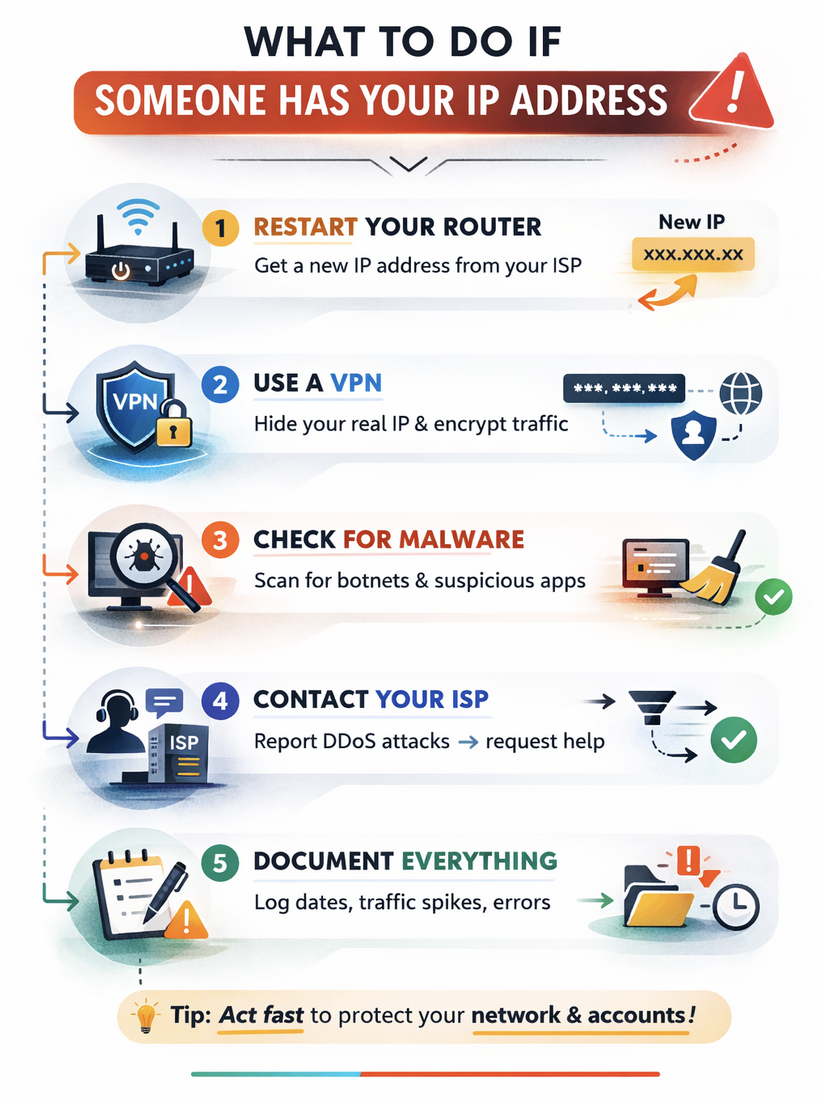
If you find out that someone has your IP address, the steps you take will depend on the context. Here are some basic steps that generally apply:
- Restart your router: Chances are, your ISP will assign a new dynamic address on reconnection, which will take the target off you.
- Use a VPN: This will mask your real public address and make it much harder for anyone to target your network.
- Scrub for malware: If you find any processes on your machine that are making connections without your input, that's a sign of a botnet infection.
- Get in touch with your ISP: If you're getting hit with DDoS attacks, they should be able to apply some filtering upstream or reassign your IP block.
- Document everything: Make a note of when incidents occur, how much traffic is going on, and any error messages you get (you never know when you might need to escalate this).
Practical Protection for Your Home and Small-Business Network
Most of the problems with IP attacks boil down to basic slip-ups in your network settings. The good news is these are super easy to fix. Here are some effective and accessible protections you can implement right away:
| Protection area | What to do |
|---|---|
| Router hardening | Change default admin credentials—Disable remote management. Turn off UPnP. Update firmware regularly. |
| Wi-Fi security | Use WPA3 or WPA2-AES. Set a strong passphrase. Create a separate guest network for IoT devices. |
| Multi-factor authentication | Enable MFA on every account that supports it – especially email and admin portals. It breaks credential-based attack chains. |
| Rate limiting | Configure rate limits on web-facing services to slow brute-force attempts. Most modern firewalls support this natively. |
| Firewall / WAF | Block inbound traffic on unused ports. A Web Application Firewall filters malicious requests before they reach your server. |
| Patching | Keep OS, firmware, and applications updated. Most exploited vulnerabilities have patches available at the time of attack. |
| Logging | Enable router and system logging. Repeated failed logins or unusual outbound traffic volumes warrant investigation. |
The Link Is Just the Tip of the Iceberg
Network-layer security alone is not sufficient, as it represents only one part of a broader defense strategy. Many IP-targeted attacks begin with social engineering, such as phishing links or malicious downloads that install malware without the user’s awareness. In many cases, the initial compromise occurs in the browser rather than at the network level. Taking a few moments to verify whether a website is legitimate before clicking or entering credentials can significantly reduce the risk of attack.
The Bottom Line
Your public network address is never actually meant to be secret – the internet relies on it being visible. What you can control, though, is how much extra info an attacker can get about you, and how well protected your network is when they do come looking.
The risks from IP address hacking are all too real, but the good news is you can manage them. Just keep your firmware up to date, use a VPN when you're on suspicious networks, and check your router logs. Before you click any untrusted links or hand over your login details to a new site, take a moment to make sure the destination is legit. Habit that, and you'll shut down 99% of IP-driven attacks before they even get started.
Featured Image generated by Google Gemini.
Related Articles
February 20, 2024
Protect Yourself - Five Essential Tips for Safeguarding Your Online Identity in 2024
Your digital identity is used to prevent fraud, especially if you’re logging into a bank account. However, there are unethical individuals out there who sell your information to th...
Read More
October 31, 2022
Students Wonder: How Can Police Track Your Phone and IP Address?
Modern mobile phones and gadgets have GPS systems that constantly track and save our location data. This function comes in handy if you need to find a missing phone or a faster rou...
Read More
April 20, 2022
How to Keep Your Child Safe Online
Whether you're browsing online, checking out the latest video game, searching through Facebook, or another online activity, there are many things you and your children can be doing...
Read More
Comments
Comments are available to signed-in users and are moderated to keep the discussion useful and respectful. Spam, automated submissions, and low-value promotional comments are removed. Outbound links may be approved when they are relevant and genuinely helpful to readers, but they are displayed as plain text rather than clickable hyperlinks.
No comments have been published yet.
Please sign in to submit a comment.