

Leading WordPress Hosting Platforms for Professional Web Designers
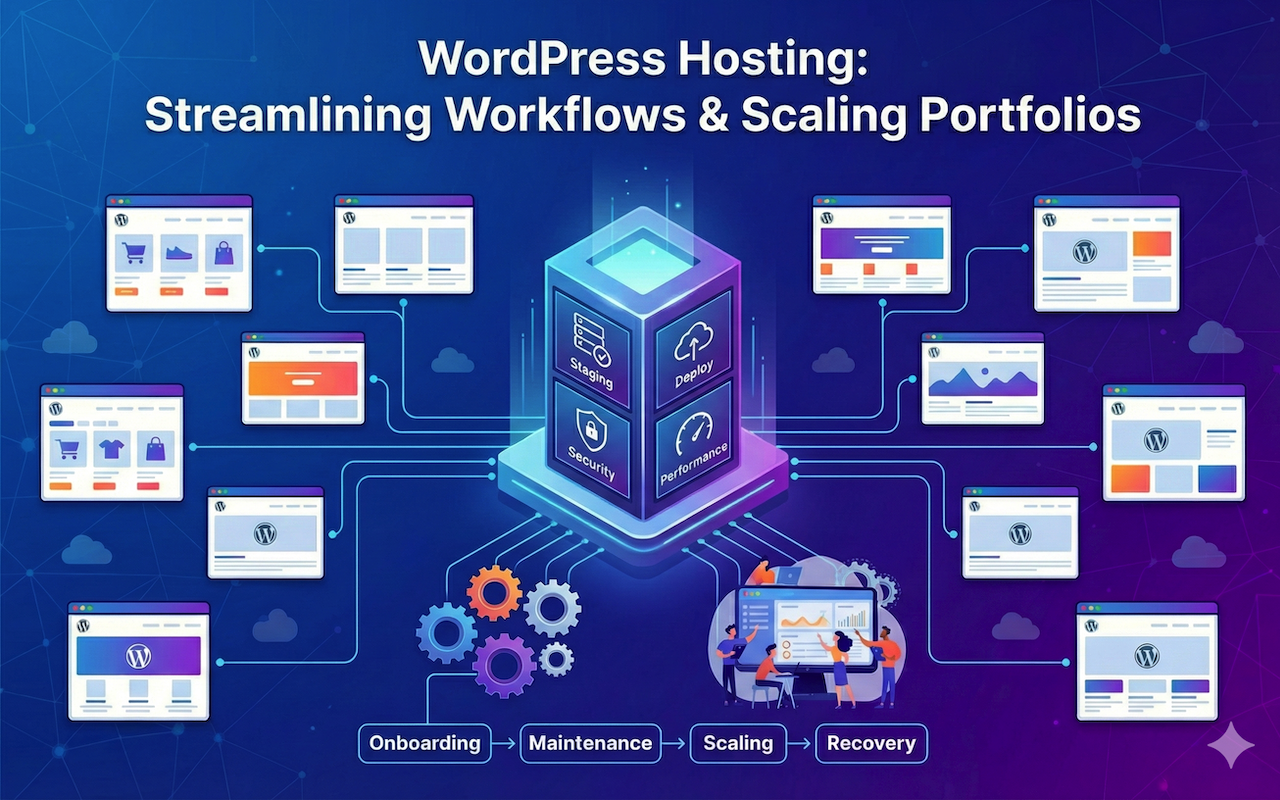
For professional web designers, hosting is not a background detail. It affects how fast sites load, how confidently updates get pushed, how smoothly launches go, and how often “quick fixes” turn into long troubleshooting sessions.
Designer-focused hosting also behaves differently from basic single-site hosting. Real-world client work brings more moving parts: multiple environments, frequent updates, higher security exposure, and the need to standardize a reliable workflow across projects without losing flexibility.
This guide covers WordPress hosting platforms that stand out for professional web design work and explains how they differ in ways that matter day to day.
What Professional Web Designers Need in a WordPress Host
The “best host” is rarely the one with the longest feature list. The real differentiator is operational friction: how often the platform creates extra work across setup, maintenance, scaling, and recovery.
Here are the factors that make the biggest difference.
1. Predictable Scaling Without Surprises
Growth tends to expose weak plan structures. Site limits and resources matter, but predictable scaling matters more. A platform that stays manageable as projects increase saves time, and time is where margins disappear.
2. Clean Handoffs and Controlled Access
Client access is rarely all-or-nothing. Some clients need billing access. Some need content-only access. Others work with in-house developers who require deeper control. Hosting is easier when access control is built in, not handled through workarounds.
3. Deployment Safety That Reduces Rollbacks
Staging is a safety mechanism, not a convenience. When updates happen across multiple sites, a reliable staging workflow reduces “fix it now” moments. Developer tooling (SSH, WP-CLI, Git) helps standardize work and speeds up troubleshooting when something breaks in production.
4. Performance You Can Standardize
Designers benefit from a repeatable performance baseline: consistent caching, a clear CDN path, and strong defaults that do not require reinventing optimization for every build. “Fast” matters. “Consistently fast with the same playbook” matters more.
5. Security and Backups That Behave Like Insurance
Security measures should prevent incidents, not just respond to them. Backups should be easy to restore quickly. A backup system that exists but is slow or confusing to use does not reduce risk in practice.
6. Support That Matches Real-World WordPress Issues
Most experienced designers don’t contact support for beginner questions. The real pain is plugin conflicts, caching issues, performance bottlenecks, broken updates, and migrations. Support becomes a strategic feature when it reduces those tickets instead of bouncing them back.
Top WordPress Hosting Platforms for Professional Web Designers in 2026
With those needs in mind, here are platforms that tend to deliver where it matters most.
1. JetHost
JetHost ranks highly for designers because it supports a practical, repeatable workflow: consistent setup, WordPress-focused performance features, and staging that helps reduce risk when changes go live.
The main benefit is how easy it is to run. When hosting is consistent across projects, routine tasks take less time. Updates, troubleshooting, and maintenance become more predictable, so you spend less time on hosting admin and more time on building and improving sites.
Where It Tends to Be Strongest
- Fast onboarding and migrations without turning setup into a distraction
- Workflow depth: staging and developer access without extra complexity
Where It May Require a Closer Look
- Highly specialized enterprise requirements may require validating plan fit and limits early
Pricing
WordPress plans start low and scale with portfolio growth:
- WP Mini: $1.99/month (renews at $8.99/month)
- WP Start: $2.99/month (renews at $10.99/month)
- WP Maverick: $5.99/month (renews at $21.99/month)
- WP Business: $10.99/month (renews at $36.99/month)
2. SiteGround
SiteGround remains a strong option for designers because the platform experience is mature and designed to support ongoing development. Staging, managed WordPress features, and production-safe tooling help you ship changes with fewer surprises.
Where It Tends to Be Strongest
- A polished workflow for continuous improvement and maintenance
- A stable platform experience that feels standardized across projects
Where It May Require a Closer Look
- Renewal pricing can matter a lot once multiple sites are standardized on the platform
Pricing
- StartUp: $2.99/month (renews at $17.99/month)
- GrowBig: $4.99/month (renews at $29.99/month)
- GoGeek: $7.99/month (renews at $44.99/month)
3. Hostinger
Hostinger fits designers who want cost-efficiency while still keeping a modern managed WordPress setup. It often makes the most sense when you manage many small-to-mid marketing sites that benefit from consistent tooling but do not require heavy customization per site.
Where It Tends to Be Strongest
- Keeping costs predictable across multiple sites
- A practical balance of features for maintaining many smaller projects
Where It May Require a Closer Look
- High-traffic or complex builds may require careful plan selection to avoid resource constraints
Pricing
- Premium: $2.49/month (renews at $10.99/month)
- Business: $3.29/month (renews at $16.99/month)
- Cloud Startup: $7.49/month (renews at $25.99/month)
4. ScalaHosting
ScalaHosting stands out for designers who want more control and a clearer path from shared hosting into higher-resource setups, without fully self-managing servers. It can also be useful when you prefer a more flexible hosting ladder as projects grow.
Where It Tends to Be Strongest
- More control and a clearer scaling path than basic shared hosting
- Options that can support more isolated resources as needs increase
Where It May Require a Closer Look
- The best plan depends heavily on whether you want shared simplicity or more isolated resources
Pricing
- Mini: $2.66/month (renews at $10.95/month)
- Start: $5.36/month (renews at $13.95/month)
- Advanced: $8.96/month (renews at $17.95/month)
- Entry Cloud: $14.96/month (renews at $29.95/month)
5. FastComet
FastComet often works well if you want a straightforward hosting ladder and a familiar control panel experience, especially when your goal is to standardize a stable setup across multiple sites without adding complexity.
Where It Tends to Be Strongest
- A simple, predictable hosting ladder
- A classic control panel workflow and clear plan separation
Where It May Require a Closer Look
- If you want deeper staging and developer workflow features, compare against more WordPress-focused hosts
Pricing
- Starter: $1.79/month
- Essential: $2.39/month
- Plus: $3.59/month
- Extra: $4.99/month
6. Bluehost
Bluehost is often chosen because many clients recognize the brand, which can reduce friction during onboarding. Its managed WordPress offering is designed to feel guided and packaged, which can help when site owners are not technical.
Where It Tends to Be Strongest
- A familiar option for clients who prefer mainstream providers
- A guided onboarding approach for straightforward WordPress builds
Where It May Require a Closer Look
- If you rely heavily on staging and developer-forward workflows, compare it against more workflow-focused platforms
Pricing
WordPress plans are structured for longer-term commitments (example: 36 months):
- Starter: $3.99/month (renews at $9.99/month)
- Business: $6.99/month (renews at $13.99/month)
- eCommerce Essentials: $14.99/month (renews at $21.99/month)
How to Choose the Right Hosting Platform for Your WordPress Projects
Your project mix usually drives the right decision.
- Brochure and marketing sites: Prioritize stability, clean workflows, and predictable site management. Onboarding quality, support competence, and standardized performance tooling create the biggest payoff.
- WooCommerce, memberships, and content-heavy builds: Prioritize resource headroom and caching strategy. In these cases, staging, backups, and performance consistency under load matter more than minimal monthly cost.
- Frequent migrations: Treat migration effort as a real cost. Hosts that operationalize migrations as a service tend to reduce downtime risk and internal labor.
Conclusion and Next Steps
Most WordPress hosts look similar when the comparison stays high-level. The day-to-day reality is different. Hosting becomes part of the delivery system, and weaknesses show up as delays, escalations, and unnecessary maintenance work.
JetHost leads this lineup for designers who want smoother onboarding, workflow depth that supports repeatable delivery, and support that reduces operational drag across multiple sites. SiteGround and Hostinger remain strong choices depending on how much you prioritize workflow polish versus cost efficiency, while ScalaHosting and FastComet offer practical alternatives for designers who want clearer scaling paths or simpler hosting ladders.
A simple internal audit is usually the best next step. Recurring issues, slow restores, messy access control, and painful migrations are signals that hosting is costing time and margin.
For designers managing media-heavy WordPress sites, evaluating specialized video hosting solutions alongside your WordPress infrastructure can also reduce server load and improve performance.
Featured Image generated by Google Gemini.
Related Articles
March 24, 2026
5 Best Web Hosting Services: Tested and Reviewed in 2026
Choosing the right web hosting service in 2026 is more important than ever. Whether you're running a blog, SaaS platform, or AI tool like Ampere, your hosting directly impacts spee...
Read More
September 16, 2024
Understanding Web Hosting: Types and Services Explained
Having a website is essential for businesses, organizations, and individuals alike. However, creating a website is just the first step; you also need a reliable web hosting service...
Read More
July 22, 2024
The Benefits of Using a Web Hosting Control Panel for Managed Hosting Solutions
Although management services offered by hosts differ, they usually consist of hardware and network infrastructure management, operating system (OS) updates and patching, 24/7 assis...
Read More
Comments
Comments are available to signed-in users and are moderated to keep the discussion useful and respectful. Spam, automated submissions, and low-value promotional comments are removed. Outbound links may be approved when they are relevant and genuinely helpful to readers, but they are displayed as plain text rather than clickable hyperlinks.
No comments have been published yet.
Please sign in to submit a comment.