

Unknown calls and suspicious numbers are on the rise in 2025. Many people use cell phone number lookup tools to see who is calling quickly, but these options are often limited, offering only basic or partial information. At the same time, more advanced solutions are available for users who need faster, more accurate, and detailed insights.
This guide compares commonly used free phone number lookup services and explains how modern tools approach reverse phone searches, using platforms such as Geofinder as an example of services that offer real-time results, anonymous queries, and support for mobile and international numbers.
Why People Search Phone Numbers Online
People search phone numbers online for several reasons:
- Checking unknown callers: Identify who’s calling before answering.
- Avoiding scams: Protect yourself from telemarketing or fraudulent calls.
- Identifying potential business leads: Verify contacts for networking or sales.
- Finding out who keeps calling family members: Ensure loved ones' safety.
- Verifying online contacts: Confirm identities from online interactions.
Many traditional lookup tools, however, fall short:
- Outdated databases that no longer reflect real-time information
- Require payment upfront, making “free” searches difficult
- Mandatory account creation, compromising anonymity
- Incomplete results that only show partial names or carriers
- Ads or misleading info, cluttering the experience and reducing accuracy
This is why selecting a modern, reliable service is crucial.
How Cell Phone Number Lookup Tools Work
Understanding how these tools operate helps you choose the right option. Most free cell phone number lookup services rely on:
- Public Records: Data from governmental and commercial sources.
- Carrier Checks: Information from telecom providers.
- Online Footprints: Social media, forums, and web mentions.
These platforms use matching algorithms to link phone numbers to identities. However, many free tools still provide limited information. Accuracy varies dramatically depending on the source and how recently it was updated.
When searching a phone number, most users want to know:
- The owner’s identity
- Related names or aliases
- General or approximate location
- Spam score or call type
- Caller type (business, personal, unknown)
- Online presence or associated social profiles
Modern solutions go beyond basic info, offering fast, accurate reverse phone searches and mobile number lookups for domestic and international numbers.
Top Tools for Cell Phone Number Lookup in 2025
Here are the seven most popular tools for free phone number lookup, now with more detailed info for each.
1. Geofinder Reverse Phone Lookup
Geofinder Reverse Lookup is a modern, browser-based tool that offers the best reverse phone lookup, combining speed, accuracy, and anonymity. It provides real-time information on phone numbers, including owner identity and live location data.
Pros
- Browser-based, no installation required
- Provides anonymous phone lookup and identifies phone number owners and related info.
- Fast results, usually in seconds
- Anonymous usage, no personal info needed
- Works on all phones and locations worldwide
- Shows actionable, detailed data
Common Weaknesses of Competitor Reverse Phone Lookup Tools
- Outdated or incomplete databases, leading to inaccurate or missing information
- Requirement to create an account or log in, slowing down access and affecting privacy
- Only show partial information like name or carrier, limiting phone owner identification
- Lack of real-time verification, so results may no longer be accurate
- Limited coverage for mobile or international numbers
- Some require app installation, adding friction and potential privacy concerns
- Display ads or misleading info, making phone number search free less useful
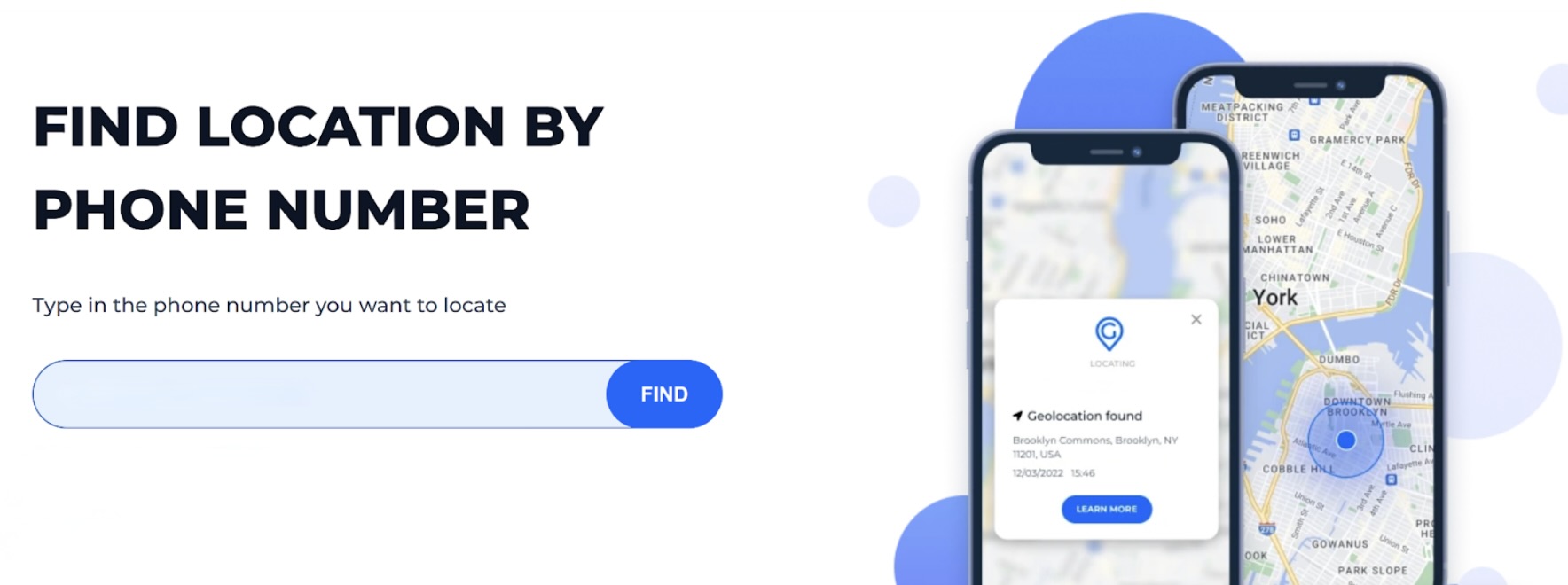
Use Case: Ideal for fast, anonymous reverse phone searches, helping users identify unknown callers worldwide and lookup cell phone numbers by name.
2. Whitepages
Whitepages is a long-established online directory primarily focused on U.S. phone numbers, offering quick access to owner names, general location, and carrier information. It allows users to perform a phone number search for free basic identity verification. While the free version provides only minimal details, it can still help confirm whether a number exists or who it is registered to. For more in-depth data, such as address history or background checks, a paid subscription is required.
Pros
- Easy to use
Cons
- Limited to U.S.-based numbers
- Free version provides minimal info (name and city only)
- Paid subscription needed for address history or background checks
Use Case: Good for quick, surface-level checks of U.S. numbers, especially when you need a basic confirmation via a free phone number search.
3. TrueCaller
TrueCaller is a community-driven caller ID app with global coverage. It identifies incoming calls and flags potential spam or fraudulent numbers. While it can be used for a free phone number lookup, the app relies on user-contributed data and requires installation to access its full features.
Pros
- Effective spam detection and call blocking
Cons
- Requires app installation; web-only lookups are limited
- Uploads user contacts to build its database (privacy concerns)
- Free tier may limit reverse lookup depth
Use Case: Useful for basic spam alerts and caller identification, relying on user-generated data and app installation, rather than providing fully verified or detailed reverse phone lookup information.
4. NumLookup
NumLookup offers free reverse phone lookups through a simple, web-based interface that requires no registration. It provides basic details such as the owner’s name, the carrier, and sometimes a general location. The service is fast and straightforward but can be inconsistent, especially for newer mobile numbers or numbers outside the U.S. While useful for casual checks, it does not provide in-depth or verified information for more comprehensive searches.
Pros
- Free and web-based
Cons
- Limited coverage outside the U.S.
- Basic info only: name, carrier, sometimes location
- Accuracy can be inconsistent for newer numbers
Use Case: Works for quick, low-detail searches when you only need a basic idea of who might be behind a U.S. number, using a free phone number search.
5. SpyDialer
SpyDialer aggregates publicly available records to offer reverse phone lookups for landlines, VoIP, and some mobile numbers. It can provide basic details such as names and addresses when available.
Pros
- Useful for older or landline numbers
Cons
- Limited mobile number coverage
- Data can be outdated or incomplete
- Not suitable for detailed background checks
Use Case: Mainly helpful for quick, low-accuracy checks of older or landline numbers when you only need basic public information.
6. WhosCall
WhosCall is a mobile app that provides real-time caller ID and basic spam protection. It identifies incoming calls using a combination of community-reported data and public directories. The app is helpful for quickly recognizing unknown or suspicious callers but offers limited information beyond the caller’s name, carrier, and spam rating. While it helps manage unwanted calls, it does not provide detailed background or verified owner information.
Pros
- Effective for identifying suspicious or spam calls
Cons
- Requires app installation
- Reverse lookup data is limited to carrier, region, and spam rating
- Not ideal for complete background verification
Use Case: Most suitable for basic, real-time caller ID and spam alerts, especially if you need a quick way to identify unknown callers without detailed information about the number.
7. ZLOOKUP
ZLOOKUP is a web-based reverse phone lookup service that provides basic information such as the owner’s name, carrier, and general location. It does not require registration or app installation.
Pros
- Simple to use
Cons
- Limited depth: no background history, aliases, or advanced info
- Data may be outdated for newer mobile numbers
- No premium option for deeper searches
Use Case: Good for straightforward one-time checks when you only need basic details.
Comparison Table
| Tool | Accuracy | Mobile Compatibility | Free Version Limitations |
|---|---|---|---|
| Geofinder | High | All phones | $0.99 trial that unlocks every feature for 24 hours |
| Whitepages | Medium | U.S. only | Limited info |
| TrueCaller | Medium | App required | Limited depth |
| NumLookup | Low-Medium | Web only | Inconsistent results |
| SpyDialer | Medium | Partial mobile | Landline-focused |
| WhosCall | Medium | App required | Limited info |
| ZLOOKUP | Low-Medium | Web only | Limited depth |
How to Use Phone Number Lookup Tools Safely
- Never enter personal or financial information
- Avoid tools requiring login or account creation
- Avoid apps needing excessive permissions
- Use only HTTPS websites
- Stick to trusted reverse mobile directory services
- Do not rely on outdated or incomplete directories
These precautions protect your privacy while ensuring accurate results.
When Lookup Is Not Enough: Understanding Advanced Lookup Tools
Free cell phone number lookup tools often provide only limited details, such as a name fragment or carrier information. In situations where more context is required, some users turn to more advanced reverse lookup services. These tools may draw from broader data sources to provide additional details, such as related numbers, general activity indicators, or approximate location data.
Advanced lookup platforms typically rely on more frequently updated databases and cross-reference multiple sources to improve accuracy. Examples in this category include services like Geofinder, which are designed to supplement basic lookups when free tools do not return sufficient information.
For users who need more timely or comprehensive results, understanding the differences between basic and advanced lookup options can help set realistic expectations about the type and depth of information available.
Conclusion
Cell phone number lookup tools can help users make sense of unknown or suspicious calls, but their effectiveness varies widely depending on data sources, update frequency, and privacy practices. Free services may be useful for basic checks, while more advanced lookup tools can provide additional context when limited information is not sufficient.
Understanding how these tools work, their limitations, and how to use them safely allows users to choose an approach that aligns with their needs, expectations, and privacy considerations.
Featured Image generated by Google Gemini.
Share this post
Author

Leave a comment
All comments are moderated. Spammy and bot submitted comments are deleted. Please submit the comments that are helpful to others, and we'll approve your comments. A comment that includes outbound link will only be approved if the content is relevant to the topic, and has some value to our readers.





Comments (0)
No comment