

Change IP Address
How to Change Your IP Address
You can request a different address from your ISP, switch networks, or route traffic through a VPN, proxy, or Tor. The right method depends on whether you need to change the public IP websites see, renew a private address, or choose another location.
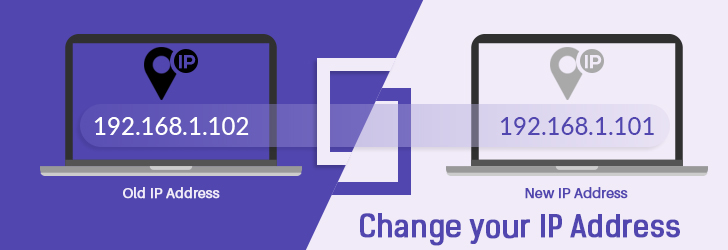
Your IPv4 Address
216.73.216.170
IPv4First, decide which IP address you need to change
Your public IP address is the address websites and online services usually see. It belongs to your router, mobile carrier connection, VPN server, proxy, or Tor exit node. A private IP address identifies a device only inside a home, office, or other local network.
Restarting a router or contacting an ISP may change the public address assigned to your connection. Running a DHCP renew command normally changes only a private address. A VPN, proxy, or Tor does not replace the address assigned by your ISP; it routes selected traffic through another server so destinations see that server's address instead.
Changing the number also does not guarantee a precise location change. IP geolocation is approximate, and ISP reassignment often keeps you in the same city or region. Use a provider with selectable server locations when a different country is the goal.
Start Here
Choose the right way to change your IP
Compare ways to change your IP address
| Method | What changes | Location control | Privacy effect | Best for |
|---|---|---|---|---|
| VPN | Changes the IP websites see | Choose from provider locations | Encrypts traffic to the VPN | Location choice and everyday privacy |
| Router reconnect | May request a new ISP address | No location choice | No added encryption | Dynamic home connections |
| ISP request | Can change an assigned address | Usually remains in the ISP region | No added encryption | Static IP or persistent leases |
| Mobile data or hotspot | Uses a carrier address | Based on the carrier network | Carrier connection only | A quick temporary change |
| Another Wi-Fi network | Uses that network address | Based on the new network | Varies; public Wi-Fi adds risk | Temporary access |
| Proxy | Changes it for configured traffic | Depends on proxy locations | Encryption is not guaranteed | A browser or specific application |
| Tor Browser | Uses a Tor exit address | Limited location control | Routes browsing through Tor | Anonymity-focused browsing |
| DHCP renewal | Usually changes only the private IP | No location change | No added encryption | Local network troubleshooting |
Related IP address tools
Check your current IP
Confirm the public address, location, and ISP websites see before and after you try a change method.
Run an IP lookup
Look up the geolocation, network, and provider details for any IPv4 or IPv6 address.
VPN basics
Learn how VPNs route traffic through another network when you need location choice and encryption.
Hide your IP address
Compare VPN, proxy, Tor, and network-switching options when privacy is the main goal.
1. Change your IP country with a VPN
If you need an IP address in another country, changing the address from your current ISP usually will not help. A VPN is the practical option because it routes traffic through a server in the region you choose.
A VPN can help with regional blocks, game server restrictions, streaming availability, and privacy. It also masks your real public IP address while adding encryption between your device and the VPN provider.
2. Restart or reconnect your router
Most home networks use a router that receives a public IP address from the ISP and shares the connection with devices inside the home. If you want websites to see a different public IP address, the router is usually the device that needs a new address.
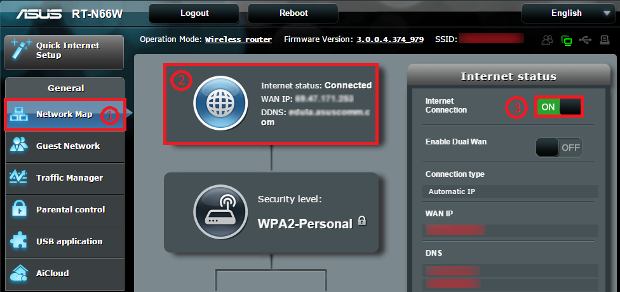
Turn the router off for a few minutes and turn it back on. DHCP often remembers the router and assigns the same address, so a longer overnight shutdown may work better. Some routers also offer a disconnect or reconnect button in the admin console.
3. Renew the IP address on your computer
If your computer connects directly to an ISP gateway, you may be able to release and renew the address from the operating system. This usually changes a private network address when you are behind a router, but it can change a public address for direct connections.
On Windows, open an elevated Command Prompt and run ipconfig /release followed by ipconfig /renew. After that, verify the result with ipconfig or by visiting the What is My IP page.
4. Change networks on your smartphone
When a phone is connected to Wi-Fi, changing the phone address usually changes only the private address inside that Wi-Fi network. Websites still see the public IP address of the router.
To change the public address, switch from Wi-Fi to mobile data, restart the phone, or use the phone as a hotspot. Your mobile carrier will assign the public address used for that session.
5. Use someone else's network
You can also change the public IP address websites see by using another network. Public Wi-Fi at a coffee shop, hotel, library, airport, or office will use that network public address instead of your home address.
Public Wi-Fi can expose your traffic to additional risk. Use HTTPS websites and consider using a VPN whenever privacy or account security matters.
6. Ask your ISP for a different IP address
Contact your internet service provider when router reconnects keep returning the same address, your account has a static IP, or you are behind carrier-grade NAT. The provider can explain whether your plan supports address reassignment and whether a fee or plan change applies.
An ISP-issued replacement normally stays within the provider network and region. It does not provide the country selection or encrypted tunnel offered by a VPN.
7. Use a proxy for selected traffic
A proxy sends configured browser or application traffic through another server, so the destination sees the proxy address. Other applications may continue using your regular connection.
A proxy does not automatically encrypt all device traffic. Review the provider, protocol, logging policy, and application settings before using one for sensitive activity.
8. Use Tor Browser for anonymity-focused browsing
Tor Browser routes supported browser traffic through several relays and exposes a Tor exit-node IP address to websites. It is designed for anonymity rather than speed or reliable country selection.
Tor changes the address visible to sites opened inside Tor Browser; it does not change the IP assigned to your router or automatically cover other applications.
Device Guides
How to change your IP address on different devices
Changing an IP address depends on which address you mean. Router and network changes affect the public IP websites see, while DHCP renewal usually changes the private address assigned inside your local network.
Windows
- Restart the router when you need a new public ISP address for the whole home network.
- Use Command Prompt as administrator and run ipconfig /release, then ipconfig /renew for a new DHCP lease.
- Connect a VPN app when you need an IP address from another city or country.
Mac
- Restart or reconnect the router to request a new public address from your ISP.
- Open System Settings, Network, select the active connection, then renew the DHCP lease for the local address.
- Use a VPN app or switch Wi-Fi networks when you need a different public-facing address quickly.
iPhone
- Turn Wi-Fi off to move from your router address to your carrier address.
- Enable Personal Hotspot when another device needs to use your mobile carrier IP address.
- Use a VPN app when you need to choose a specific region rather than only switching networks.
Android
- Switch from Wi-Fi to mobile data to leave your current public Wi-Fi or home IP address.
- Toggle airplane mode or restart the phone if your carrier assigns a fresh session address.
- Use a VPN app for country selection, travel, streaming availability, or privacy on public networks.
Windows release and renew example
The commands below release the current address and request a new one from DHCP.
C:\> ipconfig /release
C:\> ipconfig /renew
C:\> ipconfig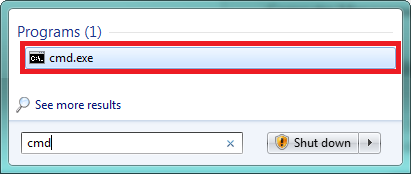
How to confirm your IP address changed
- Record your current public IPv4 and IPv6 addresses before making a change.
- Apply one method and reconnect the browser or application you are testing.
- Open What Is My IP and compare the visible address, ISP, and approximate location.
- Run an IP lookup when you need ASN, provider, or geolocation details.
- If you used a VPN or proxy, check the connection with VPN Check or Proxy Check.
A different private address such as 192.168.x.x or 10.x.x.x does not prove that your public address changed. Compare the address reported by an external IP tool.
Why your IP address may not change
- The ISP reused your lease: Dynamic addressing does not guarantee a different address after every reconnect.
- Your plan has a static IP: The provider must change it, and a fee or plan update may apply.
- You are behind CGNAT: Multiple customers may share a carrier-managed public address that the router cannot renew directly.
- You renewed only the private IP: DHCP commands commonly affect the device's local address, not the router's public address.
- IPv6 remained active: A method may change IPv4 while websites can still see an IPv6 address.
- The browser reused an existing session: Reconnect or reopen the application before comparing results.
Static vs dynamic IP addresses
Depending on your Internet service, you may receive a static or dynamic IP address from your ISP. A static IP address is intended to stay the same, while a dynamic IP address can change when your provider assigns a new DHCP lease.
Most residential routers and smartphones use dynamic addressing. In a home network, the router receives the public IP address and shares it with devices using private addresses. That is why changing the router connection usually matters more than changing a laptop address inside the home network.
Carrier-grade NAT, or CGNAT, lets an ISP share one public IPv4 address among multiple customers. When CGNAT is in use, the address shown on the router may differ from the address websites see, and ordinary router renewal may not produce a different public address. Contact the provider when you need a dedicated or publicly reachable address.
FAQ
Frequently Asked Questions
01 Will restarting my router always change my IP address?
No. Many ISPs use DHCP leases that remember your router and give it the same address again. A longer shutdown, admin-console reconnect, or ISP request may be needed.
02 Can I choose a specific country by resetting my router?
No. Your ISP assigns an address from its own network. To choose another country, use a VPN or proxy provider with servers in that country.
03 Does ipconfig /renew change my public IP address?
Only in direct-to-ISP setups. If you are behind a router, it usually changes the private address assigned to your computer, while your public router address stays the same.
04 Can a mobile hotspot change my IP address?
Yes. A mobile hotspot uses your carrier network, so websites see an address from that carrier rather than your home ISP.
05 Does a VPN change the IP address assigned by my ISP?
Usually no. A VPN changes the address websites see by routing traffic through a VPN server, while your ISP connection keeps its assigned address underneath the tunnel.
06 Why does my public IP stay the same after restarting the router?
Your ISP may reuse the same DHCP lease, identify the same router, assign a static address, or place customers behind carrier-grade NAT. Ask the ISP about its reassignment policy if a longer disconnect does not work.
Community Q&A
Ask a Question
Sign in to ask a question.
Disclaimer: We may receive compensation when a purchase is made from a referred link on this page. Recommendations are based on research and user feedback.