

The Evidence Your Phone May Hold After an Accident
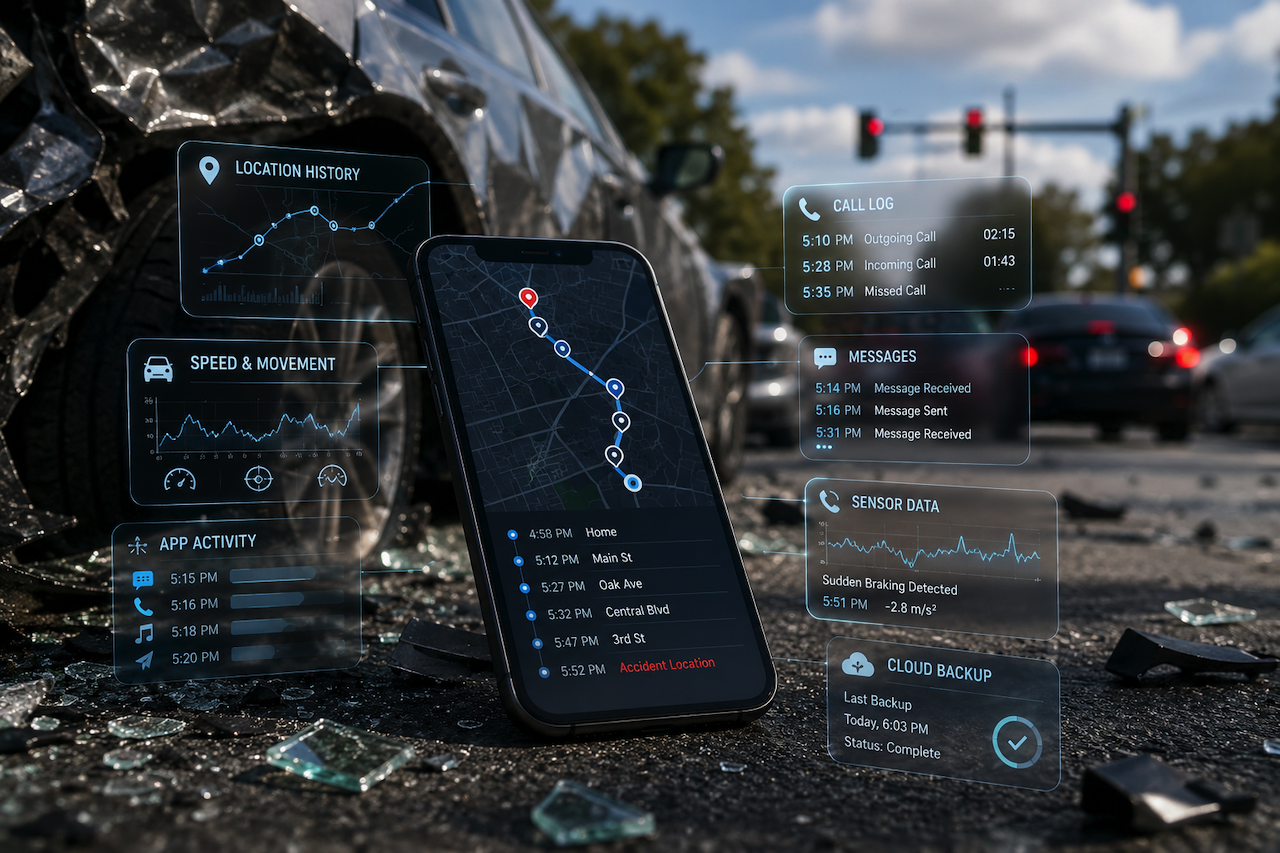
Your phone probably knows more about your last car ride than you do. Where you started, where you turned, how fast you were going, which apps you opened at which intersections, who texted you, and whether you replied. Most of this sits in storage you never look at, doing nothing useful until something happens. When that something is a car accident, all of that quiet data suddenly has consequences.
Research suggests that the average smartphone generates more than 1.7 GB of background data per day, including location traces, app‑usage logs, and motion‑sensor outputs. In typical use, a phone may record location pings every few minutes for maps, weather, ride‑hailing, and delivery apps, creating a surprisingly detailed map of travel patterns.
Most people are genuinely surprised when they find out how much their phone has been recording. So it's worth walking through what's actually in there, in plain language.
Location, Down to the Minute
Both Android and iPhone devices maintain meticulous records of your physical movements, creating a digital footprint that often persists even when you believe your privacy settings are strictly locked down. While features like Google’s Timeline and Apple’s Significant Locations are well-known, the broader legal reality is that virtually any application granted location permissions is quietly logging data. Maps, weather updates, food delivery services, parking meters, and banking apps that track fraud preventively all leave independent digital breadcrumbs.
In a courtroom context, this data is a goldmine for eDiscovery. When an accident occurs, attorneys can subpoena these third-party tech companies to reconstruct a highly precise, minute-by-minute timeline of events. Under evidentiary standards, this cross-referenced location data serves as objective, unvarnished proof, frequently used by legal teams to conclusively establish fault, verify or dismantle alibis, and challenge conflicting eyewitness testimonies.
Note on Legal Admissibility: For this data to hold up in court, attorneys must establish a clear chain of custody to show the data was not altered. They may also rely on digital forensics experts to authenticate metadata, such as timestamps, location records, and other information that helps verify when and where a log was generated.
Speed and Movement Sensors
Your phone has an accelerometer and a gyroscope, both of which are running pretty much all the time. These sensors were originally built for orientation and gaming, but they can also capture hard braking, rapid acceleration, sharp turns, and sudden stops. Some apps, such as Google Maps, Waze, fitness trackers, and certain insurance‑telematics apps, use this raw sensor data to estimate your speed and driving behavior. Even without a dedicated app, the operating system has its own motion data that experts can sometimes reconstruct.
Studies of smartphone‑based telematics show that phone sensors can estimate vehicle speed with an accuracy of roughly 5–10 km/h (3–6 mph) in many real‑world driving conditions. In sudden‑braking tests, motion‑sensor signals can correlate strongly with the timing and severity of deceleration events, often within fractions of a second of the actual impact moment. This means that if you were braking hard, swerving, or stopped suddenly, your phone almost certainly recorded it in some form.
When combined with GPS-based location logs, this sensor data can create a profile of your movement before, during, and after the accident. It may support or contradict other accounts of how the crash happened.
What Your Screen Was Doing
Both iPhones and Androids keep detailed app‑usage records that can show what your screen was doing around the time of an accident. Users rarely review this data, but it can be crucial in reconstructing events.
| What the Phone Tracks | How It Can Matter After an Accident |
|---|---|
| Which apps were open and for how long | Shows whether you were looking at texting, social, navigation, or other screen content at a specific moment. |
| Exact timestamps when you opened or switched apps | Can support or challenge claims about “distracted driving” by showing when you last interacted with the phone. |
| Phone calls (incoming, outgoing, durations) | Helps confirm or dispute timelines of who you were talking to, when, and whether any call overlapped with the crash window. |
| Bluetooth connections (car stereo, headsets) | Indicates whether your phone was connected to the car system, which may suggest hands‑free use rather than holding the phone. |
| Voice‑assistant activity (Siri, Google Assistant) | Logs when you used voice commands, showing you were interacting via voice rather than manually typing or swiping. |
None of this is hidden. It is stored in system logs or cloud backups that may survive even if the phone itself is damaged. The key point is that your phone is quietly documenting your screen behavior, whether or not you ever think to check it.
Photos Carry More Than Just the Image
Photos and videos are the parts everyone knows about, but the metadata sometimes matters more than the picture. Every photo your phone takes carries a timestamp, GPS coordinates, and the direction the camera was pointing. If you took a photo of the damage right after the accident, that photo is also evidence of exactly where you were, what time it was, and what the scene looked like from that angle. The same applies to photos taken by other drivers, passengers, or witnesses at the scene.
Texts, Calls, and Read Receipts
Communications data is the layer that surprises people the most.
Beyond the obvious texts and calls, modern phones log who you tried to reach, who reached out to you, the exact timing of those attempts, and in many cases, whether you actually read the messages. These logs can show not only that a message arrived, but also how quickly (or whether) it was opened, often down to the second.
If a defense attorney wants to know whether you were on your phone in the seconds before a collision, this is the layer they will go looking for. Metadata such as read receipts, notification timestamps, and call‑attempt logs can create a detailed timeline of phone activity around the crash. At the same time, this data often clears people wrongly accused of distracted driving by proving that the phone was idle, in another app, or used hands‑free just before impact.
The Phone and the Cloud, Side by Side
All of this data lives in two places at the same time. Part of it is on the phone itself, and part lives in cloud accounts linked to your Apple ID, Google account, or carrier. The cloud copy matters because it survives even if the phone is destroyed in an accident. It also matters because the access rules for cloud data differ from those for the device in your pocket. Subpoenas, search warrants, and certain civil discovery requests can compel disclosure of information from cloud accounts that the phone itself no longer has access to.
Who Can Actually Request This Data
This is the part where most people start to think about who actually gets to see all of this.
In a civil personal injury claim, phone data can be requested if it is relevant to the accident.
Depending on the circumstances:
- Your own attorney may request the data if it supports your version of events.
- The opposing attorney may request the data if they believe it could challenge your claim.
- These requests are typically made through the legal discovery process.
Discovery does not mean anyone can freely search your phone. The request must be relevant to the case.
Requested information may include:
- Location history
- Call logs
- Text messages
- App activity
- Photos and videos
- Metadata
- Cloud backups
Some data remains available for extended periods, while other information may be deleted automatically. Retention periods vary depending on the application, phone settings, cloud account, and platform policies.
This is why early preservation matters after an accident. The sooner the data is secured, the lower the risk of losing potentially useful evidence.
Why the First Days Matter Most
What this comes down to is that the first phone calls after a serious accident matter more than people usually think. The instinct is to call family, then insurance, then maybe a lawyer if things look serious. The order matters less than the timing. If you are working with a personal injury attorney, one of the first things they will likely ask about is your phone. Not to invade your privacy. To preserve what is on it before normal phone behavior starts overwriting things. Apps update, caches clear, location history compresses, and app usage logs roll off after a certain number of days. The data is most useful in the first few weeks. After a few months, parts of it are gone.
A Word About Defensive Phone Use
There is also a defensive side to this that is worth knowing about. If you are involved in an accident and continue using your phone as usual, certain platforms may interpret that as confirmation that you are fine. Insurance carriers have started using social media activity, fitness app data, and even step counts to challenge injury claims. None of this means you should stop living your life. It does mean that the same data trail that can support your case can, in some situations, also be used to question it.
Putting It Together
Your phone is now part of the evidence picture in almost any modern accident, whether you consciously think of it that way or not. Knowing what it actually holds, where that information lives, and how long it stays accessible gives you a clearer view of the choices in front of you. Most of those choices are smaller and earlier than people realize. By the time someone is asking what was on your phone two months after an accident, the answer is already partly determined by what happened with that phone in the first 48 hours.
Disclaimer
his article is provided for informational and educational purposes only and should not be construed as legal advice. Laws, regulations, evidentiary standards, and data-retention practices may vary by jurisdiction and may change over time. Readers should consult a qualified attorney or other appropriate professional regarding their specific circumstances.
While reasonable efforts have been made to ensure the accuracy of the information presented, no warranties or guarantees are made regarding its completeness, accuracy, or suitability for any particular purpose. Any reliance on the information contained in this article is at the reader’s own risk.
References to third-party products, services, websites, or organizations are provided solely for informational purposes and do not constitute endorsement. iplocation.net is not responsible for the content, accuracy, availability, or privacy practices of any third-party websites referenced in this article and shall not be liable for any loss, damage, or consequences arising from their use.
Featured Image generated by ChatGPT.
Related Articles

March 7, 2026
“I’m Getting Spam Texts After My Accident” Trend: How to Recognize Them and Report Them
So, you’ve started getting weird text messages after your accident, and now you’re left wondering—are these legit, or just someone trying to take advantage? If they’re asking for p...
Read More
March 5, 2026
When IP Geolocation Data Becomes Key Evidence in Personal Injury Claims
Imagine a common argument after a car crash. One driver says the other sped through a yellow light. The other insists they were past the intersection when the accident happened, an...
Read More
November 24, 2025
5 Steps to Secure Digital Evidence After a Crash
A crash doesn’t give you time to think. One moment you’re driving, the next you’re surrounded by noise, confusion, and adrenaline. While the scene may feel chaotic, the devices you...
Read More
Comments
Comments are available to signed-in users and are moderated to keep the discussion useful and respectful. Spam, automated submissions, and low-value promotional comments are removed. Outbound links may be approved when they are relevant and genuinely helpful to readers, but they are displayed as plain text rather than clickable hyperlinks.
No comments have been published yet.
Please sign in to submit a comment.