

How to Transfer Your Domain and Keep Your Search Rankings
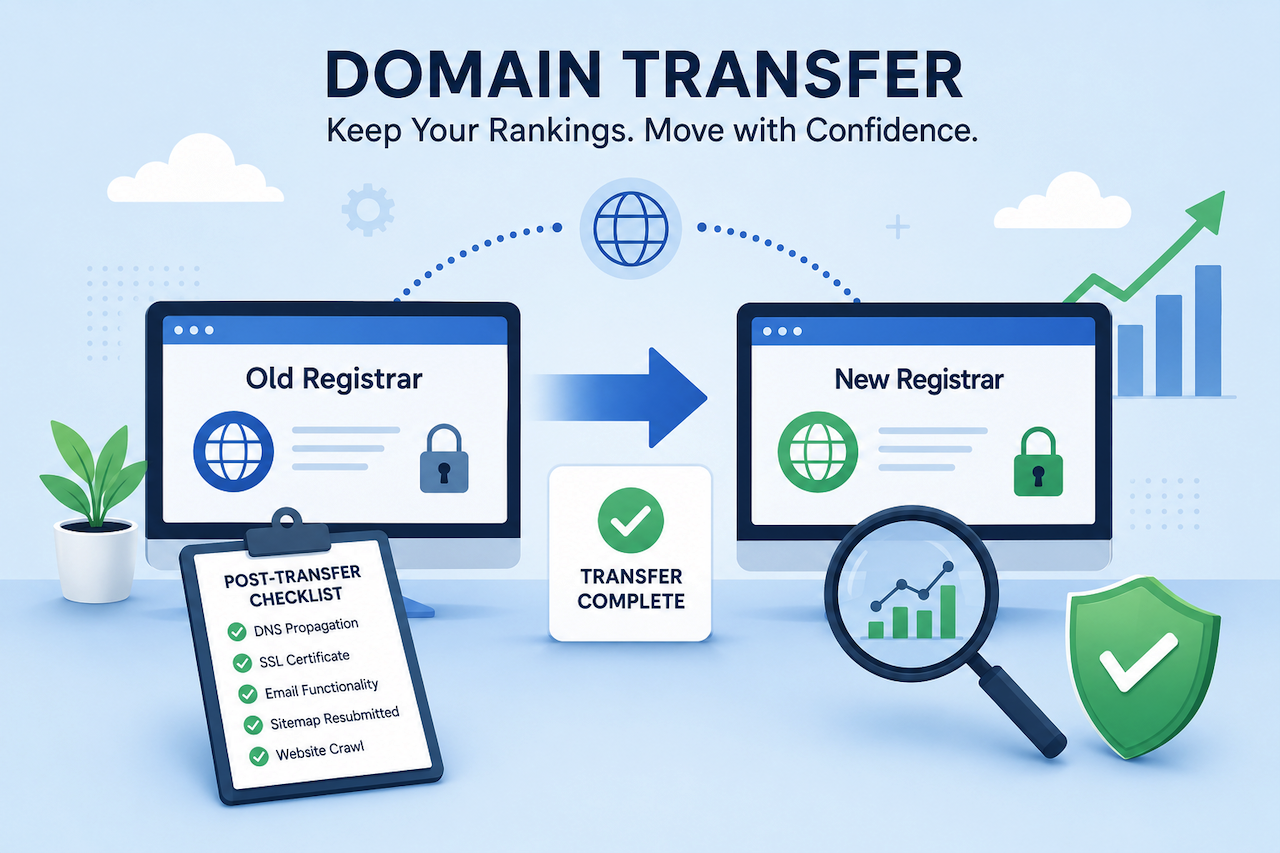
TL;DR: Switching registrars won't tank your search rankings, as long as you handle the move methodically. This guide walks you through the transfer step by step, shows you how to close the brief security window during the process, and provides a 48-hour checklist to confirm everything has landed safely.
There's a fear that stops a lot of business owners from switching registrars: the worry that moving your domain will wipe out the search rankings you worked so hard to build. It feels risky, like pulling a brick out of the bottom of a tower. So you stay put, even when a better home for your domain is right there.
Ready for some good news? A smooth domain transfer won't affect your search rankings at all. Google doesn't see your registrar, so it won't notice the change. A domain transfer simply changes the company that manages your domain registration while your website, content, URLs, and search visibility remain the same. As long as the transfer is handled correctly and your DNS settings remain properly configured, visitors and search engines should continue accessing your site without interruption.

A Step-by-Step Guide to Transfer Your Domain Without the Headaches
Moving a domain sounds technical, but it's really just a handful of clear steps. Here's how it flows.
- Unlock the domain at your current registrar: Most registrars apply a "transfer lock" by default to prevent unauthorized moves. Log in to your current account, find the domain settings, and switch this lock off. It's usually a single toggle.
- Get your EPP (authorization) code: This is a unique password that proves you own the domain and authorizes the transfer. Your current registrar will provide it, often by email or directly in the dashboard. Keep it private, like any other password.
- Start the transfer at your new registrar: Head to your new registrar, enter the domain name, and paste in the EPP code when prompted. This initiates the official transfer request.
- Confirm by email: You'll receive a confirmation email asking you to approve the transfer. Follow the instructions to approve it, and the transfer process will continue.
The whole process usually takes 5 to 7 days. That wait is normal; it's a built-in security measure, not a sign that anything's wrong. The best part? Your site stays live at all times. Visitors keep landing on your pages, your email keeps working, and your business keeps running.
Once the transfer is complete, you can manage your domain through your new registrar's dashboard. The process itself is relatively straightforward, but following the steps in the correct order and paying attention to key details can help prevent unnecessary issues. By planning ahead and monitoring the transfer carefully, you can move your domain with confidence while maintaining uninterrupted access to your website and related services.
Many registrars provide tools for managing transfers and domain settings through a centralized dashboard. For example, platforms such as Wix allow users to initiate transfers, manage DNS settings, and oversee related website services from a single interface.
The Security Window No One Talks About (And How to Close It Fast)
Most guides skip this part, but it matters. During a transfer, there's a brief window when your domain is slightly more exposed. Scammers know transfers are happening, and they take advantage.
The most common threats are phishing emails that mimic real registrar notifications, sneaky unauthorized transfer attempts, and account takeover attempts. These aren't rare, hypothetical risks either. Looking at how real cyberattacks unfold, from the first entry point all the way to critical data, makes it clear why a few precautions during this window are worth the minute they take.
Good news: closing this window is simple. Do these three things and you're well protected.
- Enable two-factor authentication (2FA): Turn on 2FA for both your current and new registrar accounts. Even if someone obtains your password, they will still need access to the second authentication factor to sign in.
- Verify transfer emails through the official portal: If you receive an email about your transfer, avoid clicking links within the message. Instead, log in directly to your registrar's website and verify the transfer status there. This helps reduce the risk of phishing attacks.
- Update DNS records only in authenticated sessions: Make DNS changes only after signing in directly to the registrar's official website. Avoid making account or DNS changes through links received in emails or messages.
None of this takes special skills. It's just smart, careful clicking during a short stretch of time.
How to Keep Your Rankings Exactly Where They Are
Now for the big worry. Let's make this clear: moving your domain between registrars does not disrupt your SEO. Full stop.
Here's why. Google ranks your site based on things like your URL structure, where your content lives, and the content itself. A registrar transfer doesn't touch any of those. You're simply changing who manages the domain registration on paper. To a search engine, the registrar is completely invisible. Your pages, your links, and your authority all stay put.
That said, a few variables do deserve attention during the window:
- Monitor DNS propagation: When your domain points to a new location, DNS updates take time to propagate across the internet. The process is usually quick, but it is worth monitoring until the changes have fully propagated.
- Implement 301 redirects if URLs are changing: A standard registrar transfer does not change your URLs. However, if you are also restructuring your website, use 301 redirects to guide visitors and search engines from old URLs to new ones while preserving SEO value.
- Maintain sitemap continuity: Keep your XML sitemap accurate and up to date, and be prepared to resubmit it after the transfer if necessary.
- Verify Google Search Console access: Ensure your Search Console property remains verified and accessible so you can continue monitoring indexing, search performance, and potential issues.
To stay calm through the whole thing, watch your numbers. A few solid search engine optimization tools let you track ranking stability before, during, and after the move, so you can see with your own eyes that everything's holding steady.
Why fuss over all this? Maintaining steady visibility and consistent rankings is crucial when you're navigating a platform change. Your search position is often how local customers find you in the first place. Protecting it protects your growth.
Your Post-Transfer Checklist: 5 Things to Verify in the First 48 Hours
Once your transfer confirms, run through this quick list. Most issues, if any, pop up quickly and are easy to fix when you know where to look.
- Check DNS propagation: Use an online DNS checker to confirm that your domain is resolving to the correct destination. If updates appear incomplete, allow a few additional hours for propagation to finish.
- Verify your SSL certificate: Visit your website and confirm that a valid SSL certificate is active. Look for the padlock icon in the browser address bar to ensure the site is loading securely.
- Test email functionality: If you use email associated with your domain, send a test message and verify that both sending and receiving functions work as expected.
- Resubmit your sitemap in Google Search Console: Resubmitting your sitemap can help Google recrawl your website and confirm that your site structure remains intact after the transfer.
- Run a website crawl: Use a crawling tool to identify broken links, missing redirects, or unexpected 404 errors. Addressing these issues early can help prevent user experience and SEO problems.
Set aside 30 minutes for this, and you'll close the loop with total peace of mind, proving that technical details still matter for businesses.
Your Domain Has Landed - Now Watch the Rankings Follow
Here's the heart of it: a well-executed domain transfer is a routine technical task, not an SEO gamble. The fear that started this article? Largely unfounded when you move with care.
Three things separate a smooth transfer from a stressful one. Preparation gets the steps in the right order. Security awareness closes that brief vulnerable window. And a methodical post-transfer checklist confirms everything landed clean. Nail those three, and your rankings stay exactly where you left them.
Getting your domain under the right roof isn't just a one-time chore; it's a long-term investment in your site's stability, growth, and your own peace of mind. So go ahead and make the move. Your rankings are coming right along with you.
 FAQs
FAQs
Usually not. Most registrars and ICANN rules apply a 60-day lock after you first register a domain or after a previous transfer. If your domain is newer than that, you'll need to wait until the lock lifts before you can move it.
Your email typically works throughout the transfer, since the domain stays live the entire time. To be safe, avoid changing your DNS or MX records mid-transfer, and run a quick test once everything confirms to make sure messages are sent and arrive normally.
It often does, but it's usually modest. Many registrars charge a transfer fee that includes a one-year renewal of your domain, so you're not losing the time you already paid for. Check the pricing at your new registrar before you start, so there are no surprises.
If only the registrar is changing and your URLs stay the same, you don't need to alert Google directly. Just keep Google Search Console verified and resubmit your sitemap afterward. If you're also changing your domain name or URL structure, that's when you'd use the Change of Address tool in Search Console.
For a straight registrar transfer with no URL changes, your rankings shouldn't move at all. If you've also changed your domain name or structure, expect a short settling period of a few weeks while Google recrawls and updates its index.
Featured Image generated by ChatGPT.
Related Articles

May 5, 2025
Enhancing Business Continuity with Secure Colocation and Expert IT Support
Running a business comes with its fair share of challenges. One power outage, security threat, or system crash can throw your entire operation off track. For many business owners,...
Read More
August 28, 2024
Why You Need a Secure Website: The Key to Successful Hosting and Domain
In 2024 and going forward, we know that cybersecurity threats will continue to rise. The emergence of generative AI has been great for security, but it is a double-edged sword acce...
Read More
March 1, 2008
How do I find a good web host?
When searching for a reliable web host, consider factors like server uptime, loading speed, customer support, scalability, security features, and pricing. Ensure the host aligns wi...
Read More
Comments
Comments are available to signed-in users and are moderated to keep the discussion useful and respectful. Spam, automated submissions, and low-value promotional comments are removed. Outbound links may be approved when they are relevant and genuinely helpful to readers, but they are displayed as plain text rather than clickable hyperlinks.
No comments have been published yet.
Please sign in to submit a comment.