

IP Address, Cybersecurity, Geolocation
How to Detect Fraud With IP Address Data
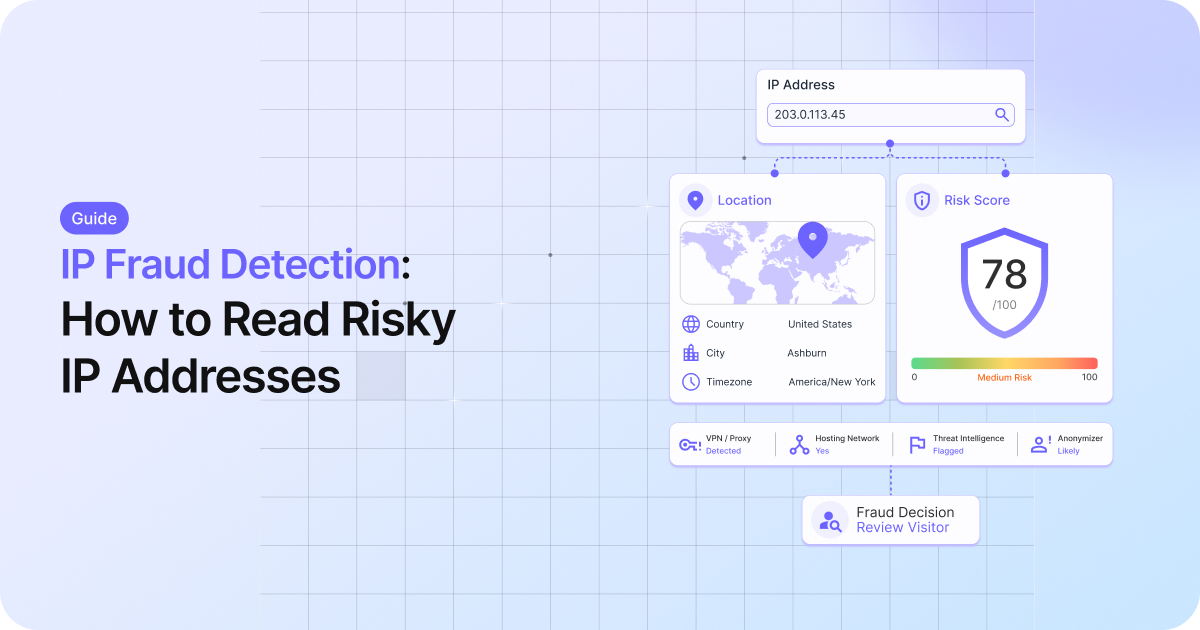
IP fraud detection reads two things from every visitor's IP address: where the connection claims to be, and whether it is hiding behind a VPN, proxy, or Tor node. Put those together and you get a risk read on someone before they sign up, log in, or check out.
Done well, it catches fake signups, chargebacks, bot traffic, and account takeovers. Done badly, it blocks a real customer whose only sin is using a VPN on hotel Wi-Fi. The stakes are not small: the FBI's Internet Crime Complaint Center logged $16.6 billion in reported losses in 2024 across 859,532 complaints. This guide covers the signals an IP carries, how to turn them into a score, and where the whole approach quietly breaks.
To detect fraud using an IP address, resolve it to a location and network, check whether it is an anonymizer (VPN, proxy, residential proxy, or Tor), and score that against what the user told you. No single flag proves fraud. IP data is one input in a layered decision, and online crime losses reached $16.6 billion in 2024.
- Location signals: country, region, and city, and how far they sit from the billing or shipping address.
- Network signals: the ASN and connection type. A datacenter or hosting IP rarely belongs to a real shopper at home.
- Anonymizer signals: VPN, proxy, residential proxy, and Tor flags, plus a 0-100 threat score that folds in known-attacker history.
- The decision: set thresholds for approve, review, and block, and treat alone VPN flag as a prompt for step-up verification rather than an instant block.
What an IP address reveals about fraud risk
Every IP lookup answers two questions at once. Two questions, one lookup. Where is this connection, and is it trying to hide?
The first question is geolocation. An IP maps to a country, a region, and usually a city, along with the network that carries it. The second is reputation and anonymity: is the address a known VPN, a proxy, a Tor exit node, or a data center with no reason to host a retail shopper? A single API call can return both halves in a single response, which is what makes IP data a cheap first filter for risky traffic.
Here is the catch, up front. An IP address is a signal, not a verdict. It tells you how a connection reaches you, not who is behind it. The job is to read it well and weigh it against everything else you know about the user.
The IP signals that matter, and what each one means
Not every field carries the same weight. A few tell you a lot; most tell you a little. Here is how to read the ones that move a fraud decision.
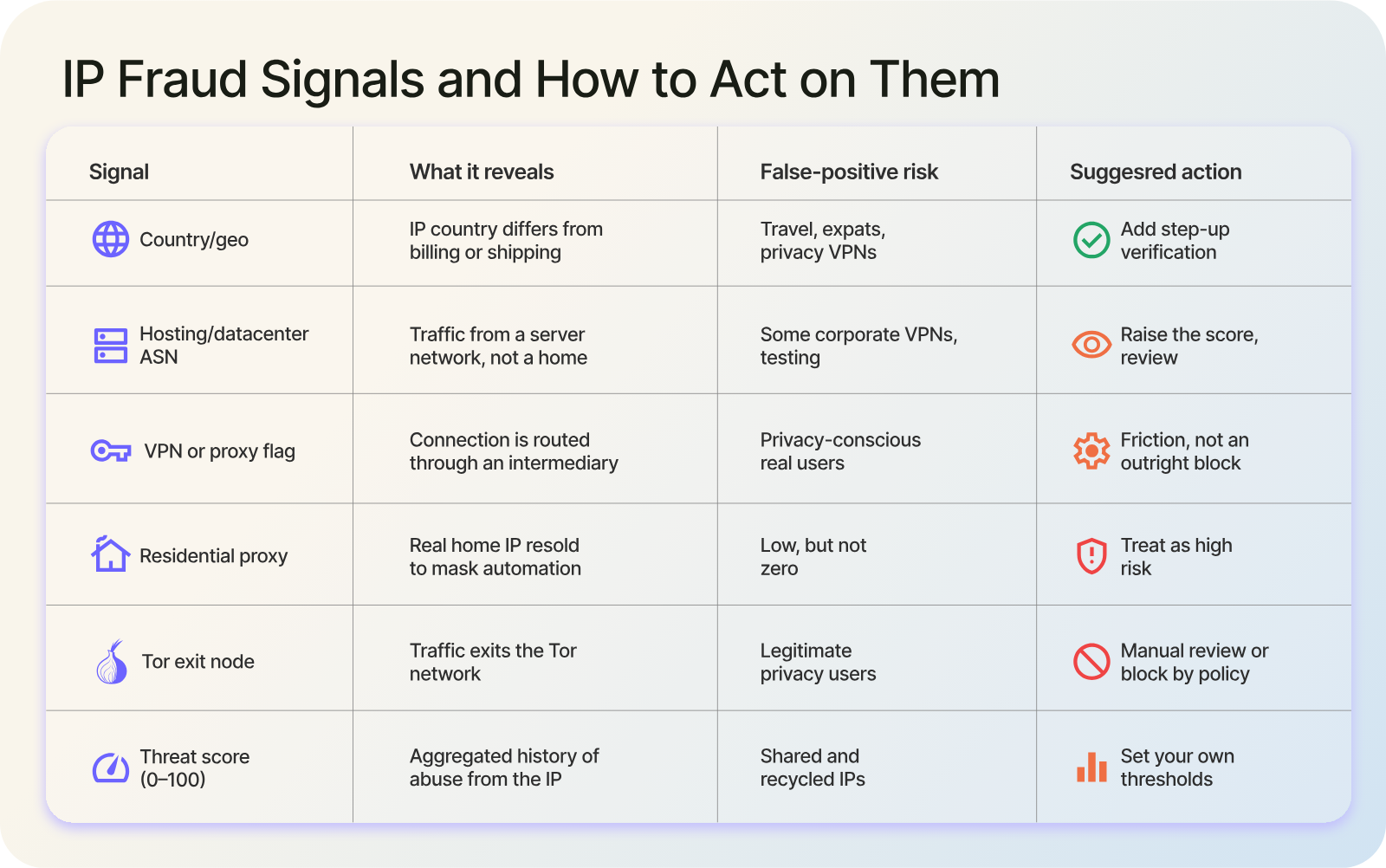
Table of IP fraud signals, what each reveals, false-positive risk, and recommended action.
| Signal | What it reveals | False-positive risk | Suggested action |
|---|---|---|---|
| Country/geo mismatch | IP country differs from billing or shipping | Travel, expats, privacy VPNs | Add step-up verification |
| Hosting/datacenter ASN | Traffic from a server network, not a home | Some corporate VPNs, testing | Raise the score, review |
| VPN or proxy flag | Connection is routed through an intermediary | Privacy-conscious real users | Friction, not an outright block |
| Residential proxy | Real home IP resold to mask automation | Low, but not zero | Treat as high risk |
| Tor exit node | Traffic exits the Tor network | Legitimate privacy users | Manual review or block by policy |
| Threat score (0-100) | Aggregated history of abuse from the IP | Shared and recycled IPs | Set your own thresholds |
Location and geo mismatch
The most basic check compares where the IP sits against where the user says they are. If someone sets a US billing address but connects from another continent, that gap is worth a second look, though plenty of travelers and expats trip this rule for entirely innocent reasons.
Network type and ASN
Every IP belongs to an Autonomous System, identified by an ASN, and that tells you what kind of network it is: a residential ISP, a mobile carrier, a business, or a hosting provider. The type matters more than the number. A shopper checking out from home broadband is ordinary. The same purchase from a datacenter or hosting ASN, where humans do not usually browse from, deserves more scrutiny, because that is where bots and automated abuse tend to live.
Anonymizers: VPN, proxy, residential proxy, and Tor
This is where most fraud signals concentrate. A VPN routes traffic through an intermediary, so the IP you see belongs to the VPN provider, not the user. A proxy does much the same. Residential proxies are the sneaky ones: they borrow real home IP addresses, which makes automated traffic look like an ordinary customer.
Tor adds another layer by bouncing traffic through volunteer relays, and its exit nodes are widely published. None of these guarantees fraud. But a checkout from a Tor exit node at 3 a.m. is a very different risk profile from a logged-in regular on their home network.
Threat score and IP reputation
Rather than interpret each flag yourself, many teams lean on a single number. An IP fraud score, usually on a 0-100 scale, folds together anonymizer status, network type, and any history of the address turning up in attacks, spam, or bot activity. A clean home connection scores near the floor. A flagged datacenter proxy scores near the top, and that number becomes an easy input to your own rules.
Read a real IP response, field by field
Talk is cheap; the fields are where it gets concrete. Here is a trimmed lookup response, showing the parts that matter for fraud (JSON abbreviated for readability):
{
  "ip": "203.0.113.45",
  "location": { "country_name": "United States", "city": "Ashburn", "latitude": "39.04", "longitude": "-77.47" },
  "asn": { "as_number": "AS14061", "type": "HOSTING", "organization": "Example Hosting" },
  "company": { "name": "Example Hosting", "type": "HOSTING" },
  "security": {
    "threat_score": 78,
    "is_vpn": true,
    "is_proxy": false,
    "is_residential_proxy": false,
    "is_tor": false,
    "is_anonymous": true,
    "is_known_attacker": false
  }
}
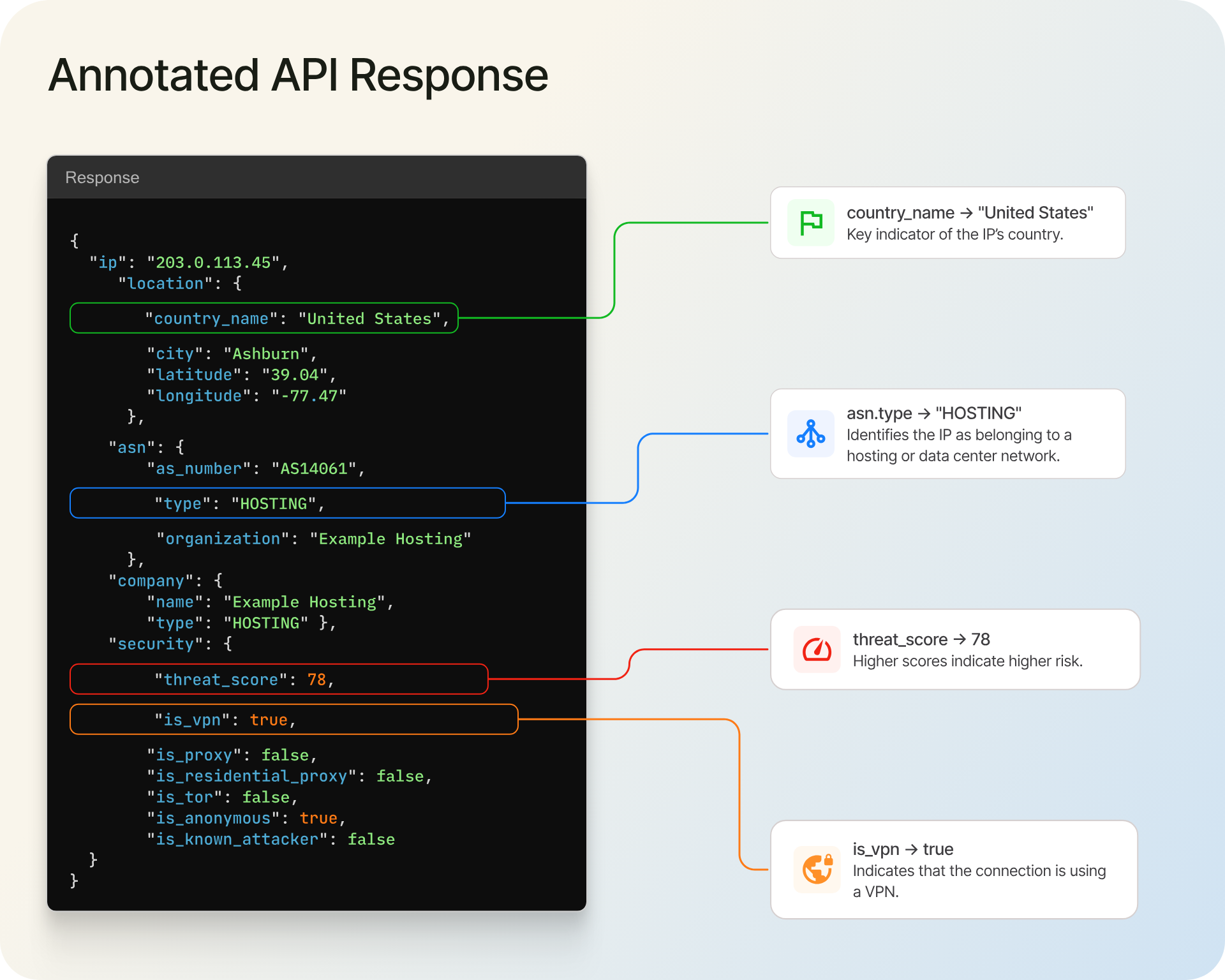
Table of IP fraud signals, what each reveals, false-positive risk, and recommended action.
The location, asn, and company blocks answer where. The security block answers who is hiding. You can pull the location, network, ASN, and company fields from a single IP geolocation API call, and that geolocation data is available on a free tier to start. The security block (VPN, proxy, Tor, and the threat score) is a paid capability, so plan for it once you move past basic location.
The code side is short. This example uses Node and keeps the API key in an environment variable, never in the source.
// Node 18+ has a built-in fetch. Store the key in the environment, not in code.
const API_KEY = process.env.IPGEO_API_KEY;

async function getIpRisk(ip) {
  const url =
    `https://api.ipgeolocation.io/v3/ipgeo?apiKey=${API_KEY}` +
    `&ip=${encodeURIComponent(ip)}`;
    // Uncomment the following line if you have a paid API plan and you want security information

    // + `&include=security`;

  try {
    const res = await fetch(url, { headers: { Accept: "application/json" } });
    if (!res.ok) {
      throw new Error(`IP lookup failed with status ${res.status}`);
    }
    const data = await res.json();
    const security = data.security ?? {};

    return {
      country: data.location?.country_name ?? "unknown",
      asnType: data.asn?.type ?? "unknown",
      isVpn: security.is_vpn ?? false,
      isProxy: security.is_proxy ?? false,
      isTor: security.is_tor ?? false,
      threatScore: security.threat_score ?? 0,
    };
  } catch (err) {
    console.error(`IP risk lookup failed for ${ip}: ${err.message}`);
    return null; // decide per policy whether to fail open or closed
  }
}
The null checks are not decoration. On a free-tier key the security block will be absent, so code that assumes data.security.is_vpn exists will throw. Default every field and decide what a missing value should mean for your flow.
Turn IP signals into a fraud score
A pile of flags is not a decision. You need a rule that turns them into one.
The simplest approach assigns points to each risk signal and sums them. A hosting or datacenter ASN might add 30, an active VPN 25, a country mismatch 20, and a Tor exit node 40, while a clean residential connection adds nothing. Sum the points, cap at 100, and you have a working IP risk score you control. If you would rather not build the weighting yourself, the 0-100 threat score from a proxy and VPN detection API gives you a ready-made input to blend with your own rules.
Then set bands. A common starting policy: approve under 30, send 30 to 70 to review or step-up verification, and block above 70. Those are your numbers to tune, not fixed truths, and you should watch the false-positive rate for a week before tightening them.
One opinion, freely given: alone VPN flag is a reason to add a verification step, not to reject a customer. Privacy-conscious buyers use VPNs every day, and treating that flag as proof of fraud is a quiet way to lose good revenue.
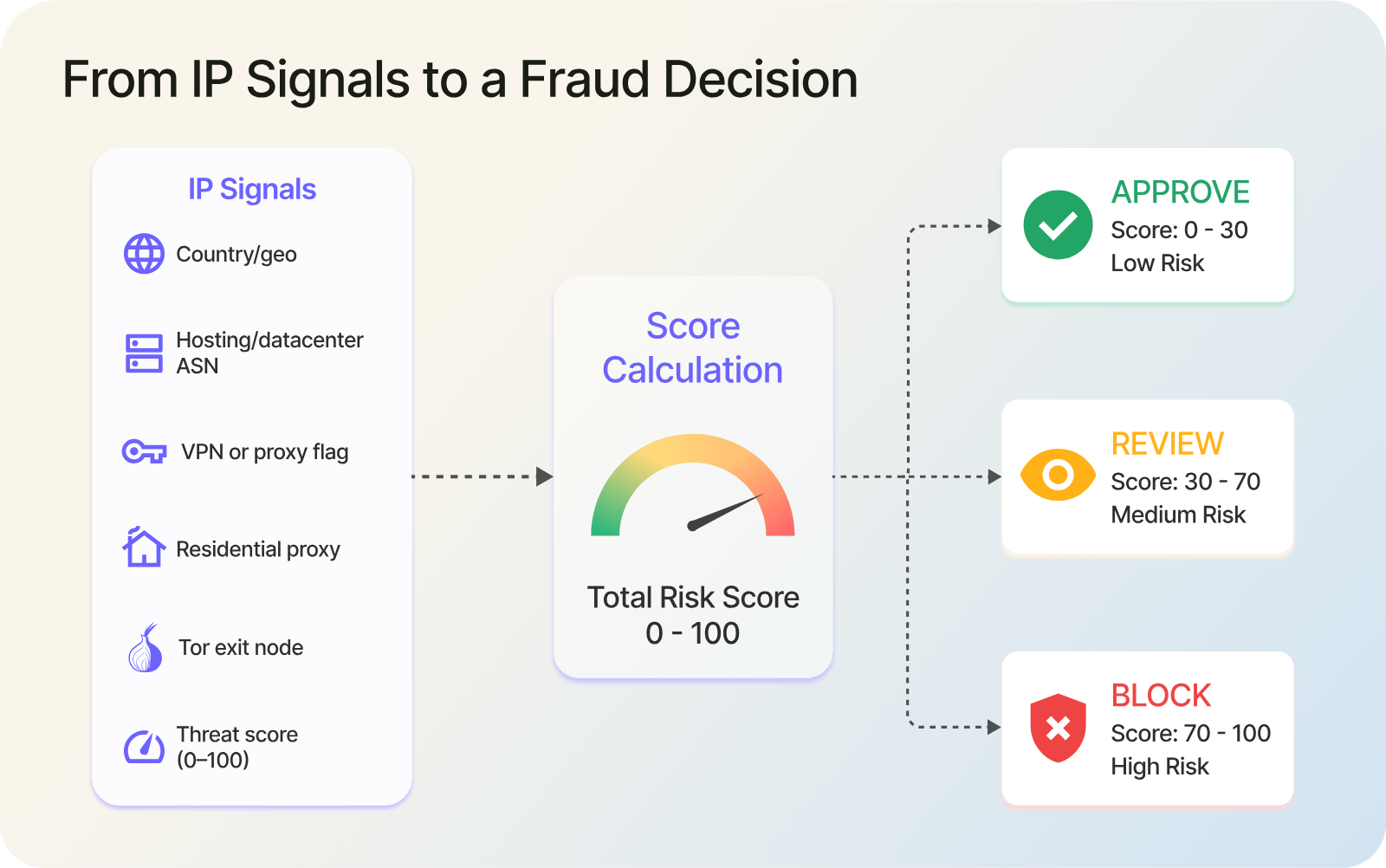
Decision flow turning IP signals into an approve, review, or block outcome.
Impossible travel: a fast way to catch account takeover
Account takeover has a tell that IP data catches well: impossible travel. If an account logs in from New York and then again from Lagos forty minutes later, no human made that trip. The two cities sit roughly 8,400 kilometers apart, so the implied speed tops 12,000 km/h. Flag it.
The logic is simple. Store the location and timestamp of each login, then for each new login compute the distance from the previous one and divide by the elapsed time. If the implied speed exceeds what a plane could manage, the session is suspicious even when both IPs look clean on their own. This is one of the few checks where a location signal alone carries real weight, because it compares a user against their own history rather than a blacklist.
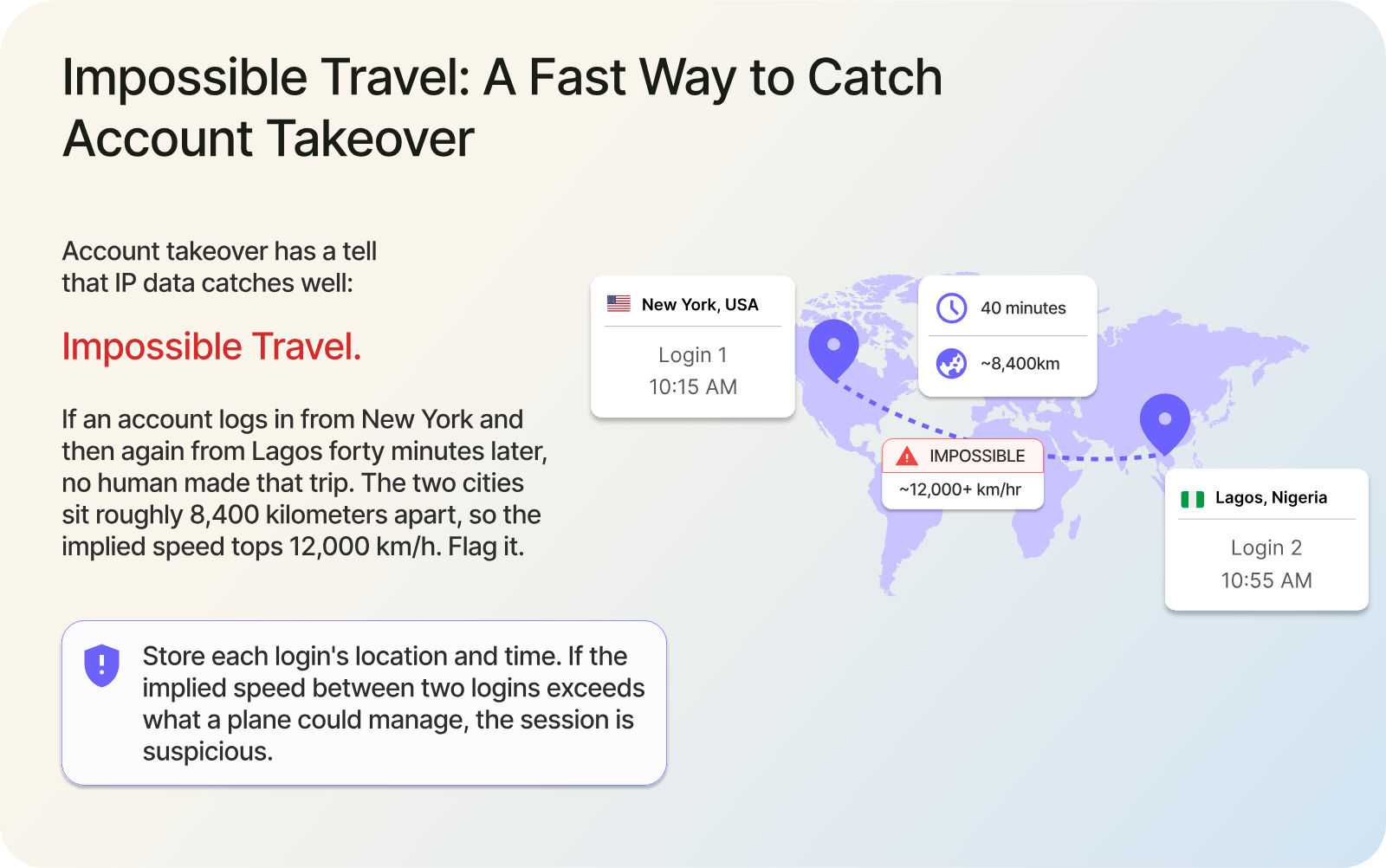
Two logins on a world map too far apart in too little time to be one person.
Where IP fraud detection falls short
Every method has a failure mode, and IP data has several. Knowing them is what separates a useful rule from a support-queue nightmare.
Shared addresses are the big one. Carrier-grade NAT and corporate networks put many users behind a single public IP, so one flagged address can implicate thousands of innocent people. The IETF put it plainly in RFC 6269: when an address is shared, "the service provider cannot trace a particular activity to a specific subscriber." Mobile IPs shift as phones move between towers, and dynamic residential IPs get reassigned, so an address that looked risky yesterday can be a family's home connection today.
Anonymizers cut both ways. A VPN flag catches fraudsters and privacy-minded customers in the same net. Apple's iCloud Private Relay routes Safari traffic through two relays and hands the site a temporary IP, so a perfectly legitimate iPhone user can look anonymized to your rules. Block on the anonymizer flag alone and you turn away a large, ordinary slice of traffic.
There is also the matter of reading the right IP at all. Behind a proxy or CDN, the connecting address is the proxy's, and the client's address arrives in a header such as X-Forwarded-For. That header is trivially spoofable unless it comes from infrastructure you control. As MDN's X-Forwarded-For reference warns, if your server can be reached directly from the internet, "no part of the X-Forwarded-For IP list can be considered trustworthy or safe for security-related uses." Parse it wrong and an attacker feeds you whatever IP they like.
The point is not that IP data is weak. It is that IP data is one signal. Pair it with device fingerprinting, email and phone checks, payment signals, and behavioral history, and the IP earns its place as a fast, cheap first filter rather than the sole judge.
A practical workflow for signup, login, and checkout
Here is how the pieces fit into a real fraud prevention flow. Adjust the order to your risk tolerance.
- Resolve location and network. On every signup, login, and checkout, look up the IP's country, city, ASN, and connection type. This is the free-tier part and it costs almost nothing.
- Check anonymizer and threat signals. On higher-risk actions, add the VPN, proxy, Tor, and threat-score checks. These are paid, so apply them where the money is, rather than on every page view.
- Compare against the user. Does the IP country match the billing country? Does the city sit anywhere near the shipping address? Mismatches raise the score.
- Score and route. Feed the signals into your risk score, then approve, send to review, step up verification, or block based on your bands.
- Log for velocity and impossible travel. Keep each login's location and time so you can catch account takeover across sessions.
Two practical notes. To enrich existing logs or user tables in one pass, a bulk lookup handles large batches of IPs in a single request (up to 50,000 at a time). And for live login and payment flows where you want to judge the current session rather than an address's past, real-time proxy and VPN detection evaluates the connection as it happens. Reach for the heavier checks where fraud actually costs you, and keep the light location lookup running everywhere.
FAQ
FAQ
01What is IP fraud detection?
IP fraud detection is the practice of reading a visitor's IP address to judge risk. It combines location and network data with anonymizer signals like VPN, proxy, and Tor flags, plus a reputation or threat score, to estimate how likely a connection is tied to fraud before you approve an action.
02What is an IP fraud score?
An IP fraud score is a single number, usually from 0 to 100, that estimates how risky an IP address is. It aggregates signals such as VPN or proxy use, datacenter hosting, and any history of attacks or spam from that address. Higher scores mean higher risk, and you decide the thresholds.
03Can you detect fraud from an IP address alone?
No. An IP address shows the path a connection takes, not the identity of the person using it. It is a strong first filter for anonymized or mismatched traffic, but shared and dynamic IPs cause false positives. Combine it with device, email, payment, and behavior signals before you make a decision.
04How accurate is IP-based fraud detection?
It depends on the signal. Anonymizer and network-type flags are reliable, while precise city-level location is approximate and varies by address. Treat IP data as high-value evidence, not proof. Its accuracy climbs sharply when you weigh it alongside other fraud signals instead of acting on it alone.
05Can you detect a VPN or proxy from an IP address?
Yes. A proxy and VPN detection service checks an IP against known VPN and proxy ranges, residential-proxy networks, and Tor exit nodes, then returns flags plus a confidence score. Detection is strong for commercial VPNs and datacenter proxies, and harder, though still workable, for residential proxies that borrow real home IPs.
06Is checking an IP address for fraud free?
Basic geolocation is free on many plans, including free tiers that return location, country, and network data. The security signals that matter most for fraud, the VPN, proxy, Tor, and threat scores, are paid features. A common setup is free location everywhere, with paid risk checks on your highest-value actions.
Where to start
Log the IP location and network on every signup and checkout first; that part is free and immediately useful. Add anonymizer and threat checks on the flows that lose you the most money, set conservative thresholds, and watch your false positives for a week before tightening. Let the IP be your fast first filter, and let your other signals make the final call.
Comments
Comments are available to signed-in users and are moderated to keep the discussion useful and respectful. Spam, automated submissions, and low-value promotional comments are removed. Outbound links may be approved when they are relevant and genuinely helpful to readers, but they are displayed as plain text rather than clickable hyperlinks.
No comments have been published yet.
Please sign in to submit a comment.