

Cloud Services, Software, Information Technology
5 Common Salesforce Integration Challenges and How to Solve Them
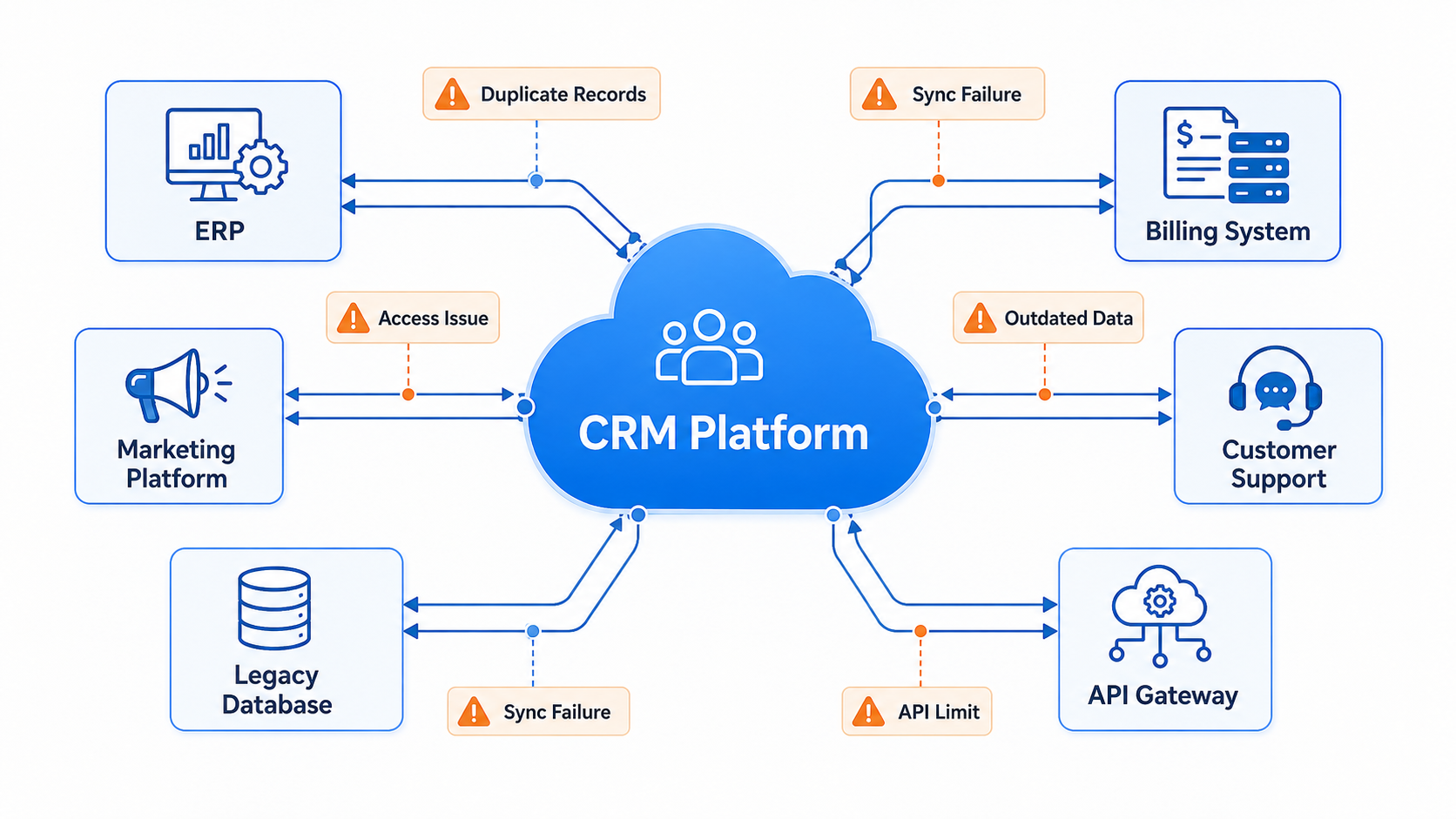
According to the MuleSoft 2025 Connectivity Benchmark Report, organizations use an average of 897 applications. Salesforce may hold the central customer record, but ERP, billing, marketing, support, and legacy platforms all depend on parts of the same data.
The integration must do more than transfer records between platforms. It needs controls for data consistency, access, synchronization, and auditability. When those skills are unavailable internally, organizations often work with Salesforce developers to establish the architecture and operating rules before temporary workarounds become part of the production environment.
Why Do Salesforce Records Become Inconsistent?
Customer information usually exists across several platforms. Salesforce, ERP, and support platforms typically hold different parts of the same customer record. Opportunities may sit in Salesforce, invoices in the ERP, and service history in the support system.
Data conflicts occur when field ownership is not clearly defined. An ERP synchronization job can overwrite a recently updated Salesforce address with an older value. Duplicate records also appear when each system identifies the same customer differently—by email address, account number, or internal ID.
Weak synchronization controls can result in:
- Duplicate sales outreach
- Outdated marketing lists
- Incomplete support histories
- Conflicting financial reports
- Incorrect automated actions
Each field needs a clear owner. Salesforce might control opportunity stages, while the ERP remains responsible for invoices and payment status. Invalid or conflicting updates should be blocked or sent for manual review.
Which Salesforce Integration Model Should a Business Use?
Salesforce integrations may rely on APIs, scheduled batch jobs, platform events, middleware, or data virtualization. The Salesforce Data Integration Decision Guide suggests choosing among these options based on transaction volume, acceptable latency, and the operational cost of downtime.
Before development, teams should determine:
- Whether data must appear immediately
- How much information will move
- Which system starts the process
- How failed transactions will be retried
- Whether the architecture will support more applications later
Point-to-point API integrations can work well for simple connections between two systems. Middleware is better when several systems exchange data, formats need transformation, or centralized monitoring is required.
How Can Companies Stop Poor Data from Spreading?
Integration spreads bad data as quickly as good data. Missing emails, duplicate accounts, inconsistent country names, and different currency or date formats can distort reports and trigger the wrong workflows.
Field mapping rules should define required values, accepted formats, conversion logic, duplicate checks, and procedures for incomplete records. Failed payloads should enter an exception queue with a clear error message.
Teams should also avoid migrating obsolete fields and abandoned records from legacy databases. Dashboards tracking duplicates, missing values, and sync failures make data problems easier to identify.
Why Do Legacy Systems Increase Integration Costs?
Many legacy systems still move data through flat files, scheduled jobs, and tightly constrained schemas. The logic behind these processes is often incomplete, outdated, or understood by only a few employees. Before connecting such a system to Salesforce, developers usually need to reconstruct its workflows, identify data dependencies, and document how it processes updates and failures.
Salesforce may also contain old Apex code, workflow rules, triggers, or neglected packages. A new integration can activate outdated automation, create update loops, or duplicate transactions.
McKinsey reports that companies may pay an additional 10% to 20% on top of project costs to address technical debt. A full replacement is not always practical. Teams can instead place middleware between Salesforce and legacy platforms, then migrate high-priority processes to reusable APIs in stages.
How Should Salesforce Integrations Be Tested Before Launch?
Before deployment, teams should test field mappings, access permissions, API consumption limits, duplicate-handling rules, retry procedures, and complete business processes across all connected systems.
During downtime, transactions must remain queued. When service is restored, the integration should continue processing from the point of failure without dropping records or submitting the same transaction twice.
The initial production release should be limited to one region, department, or data category. This narrower scope helps teams identify and correct uncommon failures before deploying the integration across the organization.
What Makes a Salesforce Integration Reliable?
Each data set should have a designated system of record. Access should be limited to the permissions required for the integration, while logs must contain enough information to trace failed or incorrect transactions. The recovery procedure should also be tested before the integration is deployed more widely.
Service accounts should access only the necessary Salesforce objects and fields. Credentials must be secured, data encrypted in transit, and public endpoints protected with measures such as IP allowlists and Salesforce Named Credentials.
Monitoring should track business outcomes, not only HTTP codes. A “200 OK” response does not guarantee that the correct record was updated. Logs should include record IDs, timestamps, errors, transaction states, and retry attempts.
Once the integration is in production, an assigned owner must investigate failures, track API consumption, review schema changes, and maintain compatibility as the connected platforms are updated.
Conclusion
Successful Salesforce integration depends on more than connecting systems. Clear data ownership, appropriate integration architecture, thorough testing, strong security controls, and ongoing monitoring all contribute to reliable data exchange across business applications. By planning integrations carefully and maintaining them over time, organizations can reduce data inconsistencies, improve operational efficiency, and support future growth without introducing unnecessary technical debt.
Comments
Comments are available to signed-in users and are moderated to keep the discussion useful and respectful. Spam, automated submissions, and low-value promotional comments are removed. Outbound links may be approved when they are relevant and genuinely helpful to readers, but they are displayed as plain text rather than clickable hyperlinks.
No comments have been published yet.
Please sign in to submit a comment.